Music New Tab
Provides music-themed new tab page
Cos'è Music New Tab?
Music New Tab è un'estensione di Chrome sviluppata da http://musicnewtab.com, e la sua funzione principale è "Provides music-themed new tab page".
Screenshot dell'Estensione
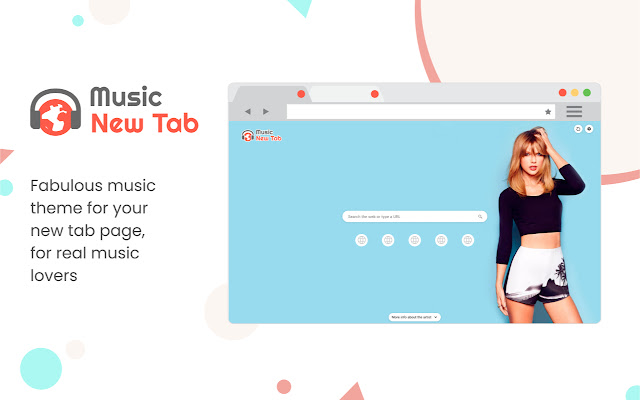


Scarica il file CRX dell'estensione Music New Tab
Scarica i file di estensione Music New Tab in formato crx, installa manualmente le estensioni di Chrome nel browser o condividi i file crx con gli amici per installare facilmente le estensioni di Chrome.
Istruzioni per l'Uso dell'Estensione
                        Enjoy the new tab experience with its background musician and singing artist posters, most visited sites for your easy access, and a search box.

Know more about the musician:
Did you recognize the singer from the background poster and want to know more about him/her? Simply click on the “More info about the artist” button at the bottom of the page and check it out! The information of the artists is provided by YouTube.

Most Visited Sites:
Enable this feature and get quick access to the icons of your most visited websites on the New Tab page.

Enable/disable background poster:
Want some focus and concentration on your work? You can always turn off the background. It’s in the Settings of the extension. Don’t forget to turn it back on when you are in the mood again!

Background Refreshing Interval:
Set your preferred background poster refreshing interval (by hours).

Search Box and Supported Search Engines Inside:
Supporting Yahoo (default), Google, Bing, and DuckDuckGo from the search box. You can make your selection in the Settings of the extension.

Permissions used and reasons:

Access to “topSites” (optional). We require this permission to enable the display of the most visited sites on your New Tab page. It’s optional, only needed if you want to enable it.

How to remove this extension?

If you want to remove our extension, go to “Settings” on Chrome, and find our extension in the “Extensions” tab. Click “remove”. Alternatively, you can right-click on the extension’s icon on your browser and select “Uninstall” from the drop-down menu.

Chrome™  and YouTube™ are trademarks of Google LLC. The use of them does not imply any affiliation to or endorsement by Google LLC.

By adding this extension to your Chrome browser, you accept and agree to our Privacy Policy and End-User License Agreement.

Privacy Policy: https://www.musicnewtab.com/privacy

EULA: https://www.musicnewtab.com/terms

FAQ: https://www.musicnewtab.com/#faq

Contact Us: https://www.musicnewtab.com/contact

Uninstall: https://www.musicnewtab.com/uninstall
Informazioni di Base sull'Estensione
| Nome |  Music New Tab Music New Tab |
| ID | hfamgdphmadpbopjpnjeclijgabhmeml |
| URL Ufficiale | https://chrome.google.com/webstore/detail/music-new-tab/hfamgdphmadpbopjpnjeclijgabhmeml |
| Descrizione | Provides music-themed new tab page |
| Dimensione del File | 42.42 KB |
| Conteggio Installazioni | 358,581 |
| Versione Corrente | 3.0.0 |
| Ultimo Aggiornamento | 2021-01-11 |
| Data di Pubblicazione | 2020-08-19 |
| Valutazione | 3.40/5 Totale 20 Valutazioni |
| Sviluppatore | http://musicnewtab.com |
| [email protected] | |
| Tipo di Pagamento | free |
| Sito Web dell'Estensione | https://www.musicnewtab.com |
| URL della Pagina di Aiuto | https://www.musicnewtab.com/contact |
| URL della Pagina della Politica sulla Privacy | https://www.musicnewtab.com/privacy |
| Lingue Supportate | en |
| manifest.json | |
null | |