IG Media Downloader
Download photos and videos on Instagram with ease.
Cos'è IG Media Downloader?
IG Media Downloader è un'estensione di Chrome sviluppata da pyplacca, e la sua funzione principale è "Download photos and videos on Instagram with ease.".
Screenshot dell'Estensione
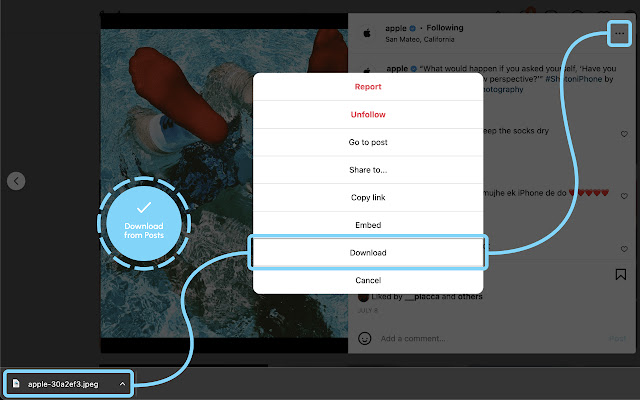

Scarica il file CRX dell'estensione IG Media Downloader
Scarica i file di estensione IG Media Downloader in formato crx, installa manualmente le estensioni di Chrome nel browser o condividi i file crx con gli amici per installare facilmente le estensioni di Chrome.
Istruzioni per l'Uso dell'Estensione
                        IG Media Downloader allows you to easily download photos/videos from the Instagram desktop site in just two clicks.
No need to switch between tabs and paste copied links for downloading. Just download it right from IG.

PS: If you already have Instagram opened and you just installed this extension, kindly reload the page to harness the full power of the extension.

Changelog
v1.3.0
- Fixed an issue where the download button wasn't appearing in the context menu
- Updated default popup images

v1.3.2
- Bug fix

v1.3.4
- Bug fixes

If you like this app, please rate it and leave a review.
If you spot any issues, kindly leave a message on the Support page.

Thanks for checking out or installing this extension!
Informazioni di Base sull'Estensione
| Nome |  IG Media Downloader IG Media Downloader |
| ID | hfcenolookheknpobmckkgccedgnpoff |
| URL Ufficiale | https://chrome.google.com/webstore/detail/ig-media-downloader/hfcenolookheknpobmckkgccedgnpoff |
| Descrizione | Download photos and videos on Instagram with ease. |
| Dimensione del File | 215 KB |
| Conteggio Installazioni | 10,000 |
| Versione Corrente | 1.3.4 |
| Ultimo Aggiornamento | 2022-10-10 |
| Data di Pubblicazione | 2020-05-25 |
| Valutazione | 2.70/5 Totale 33 Valutazioni |
| Sviluppatore | pyplacca |
| [email protected] | |
| Tipo di Pagamento | free |
| Lingue Supportate | en |
| manifest.json | |
{
    "update_url": "https:\/\/clients2.google.com\/service\/update2\/crx",
    "name": "IG Media Downloader",
    "description": "Download photos and videos on Instagram with ease.",
    "version": "1.3.4",
    "manifest_version": 3,
    "action": {
        "default_popup": "popup.html",
        "default_icon": {
            "16": "assets\/logo\/igdown16.png",
            "32": "assets\/logo\/igdown32.png",
            "48": "assets\/logo\/igdown48.png",
            "128": "assets\/logo\/igdown128.png"
        }
    },
    "icons": {
        "16": "assets\/logo\/igdown16.png",
        "32": "assets\/logo\/igdown32.png",
        "48": "assets\/logo\/igdown48.png",
        "128": "assets\/logo\/igdown128.png"
    },
    "background.service_worker": {
        "scripts": [
            "background.js"
        ],
        "persistent": false
    },
    "content_scripts": [
        {
            "matches": [
                "https:\/\/*.instagram.com\/*"
            ],
            "run_at": "document_idle",
            "js": [
                "assets\/content\/js\/content-module.js",
                "assets\/content\/js\/content-popup.js"
            ],
            "css": [
                "assets\/content\/css\/content-style.css"
            ]
        }
    ],
    "permissions": [
        "declarativeContent"
    ]
} | |