JSFiddle Auto Run & Save
This extension makes JSFiddle automatically run & save while typing, also adds a button to hide panels other than js
Cos'è JSFiddle Auto Run & Save?
JSFiddle Auto Run & Save è un'estensione di Chrome sviluppata da kongyuyu, e la sua funzione principale è "This extension makes JSFiddle automatically run & save while typing, also adds a button to hide panels other than js".
Screenshot dell'Estensione


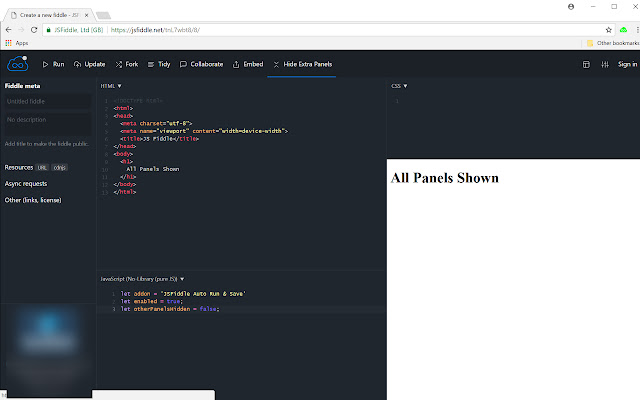

Scarica il file CRX dell'estensione JSFiddle Auto Run & Save
Scarica i file di estensione JSFiddle Auto Run & Save in formato crx, installa manualmente le estensioni di Chrome nel browser o condividi i file crx con gli amici per installare facilmente le estensioni di Chrome.
Istruzioni per l'Uso dell'Estensione
                        Features:
1. JSFiddle runs automatically when key strikes stopped for 1.5 seconds.
2. JSFiddle saves automatically with every 25 key strikes.
3. Adds a button on JSFiddle page to hide all panels other than js panel.

Feature 1 & 2 could be turned on/off by toggling the extension icon.
Feature 3 could be toggled with the "Hide/Show Extra Panels" button on JSFiddle Page.

Work in progress:
1. Add a configuration page for customize auto run delay and auto save key counts.

Special thanks to @mechanicious on github. I learnt how to enable auto run on JSFiddle from him, and then built this extension.
Informazioni di Base sull'Estensione
| Nome |  JSFiddle Auto Run & Save JSFiddle Auto Run & Save |
| ID | holmgemnafgpfmphccghdfljgaocpbfj |
| URL Ufficiale | https://chrome.google.com/webstore/detail/jsfiddle-auto-run-save/holmgemnafgpfmphccghdfljgaocpbfj |
| Descrizione | This extension makes JSFiddle automatically run & save while typing, also adds a button to hide panels other than js |
| Dimensione del File | 24.39 KB |
| Conteggio Installazioni | 58 |
| Versione Corrente | 0.0.1 |
| Ultimo Aggiornamento | 2018-02-13 |
| Data di Pubblicazione | 2018-02-13 |
| Valutazione | 5.00/5 Totale 1 Valutazioni |
| Sviluppatore | kongyuyu |
| Tipo di Pagamento | free |
| Sito Web dell'Estensione | https://github.com/kongyuyu/jsfiddle-chrome-extension |
| URL della Pagina di Aiuto | https://github.com/kongyuyu/jsfiddle-chrome-extension/issues |
| Lingue Supportate | en-US |
| manifest.json | |
{
    "update_url": "https:\/\/clients2.google.com\/service\/update2\/crx",
    "manifest_version": 2,
    "name": "JSFiddle Auto Run & Save",
    "description": "This extension makes JSFiddle automatically run & save while typing, also adds a button to hide panels other than js",
    "version": "0.0.1",
    "icons": {
        "16": "images\/icon-enabled-16.png",
        "48": "images\/icon-enabled-48.png",
        "128": "images\/icon-enabled-128.png"
    },
    "background": {
        "scripts": [
            "scripts\/background.js"
        ],
        "persistent": false
    },
    "page_action": [],
    "content_scripts": [
        {
            "matches": [
                "https:\/\/jsfiddle.net\/*"
            ],
            "js": [
                "scripts\/jsfiddle-mixin.js"
            ],
            "run_at": "document_end"
        }
    ],
    "permissions": [
        "tabs",
        "storage",
        "declarativeContent"
    ]
} | |