Fabric Explorer
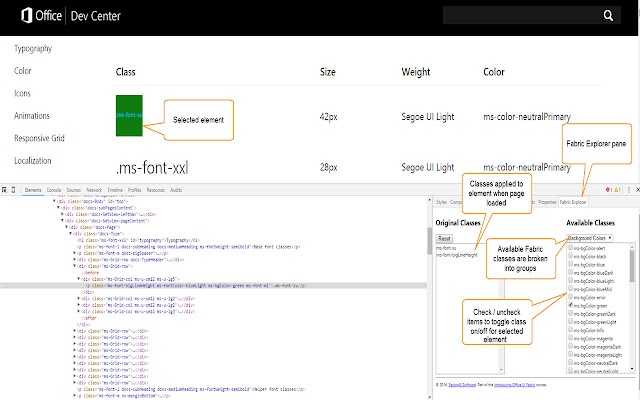
This Extension allows you to explore the Office UI Fabric live on a webpage - adding and removing Fabric classes from an element…
Cos'è Fabric Explorer?
Fabric Explorer è un'estensione di Chrome sviluppata da sector43 Software, e la sua funzione principale è "This Extension allows you to explore the Office UI Fabric live on a webpage - adding and removing Fabric classes from an element…".
Screenshot dell'Estensione
Scarica il file CRX dell'estensione Fabric Explorer
Scarica i file di estensione Fabric Explorer in formato crx, installa manualmente le estensioni di Chrome nel browser o condividi i file crx con gli amici per installare facilmente le estensioni di Chrome.
Istruzioni per l'Uso dell'Estensione
This Extension allows you to explore the Office UI Fabric live on a webpage - adding and removing Fabric classes from an element and immediately seeing the effect on the page. Useful for learning about Fabric, as well as interactively designing user interfaces that utilize Fabric. Informazioni di Base sull'Estensione
| Nome |  Fabric Explorer Fabric Explorer |
| ID | iealmcjmkenoicmjpcebflbpcendnjnm |
| URL Ufficiale | https://chrome.google.com/webstore/detail/fabric-explorer/iealmcjmkenoicmjpcebflbpcendnjnm |
| Descrizione | This Extension allows you to explore the Office UI Fabric live on a webpage - adding and removing Fabric classes from an element… |
| Dimensione del File | 55.37 KB |
| Conteggio Installazioni | 454 |
| Versione Corrente | 2.0.1 |
| Ultimo Aggiornamento | 2016-11-10 |
| Data di Pubblicazione | 2016-11-10 |
| Valutazione | 2.75/5 Totale 4 Valutazioni |
| Sviluppatore | sector43 Software |
| Tipo di Pagamento | free |
| Sito Web dell'Estensione | http://www.sector43.com/fabric-explorer/ |
| Lingue Supportate | en-US |
| manifest.json | |
{
"update_url": "https:\/\/clients2.google.com\/service\/update2\/crx",
"manifest_version": 2,
"name": "Fabric Explorer",
"version": "2.0.1",
"permissions": [
"tabs",
" | |