StickyNotes
Put sticky notes on the web page. Write a note on it. Jump to it. And sync stickies between devices. (chrome, firefox, firefox for…
Cos'è StickyNotes?
StickyNotes è un'estensione di Chrome sviluppata da kumabook, e la sua funzione principale è "Put sticky notes on the web page. Write a note on it. Jump to it. And sync stickies between devices. (chrome, firefox, firefox for…".
Screenshot dell'Estensione
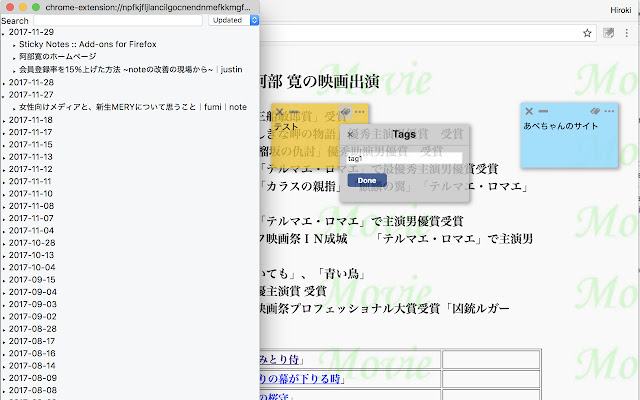
Scarica il file CRX dell'estensione StickyNotes
Scarica i file di estensione StickyNotes in formato crx, installa manualmente le estensioni di Chrome nel browser o condividi i file crx con gli amici per installare facilmente le estensioni di Chrome.
Istruzioni per l'Uso dell'Estensione
                        Put sticky notes on the web page.
Write a note on it.
Jump to it.
And sync stickies between devices.
(chrome, firefox, firefox for android, ios app)
Informazioni di Base sull'Estensione
| Nome |  StickyNotes StickyNotes |
| ID | imcecnigpdchlakcljkjjhddmilnmcji |
| URL Ufficiale | https://chrome.google.com/webstore/detail/stickynotes/imcecnigpdchlakcljkjjhddmilnmcji |
| Descrizione | Put sticky notes on the web page. Write a note on it. Jump to it. And sync stickies between devices. (chrome, firefox, firefox for… |
| Dimensione del File | 1.23 MB |
| Conteggio Installazioni | 694 |
| Versione Corrente | 1.2.4 |
| Ultimo Aggiornamento | 2019-05-20 |
| Data di Pubblicazione | 2019-05-20 |
| Valutazione | 5.00/5 Totale 3 Valutazioni |
| Sviluppatore | kumabook |
| [email protected] | |
| Tipo di Pagamento | free |
| Sito Web dell'Estensione | http://kumabook.github.io/stickynotes/ |
| URL della Pagina di Aiuto | https://github.com/kumabook/stickynotes/issues |
| Lingue Supportate | en,ja |
| manifest.json | |
{
    "update_url": "https:\/\/clients2.google.com\/service\/update2\/crx",
    "name": "StickyNotes",
    "version": "1.2.4",
    "manifest_version": 2,
    "applications": {
        "gecko": {
            "id": "[email protected]"
        }
    },
    "permissions": [
        "contextMenus",
        "storage",
        "notifications",
        "tabs",
        "activeTab",
        "webNavigation",
        "*:\/\/stickynotes.kumabook.tokyo\/*"
    ],
    "background": {
        "scripts": [
            "background\/bundle.js"
        ]
    },
    "default_locale": "en",
    "content_scripts": [
        {
            "matches": [
                "*:\/\/*\/*"
            ],
            "match_about_blank": true,
            "css": [
                "content_scripts\/sticky-view.css"
            ],
            "js": [
                "content_scripts\/bundle.js"
            ]
        }
    ],
    "options_ui": {
        "page": "options_ui\/index.html"
    },
    "browser_action": {
        "browser_style": true,
        "default_icon": "icons\/icon-32.png",
        "default_title": "StickyNotes",
        "default_popup": "popup\/index.html"
    },
    "sidebar_action": {
        "default_icon": "icons\/icon-32.png",
        "default_title": "StickyNotes",
        "default_panel": "sidebar\/index.html"
    },
    "commands": {
        "_execute_sidebar_action": {
            "suggested_key": {
                "default": "Ctrl+Shift+S",
                "mac": "MacCtrl+Shift+S"
            },
            "description": "Show stickies on sidebar"
        },
        "create_sticky": {
            "suggested_key": {
                "default": "Ctrl+Shift+C",
                "mac": "MacCtrl+Shift+C"
            },
            "description": "Create a sticky in active tab"
        },
        "toggle_stickies": {
            "suggested_key": {
                "default": "Ctrl+Q",
                "mac": "MacCtrl+Q"
            },
            "description": "Toggle visiblities of stickies in active tab"
        }
    },
    "web_accessible_resources": [
        "content_scripts\/delete.png",
        "content_scripts\/delete-hover.png",
        "content_scripts\/menu.png",
        "content_scripts\/menu-hover.png",
        "content_scripts\/edit-tag.png",
        "content_scripts\/edit-tag-hover.png",
        "content_scripts\/minimize.png",
        "content_scripts\/minimize-hover.png",
        "content_scripts\/color.png",
        "content_scripts\/page-option.png",
        "content_scripts\/back.png",
        "content_scripts\/close.png"
    ]
} | |