HTML Style Quick Viewer
HTML DOM element style quick viewer
Cos'è HTML Style Quick Viewer?
HTML Style Quick Viewer è un'estensione di Chrome sviluppata da _(:з」∠)_, e la sua funzione principale è "HTML DOM element style quick viewer".
Screenshot dell'Estensione
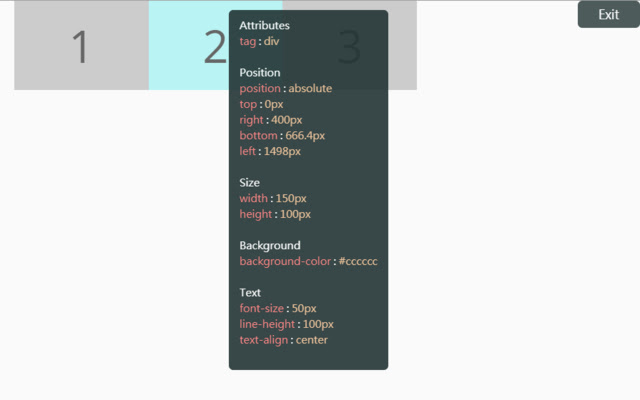
Scarica il file CRX dell'estensione HTML Style Quick Viewer
Scarica i file di estensione HTML Style Quick Viewer in formato crx, installa manualmente le estensioni di Chrome nel browser o condividi i file crx con gli amici per installare facilmente le estensioni di Chrome.
Istruzioni per l'Uso dell'Estensione
                        How about viewing the HTML DOM styles in a different way?
Just move your mouse and it shows the target's styles.

After installation, you may have to reload tabs to for the extension to take effect.

Instructions:
1. Click HTML Style Quick Viewer in the toolbar, then click 'run' button to start.
2. Move mouse to see the element's styles.
3. Mouse left click to close the popup panel.
4. Mouse middle click to pin the popup panel.
5. Click the 'Exit' button at the top-right or click 'Stop' button through the toolbar to stop.
Informazioni di Base sull'Estensione
| Nome |  HTML Style Quick Viewer HTML Style Quick Viewer |
| ID | inafmkpmbkldliccdbeieeafnbkcmmap |
| URL Ufficiale | https://chrome.google.com/webstore/detail/html-style-quick-viewer/inafmkpmbkldliccdbeieeafnbkcmmap |
| Descrizione | HTML DOM element style quick viewer |
| Dimensione del File | 15.88 KB |
| Conteggio Installazioni | 271 |
| Versione Corrente | 1.0.2 |
| Ultimo Aggiornamento | 2018-08-26 |
| Data di Pubblicazione | 2018-08-26 |
| Valutazione | 5.00/5 Totale 3 Valutazioni |
| Sviluppatore | _(:з」∠)_ |
| [email protected] | |
| Tipo di Pagamento | free |
| Lingue Supportate | en |
| manifest.json | |
{
    "update_url": "https:\/\/clients2.google.com\/service\/update2\/crx",
    "name": "HTML Style Quick Viewer",
    "description": "HTML DOM element style quick viewer",
    "version": "1.0.2",
    "permissions": [
        "activeTab"
    ],
    "content_scripts": [
        {
            "matches": [
                "http:\/\/*\/*",
                "https:\/\/*\/*"
            ],
            "js": [
                "content\/content.js"
            ],
            "css": [
                "content\/content.css"
            ],
            "run_at": "document_start"
        }
    ],
    "browser_action": {
        "default_title": "HTML Style Quick Viewer\nRight click (Close)\nMiddle click (Pin)",
        "default_icon": {
            "16": "icons\/icon_16.png",
            "32": "icons\/icon_32.png",
            "48": "icons\/icon_48.png",
            "128": "icons\/icon_128.png"
        },
        "default_popup": "popup\/popup.html"
    },
    "manifest_version": 2
} | |