UCLA Automated Login
Tired of entering your UCLA logon ID and username every single time? Install the UCLA Automated Login! By clicking the icon after…
Cos'è UCLA Automated Login?
UCLA Automated Login è un'estensione di Chrome sviluppata da Stanley Hsu, e la sua funzione principale è "Tired of entering your UCLA logon ID and username every single time? Install the UCLA Automated Login! By clicking the icon after…".
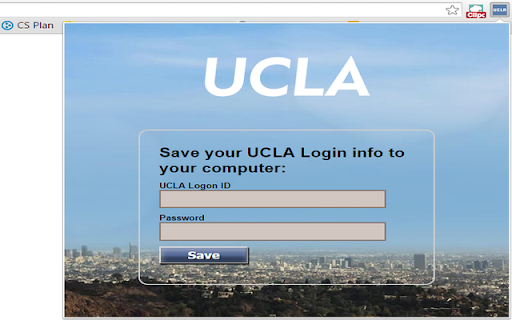
Screenshot dell'Estensione
Scarica il file CRX dell'estensione UCLA Automated Login
Scarica i file di estensione UCLA Automated Login in formato crx, installa manualmente le estensioni di Chrome nel browser o condividi i file crx con gli amici per installare facilmente le estensioni di Chrome.
Istruzioni per l'Uso dell'Estensione
                        Tired of entering your UCLA logon ID and username every single time?
Install the UCLA Automated Login!

By clicking the icon after installing and entering the logon info, you will never have to manually enter them again.

This extension allows you to automatically log in to all the newly updated UCLA authentication pages.
Informazioni di Base sull'Estensione
| Nome |  UCLA Automated Login UCLA Automated Login |
| ID | inelalkinoinjgbfjfmkfiagmfefpeic |
| URL Ufficiale | https://chromewebstore.google.com/detail/ucla-automated-login/inelalkinoinjgbfjfmkfiagmfefpeic |
| Descrizione | Tired of entering your UCLA logon ID and username every single time? Install the UCLA Automated Login! By clicking the icon after… |
| Dimensione del File | 150 KB |
| Conteggio Installazioni | 13 |
| Versione Corrente | 2.0.1 |
| Ultimo Aggiornamento | 2015-11-10 |
| Data di Pubblicazione | 2015-11-10 |
| Valutazione | 5.00/5 Totale 3 Valutazioni |
| Sviluppatore | Stanley Hsu |
| Tipo di Pagamento | free |
| Lingue Supportate | en |
| manifest.json | |
{
    "update_url": "http:\/\/clients2.google.com\/service\/update2\/crx",
    "name": "UCLA Automated Login",
    "version": "2.0.1",
    "manifest_version": 2,
    "icons": {
        "16": "images\/icon16.png",
        "48": "images\/icon48.png",
        "128": "images\/ucla128.png"
    },
    "background": {
        "page": "background.html"
    },
    "permissions": [
        "tabs",
        "https:\/\/*\/*"
    ],
    "options_page": "optionPage.html",
    "browser_action": {
        "default_icon": "images\/icon16.png",
        "default_title": "UCLA Automated Login",
        "default_popup": "options.html"
    }
} | |