Hacker Tab
Customizable Hacker Themed New Tab For Chrome
Cos'è Hacker Tab?
Hacker Tab è un'estensione di Chrome sviluppata da iamrobertgrigoryan, e la sua funzione principale è "Customizable Hacker Themed New Tab For Chrome".
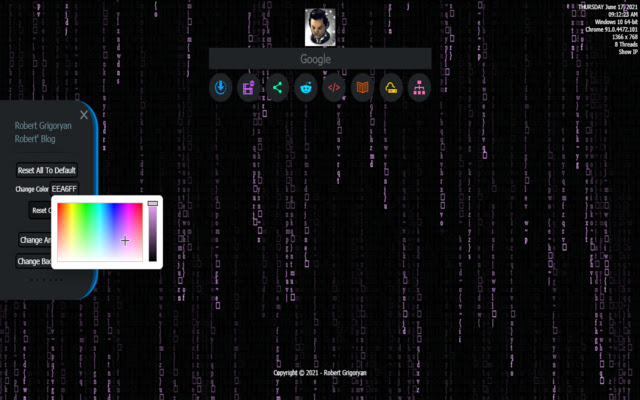
Screenshot dell'Estensione
Scarica il file CRX dell'estensione Hacker Tab
Scarica i file di estensione Hacker Tab in formato crx, installa manualmente le estensioni di Chrome nel browser o condividi i file crx con gli amici per installare facilmente le estensioni di Chrome.
Istruzioni per l'Uso dell'Estensione
                        Customizable Hacker Themed New Tab For Chrome
Matrix based animated hacker theme with many search engines and Mr. Robot Wallpapers. Feel geeky and impress your friends with the cool animation in your chrome.

Setting Menu can be accessed by moving cursor to left edge. Matrix can be customized to any colour of your liking through a colour picker. There are Mr. Robot Wallpapers are built in but any other wallpaper can be used from 'Custom Wallpaper' button.
Informazioni di Base sull'Estensione
| Nome |  Hacker Tab Hacker Tab |
| ID | jchakoeddfllhdnlbbbmfjhnfiglkohd |
| URL Ufficiale | https://chrome.google.com/webstore/detail/hacker-tab/jchakoeddfllhdnlbbbmfjhnfiglkohd |
| Descrizione | Customizable Hacker Themed New Tab For Chrome |
| Dimensione del File | 80.51 MB |
| Conteggio Installazioni | 30 |
| Versione Corrente | 1.0 |
| Ultimo Aggiornamento | 2021-06-20 |
| Data di Pubblicazione | 2021-06-20 |
| Sviluppatore | iamrobertgrigoryan |
| [email protected] | |
| Tipo di Pagamento | free |
| Sito Web dell'Estensione | https://rebrand.ly/robertgrigoryan |
| Lingue Supportate | en |
| manifest.json | |
{
    "browser_action": {
        "default_icon": "icons\/icon16.png",
        "default_popup": "\/popup.html"
    },
    "chrome_url_overrides": {
        "newtab": "index.html"
    },
    "description": "Customizable Hacker Themed New Tab For Chrome",
    "icons": {
        "16": "icons\/icon16.png",
        "19": "icons\/icon19.png",
        "48": "icons\/icon48.png",
        "96": "icons\/icon96-128.png",
        "128": "icons\/icon128.png"
    },
    "manifest_version": 2,
    "name": "Hacker Tab",
    "short_name": "Hacker Tab",
    "web_accessible_resources": [
        "css\/*.ttf",
        "js\/custom.min.js",
        "js\/script.min.js",
        "js\/jscolor.min.js",
        "js\/fast.min.js",
        "js\/def-settings-reloader.js",
        "js\/platform.min.js",
        "js\/sortable.min.js",
        "js\/perfect-scrollbar.min.js",
        "js\/init.js"
    ],
    "update_url": "https:\/\/clients2.google.com\/service\/update2\/crx",
    "background": {
        "scripts": [
            "js\/jquery.js",
            "js\/init.js",
            "js\/script.min.js",
            "js\/jscolor.min.js",
            "js\/custom.min.js",
            "js\/fast.min.js",
            "js\/def-settings-reloader.js",
            "js\/platform.min.js",
            "js\/sortable.min.js",
            "js\/perfect-scrollbar.min.js",
            "autocomplete\/index.js",
            "js\/canvas\/matrix.js",
            "js\/canvas\/stars.js",
            "js\/canvas\/trails.js",
            "js\/canvas\/nodes.js",
            "js\/canvas\/nodes2x.js",
            "js\/canvas\/circuits.js"
        ]
    },
    "content_security_policy": "script-src 'self'; object-src 'self'",
    "version": "1.0"
} | |