WPT Lighthouse Calc
Calculate Lighthouse scores from WPT results.
Cos'è WPT Lighthouse Calc?
WPT Lighthouse Calc è un'estensione di Chrome sviluppata da Ramit Mittal, e la sua funzione principale è "Calculate Lighthouse scores from WPT results.".
Screenshot dell'Estensione
Scarica il file CRX dell'estensione WPT Lighthouse Calc
Scarica i file di estensione WPT Lighthouse Calc in formato crx, installa manualmente le estensioni di Chrome nel browser o condividi i file crx con gli amici per installare facilmente le estensioni di Chrome.
Istruzioni per l'Uso dell'Estensione
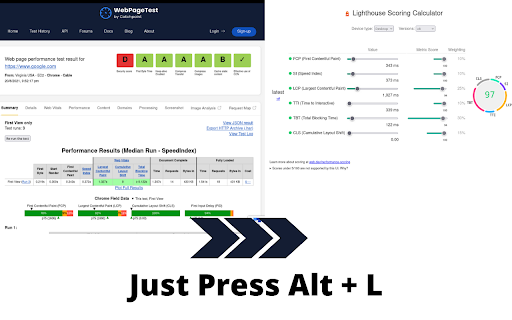
                        Open the Lighthouse Scoring Calculator with values from a WPT test results page.
Simply visit a WPT test result page and press the activation shortcut.
The Lighthouse score will open in a new tab.

This extension is also compatible with private WPT instances.
Make sure you enable the activation shortcut from your extension settings.
Informazioni di Base sull'Estensione
| Nome |  WPT Lighthouse Calc WPT Lighthouse Calc |
| ID | jdgkljapgdgdkfbkoekdpjnbolgefdbb |
| URL Ufficiale | https://chromewebstore.google.com/detail/wpt-lighthouse-calc/jdgkljapgdgdkfbkoekdpjnbolgefdbb |
| Descrizione | Calculate Lighthouse scores from WPT results. |
| Dimensione del File | 7.95 KB |
| Conteggio Installazioni | 149 |
| Versione Corrente | 1.0.1 |
| Ultimo Aggiornamento | 2023-04-25 |
| Data di Pubblicazione | 2021-08-21 |
| Sviluppatore | Ramit Mittal |
| [email protected] | |
| Tipo di Pagamento | free |
| Sito Web dell'Estensione | https://github.com/ramitmittal/wpt-lighthouse-calc |
| URL della Pagina di Aiuto | https://github.com/ramitmittal/wpt-lighthouse-calc |
| Lingue Supportate | en |
| manifest.json | |
{
    "update_url": "https:\/\/clients2.google.com\/service\/update2\/crx",
    "manifest_version": 3,
    "name": "WPT Lighthouse Calc",
    "description": "Calculate Lighthouse scores from WPT results.",
    "version": "1.0.1",
    "icons": {
        "128": "icon_128.png"
    },
    "background": {
        "service_worker": "sw.js"
    },
    "commands": {
        "open": {
            "suggested_key": "Alt+L",
            "description": "Open Lighthouse Scorecalc page from WPT results"
        }
    },
    "permissions": [
        "activeTab",
        "tabs"
    ]
} | |