ChatGPT-Personality-Selector
This extention allows the user to condition chatgpt for specific applications rsulting in a more optimized use of the tool.
Cos'è ChatGPT-Personality-Selector?
ChatGPT-Personality-Selector è un'estensione di Chrome sviluppata da aloui.seifeddine, e la sua funzione principale è "This extention allows the user to condition chatgpt for specific applications rsulting in a more optimized use of the tool.".
Screenshot dell'Estensione
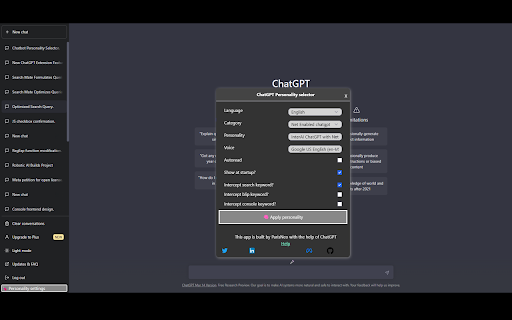


Scarica il file CRX dell'estensione ChatGPT-Personality-Selector
Scarica i file di estensione ChatGPT-Personality-Selector in formato crx, installa manualmente le estensioni di Chrome nel browser o condividi i file crx con gli amici per installare facilmente le estensioni di Chrome.
Istruzioni per l'Uso dell'Estensione
                        Introducing the ChatGPT Personality Selector, a Google Chrome extension that offers a new and revolutionary way to customize your chatbot experience. The extension offers an extensive list of personalities to choose from, allowing users to condition their chatbot to become a person or tool specialized in a specific area, such as an educator, doctor, translator, password generator, stand-up comedian, psychic, expert in startup creation, developer, or even a Linux, python, or other terminal, and many more.

But the extension's features do not end there. The ChatGPT Personality Selector also offers special personalities, such as the NetEnabled ChatGPT, which can connect to the internet and perform searches to provide users with up-to-date information. Users can also choose the Internet Search personality if they prefer to provide the search query themselves.

To use the extension, simply select the desired personality from the list of options and press the validation button. Your chatbot will then be instantly transformed and ready to perform the specific task with ease.

One of the latest features added to the ChatGPT Personality Selector is the ability to activate or deactivate keyword interception from the settings menu, which gives users greater control over how ChatGPT interacts with the content they are browsing.

Moreover, the chatgpt_extensions tool is now available, which allows users to perform image describing, UI building from images, and other cool stuff. With this tool, users can link ChatGPT to a console, for now, Powershell on Windows, but other shells will be added soon. This feature empowers ChatGPT to take control, build software, and even debug it for users. All users need to do is provide the specification.

To use this feature, users can head to the git page of chatgpt_extension at https://github.com/ParisNeo/chatgpt_extensions. They can download the project or clone the repo and run a shell with python enabled. After installing the requirements using pip from requirements.txt, users can run one of the three services, such as blip_service.py for image-related personality, or console_service.py for console-related apps.

It's essential to note that the chatgpt_extensions console service is still experimental, so users should use it at their own risk. If they feel that the extension is not doing what they want it to do, they can simply stop the page.

The ChatGPT Personality Selector also supports multiple languages and provides a search tool to enhance ChatGPT's capacity to understand the world today.

The ChatGPT Personality Selector is an essential tool for users who want to have more control over their chatbot experience. With its wide range of personalities and new features, such as keyword interception control and the chatgpt_extensions tool, users can tailor their chatbot experience to their specific needs. The full source code of the ChatGPT Personality Selector is open source under MIT license and can be found at https://github.com/ParisNeo/chatgpt-personality-selector. So why wait? Visit the website now and start transforming your chatbot experience!
Informazioni di Base sull'Estensione
| Nome |  ChatGPT-Personality-Selector ChatGPT-Personality-Selector |
| ID | jdmpccdlifdkhniemenfmieffkdblahk |
| URL Ufficiale | https://chromewebstore.google.com/detail/chatgpt-personality-selec/jdmpccdlifdkhniemenfmieffkdblahk |
| Descrizione | This extention allows the user to condition chatgpt for specific applications rsulting in a more optimized use of the tool. |
| Dimensione del File | 1.06 MB |
| Conteggio Installazioni | 3,256 |
| Versione Corrente | 3.0 |
| Ultimo Aggiornamento | 2023-04-04 |
| Data di Pubblicazione | 2023-01-25 |
| Valutazione | 3.71/5 Totale 7 Valutazioni |
| Sviluppatore | aloui.seifeddine |
| [email protected] | |
| Tipo di Pagamento | free |
| Sito Web dell'Estensione | https://github.com/ParisNeo/chatgpt-personality-selector |
| URL della Pagina di Aiuto | https://github.com/ParisNeo/chatgpt-personality-selector/issues |
| Lingue Supportate | en |
| manifest.json | |
{
    "update_url": "https:\/\/clients2.google.com\/service\/update2\/crx",
    "manifest_version": 3,
    "name": "ChatGPT-Personality-Selector",
    "description": "This extention allows the user to condition chatgpt for specific applications rsulting in a more optimized use of the tool.",
    "version": "3.0",
    "icons": {
        "16": "icon.png",
        "32": "icon.png",
        "48": "icon.png",
        "128": "icon.png"
    },
    "host_permissions": [
        "https:\/\/parisneo.pythonanywhere.com\/*"
    ],
    "background": {
        "service_worker": "background.js"
    },
    "content_scripts": [
        {
            "matches": [
                "https:\/\/chat.openai.com\/*"
            ],
            "css": [
                "style.css"
            ],
            "js": [
                "papaparse.min.js",
                "content.js"
            ]
        }
    ],
    "permissions": [
        "storage"
    ],
    "web_accessible_resources": [
        {
            "resources": [
                "languages\/prompts_ar-AR.csv",
                "languages\/prompts_de-DE.csv",
                "languages\/prompts_en-US.csv",
                "languages\/prompts_fr-FR.csv",
                "languages\/prompts_fr-FR_bk.csv",
                "languages\/prompts_it-IT.csv",
                "languages\/prompts_nl-XX.csv",
                "languages\/prompts_zh-CN.csv"
            ],
            "matches": [
                "https:\/\/chat.openai.com\/*"
            ]
        }
    ]
} | |