Check Weather
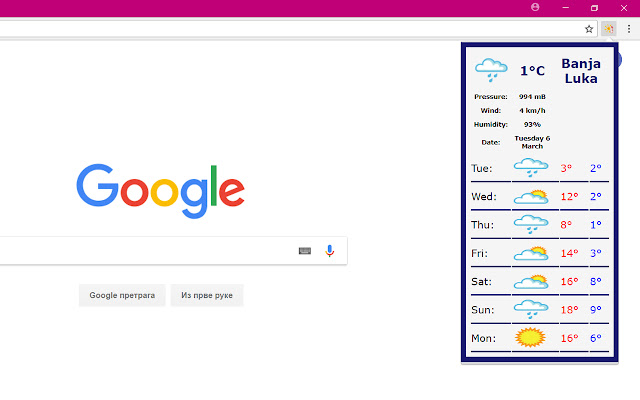
Weather forecast for current city and location of current visited website.
Cos'è Check Weather?
Check Weather è un'estensione di Chrome sviluppata da anajeftovic1, e la sua funzione principale è "Weather forecast for current city and location of current visited website.".
Screenshot dell'Estensione
Scarica il file CRX dell'estensione Check Weather
Scarica i file di estensione Check Weather in formato crx, installa manualmente le estensioni di Chrome nel browser o condividi i file crx con gli amici per installare facilmente le estensioni di Chrome.
Istruzioni per l'Uso dell'Estensione
Check Weather extension is the perfect tool for getting weather information. It provides current weather conditions and seven days forecast based on Your location. Also, You will get weather info for location of website You are visiting. You don't have to wait for weather information anymore, just click on button and You will get all necessary information. Informazioni di Base sull'Estensione
| Nome |  Check Weather Check Weather |
| ID | jeboiehfeffphnnfahahdkaejhhafehm |
| URL Ufficiale | https://chrome.google.com/webstore/detail/check-weather/jeboiehfeffphnnfahahdkaejhhafehm |
| Descrizione | Weather forecast for current city and location of current visited website. |
| Dimensione del File | 57.01 KB |
| Conteggio Installazioni | 1,544 |
| Versione Corrente | 0.0.0.3 |
| Ultimo Aggiornamento | 2018-03-12 |
| Data di Pubblicazione | 2018-03-12 |
| Valutazione | 3.17/5 Totale 6 Valutazioni |
| Sviluppatore | anajeftovic1 |
| Tipo di Pagamento | free |
| Lingue Supportate | en |
| manifest.json | |
{
"update_url": "https:\/\/clients2.google.com\/service\/update2\/crx",
"name": "Check Weather",
"version": "0.0.0.3",
"manifest_version": 2,
"description": "Weather forecast for current city and location of current visited website.",
"browser_action": {
"default_icon": {
"38": "img\/image38.png"
},
"default_title": "Check Weather",
"default_popup": "src\/forecast.html"
},
"icons": {
"38": "img\/image38.png",
"48": "img\/image48.png",
"64": "img\/image64.png",
"96": "img\/image96.png",
"128": "img\/image128.png"
},
"permissions": [
" | |