canopy companion css selector tool
This extensions helps you create quality css, jquery, and xpath selectors
Cos'è canopy companion css selector tool?
canopy companion css selector tool è un'estensione di Chrome sviluppata da http://lefthandedgoat.github.io/canopy, e la sua funzione principale è "This extensions helps you create quality css, jquery, and xpath selectors".
Screenshot dell'Estensione
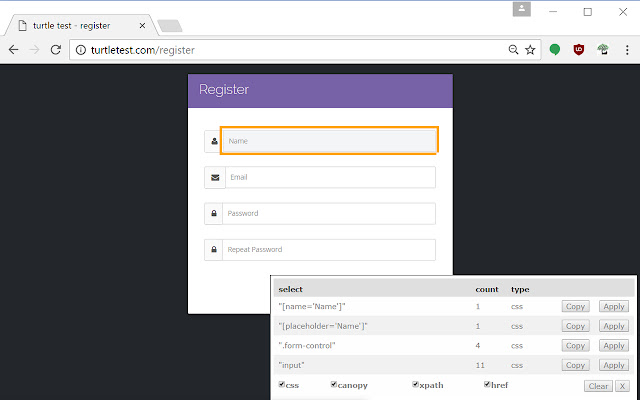
Scarica il file CRX dell'estensione canopy companion css selector tool
Scarica i file di estensione canopy companion css selector tool in formato crx, installa manualmente le estensioni di Chrome nel browser o condividi i file crx con gli amici per installare facilmente le estensioni di Chrome.
Istruzioni per l'Uso dell'Estensione
                        This extensions helps you create quality css, jquery, and xpath selectors

Learn more about the canopy ui automation and testing library here: http://lefthandedgoat.github.io/canopy/
Informazioni di Base sull'Estensione
| Nome |  canopy companion css selector tool canopy companion css selector tool |
| ID | jehfnloleecojodohcdfpbhjahhaplje |
| URL Ufficiale | https://chrome.google.com/webstore/detail/canopy-companion-css-sele/jehfnloleecojodohcdfpbhjahhaplje |
| Descrizione | This extensions helps you create quality css, jquery, and xpath selectors |
| Dimensione del File | 333 KB |
| Conteggio Installazioni | 62 |
| Versione Corrente | 0.2 |
| Ultimo Aggiornamento | 2017-02-02 |
| Data di Pubblicazione | 2017-02-02 |
| Valutazione | 5.00/5 Totale 2 Valutazioni |
| Sviluppatore | http://lefthandedgoat.github.io/canopy |
| Tipo di Pagamento | free |
| Sito Web dell'Estensione | http://lefthandedgoat.github.io/canopy/ |
| Lingue Supportate | en-US |
| manifest.json | |
{
    "update_url": "https:\/\/clients2.google.com\/service\/update2\/crx",
    "manifest_version": 2,
    "name": "canopy companion css selector tool",
    "description": "This extensions helps you create quality css, jquery, and xpath selectors",
    "version": "0.2",
    "browser_action": {
        "default_icon": "icon.png"
    },
    "permissions": [
        "tabs",
        "http:\/\/*\/*",
        "https:\/\/*\/*"
    ],
    "background": {
        "scripts": [
            "background.js"
        ],
        "persistent": false
    }
} | |