RDS Bar
Handy tool for quick analysis of website and page SEO indicators, designed for webmasters and optimizers.
Cos'è RDS Bar?
RDS Bar è un'estensione di Chrome sviluppata da recipdonor.com, e la sua funzione principale è "Handy tool for quick analysis of website and page SEO indicators, designed for webmasters and optimizers.".
Screenshot dell'Estensione
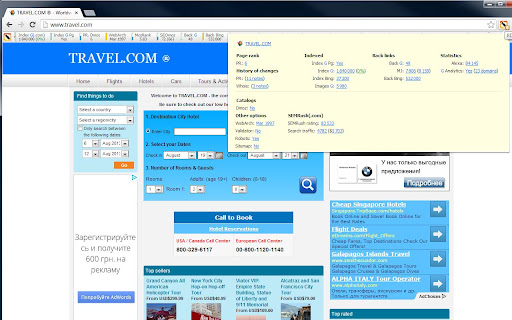

Scarica il file CRX dell'estensione RDS Bar
Scarica i file di estensione RDS Bar in formato crx, installa manualmente le estensioni di Chrome nel browser o condividi i file crx con gli amici per installare facilmente le estensioni di Chrome.
Istruzioni per l'Uso dell'Estensione
                        RDS Bar is a handy tool for quick analysis of website and page SEO indicators, designed for webmasters and optimizers. And also with a number of useful features for ordinary users.

Site analysis - a button from the browser panel for complex site and page analysis in one place with grouped data by blocks.

RDS Toolbar is a toolbar that is embedded on the page in the form of a toolbar and has flexible settings for parameters and a number of useful functions. We recommend to use to reduce the number of requests.

Integration into search engine pages - a group of tools extending the functionality of search results pages and extending blocks with the results, placing blocks with parameters under them.

Substitution - highlighting noindex, nofollow and external links, as well as hidden blocks on the page.

A detailed list of supported parameters and functionality of the extension can be found on the home page https://www.recipdonor.com/bar

The extension is free for all comers. The code is open.

It is possible to improve the current extension for your tasks: the improvement of functionality and the addition of parameters that are most important to you.

Send your questions and suggestions to [email protected]
Privacy Policy available at https://www.recipdonor.com/privacy-bar
Informazioni di Base sull'Estensione
| Nome |  RDS Bar RDS Bar |
| ID | jlipcaflaocihnmlhnhcfombgmmfglho |
| URL Ufficiale | https://chromewebstore.google.com/detail/rds-bar/jlipcaflaocihnmlhnhcfombgmmfglho |
| Descrizione | Handy tool for quick analysis of website and page SEO indicators, designed for webmasters and optimizers. |
| Dimensione del File | 1.73 MB |
| Conteggio Installazioni | 60,687 |
| Versione Corrente | 7.2021.108.109 |
| Ultimo Aggiornamento | 2021-08-11 |
| Data di Pubblicazione | 2020-03-31 |
| Valutazione | 4.20/5 Totale 647 Valutazioni |
| Sviluppatore | recipdonor.com |
| [email protected] | |
| Tipo di Pagamento | free |
| Sito Web dell'Estensione | https://www.recipdonor.com/bar-chrome |
| URL della Pagina di Aiuto | https://www.recipdonor.com/barfeedback |
| URL della Pagina della Politica sulla Privacy | https://www.recipdonor.com/privacy-bar |
| Lingue Supportate | en,ru |
| manifest.json | |
{
    "update_url": "https:\/\/clients2.google.com\/service\/update2\/crx",
    "name": "__MSG_appName__",
    "version": "7.2021.108.109",
    "manifest_version": 2,
    "description": "__MSG_appDesc__",
    "default_locale": "en",
    "icons": {
        "16": "icons\/skin\/logo\/16.png",
        "48": "icons\/skin\/logo\/48.png",
        "128": "icons\/skin\/logo\/128.png"
    },
    "background": {
        "page": "chrome\/main.html"
    },
    "options_ui": {
        "page": "new_options.html",
        "open_in_tab": true
    },
    "browser_action": {
        "default_icon": "icons\/skin\/logo\/19.png",
        "default_popup": "chrome\/popup.html"
    },
    "content_scripts": [
        {
            "matches": [
                "*:\/\/*\/*"
            ],
            "run_at": "document_start",
            "css": [
                "css\/content.css",
                "css\/search_integration.css",
                "lib\/chartist.min.css"
            ],
            "js": [
                "lib\/jquery.js",
                "lib\/underscore.js",
                "lib\/backbone.js",
                "lib\/namespaces.js",
                "lib\/chartist.min.js",
                "content\/messenger.js",
                "content\/bar.js",
                "views\/parameters.js",
                "views\/tooltips.js",
                "views\/contextmenu.js",
                "content\/app.js",
                "includes\/punycode.js",
                "includes\/highlighting.js",
                "content\/integrations\/search\/search_integration.js",
                "content\/integrations\/search\/yandex.js",
                "content\/integrations\/search\/yandex_catalog.js",
                "content\/integrations\/search\/ya.js",
                "content\/integrations\/search\/google.js",
                "content\/integrations\/index.js",
                "includes\/lib.js",
                "chrome\/content.js"
            ]
        }
    ],
    "permissions": [
        "tabs",
        "cookies",
        "storage",
        "unlimitedStorage",
        "*:\/\/*\/*",
        "contextMenus",
        "clipboardWrite",
        "webRequest",
        "webRequestBlocking"
    ],
    "commands": {
        "get-indexed-pages": {
            "suggested_key": {
                "default": "Ctrl+Q"
            },
            "description": "Copy all indexed pages from the DB"
        },
        "copy-search-urls": {
            "suggested_key": {
                "default": "Ctrl+Shift+Y"
            },
            "description": "Copy all search urls from a search integration page"
        },
        "seotags-check-button": {
            "suggested_key": {
                "default": "Ctrl+Shift+F"
            },
            "description": "Push SEOTags button"
        },
        "disable-styles": {
            "suggested_key": {
                "default": "Alt+S"
            },
            "description": "Disable the styles of the webpage"
        }
    },
    "web_accessible_resources": [
        "icons\/*\/*.png",
        "content\/integrations\/search\/popup.html",
        "resources\/*",
        "new_options.html",
        "cookies\/cookies_info.html"
    ]
} | |