Save to Screenly
Display live web pages on your Screenly digital sign.
Cos'è Save to Screenly?
Save to Screenly è un'estensione di Chrome sviluppata da Screenly, e la sua funzione principale è "Display live web pages on your Screenly digital sign.".
Screenshot dell'Estensione


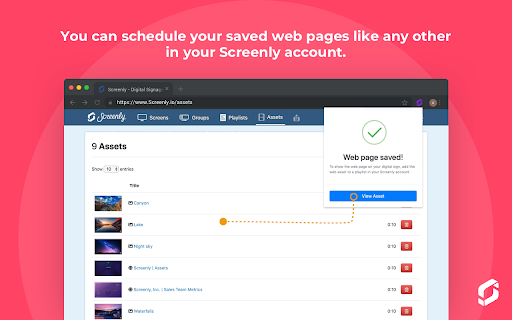
Scarica il file CRX dell'estensione Save to Screenly
Scarica i file di estensione Save to Screenly in formato crx, installa manualmente le estensioni di Chrome nel browser o condividi i file crx con gli amici per installare facilmente le estensioni di Chrome.
Istruzioni per l'Uso dell'Estensione
                        Easily and quickly create digital signage content from a web page, and display this content on your Screenly-powered digital signs. Whether you have a chart, an analytics page, or just an inspirational quote, the Save to Screenly extension makes publishing to your screens a breeze.

Save to Screenly also makes it easy to display web pages that require a username and password. The Save Authentication option saves your current login session so that Screenly can display the password-protected web page on your digital sign. If your session expires, use Save to Screenly to update it quickly.
Informazioni di Base sull'Estensione
| Nome |  Save to Screenly Save to Screenly |
| ID | kcoehkngnbhlmdcgcadliaadlmbjmcln |
| URL Ufficiale | https://chromewebstore.google.com/detail/save-to-screenly/kcoehkngnbhlmdcgcadliaadlmbjmcln |
| Descrizione | Display live web pages on your Screenly digital sign. |
| Dimensione del File | 88.92 KB |
| Conteggio Installazioni | 442 |
| Versione Corrente | 1.0.1 |
| Ultimo Aggiornamento | 2019-08-18 |
| Data di Pubblicazione | 2019-08-14 |
| Sviluppatore | Screenly |
| Tipo di Pagamento | free |
| URL della Pagina della Politica sulla Privacy | https://www.screenly.io/privacy-policy |
| Lingue Supportate | en |
| manifest.json | |
{
    "update_url": "https:\/\/clients2.google.com\/service\/update2\/crx",
    "manifest_version": 2,
    "name": "Save to Screenly",
    "version": "1.0.1",
    "description": "Display live web pages on your Screenly digital sign.",
    "icons": {
        "16": "assets\/images\/screenly-logo-16.png",
        "48": "assets\/images\/screenly-logo-48.png",
        "128": "assets\/images\/screenly-logo-128.png"
    },
    "permissions": [
        "storage",
        "activeTab",
        "cookies",
        "http:\/\/*\/*",
        "https:\/\/*\/*"
    ],
    "browser_action": {
        "default_popup": "popup.html",
        "default_title": "Save to Screenly",
        "default_icon": {
            "16": "assets\/images\/screenly-logo-16.png",
            "32": "assets\/images\/screenly-logo-32.png"
        }
    },
    "options_page": "options.html"
} | |