Maxi Refresher
Refresh pages with multiple timers. Reach maximum efficiency with Maxi auto refresh tool
Cos'è Maxi Refresher?
Maxi Refresher è un'estensione di Chrome sviluppata da MitchelLil, e la sua funzione principale è "Refresh pages with multiple timers. Reach maximum efficiency with Maxi auto refresh tool".
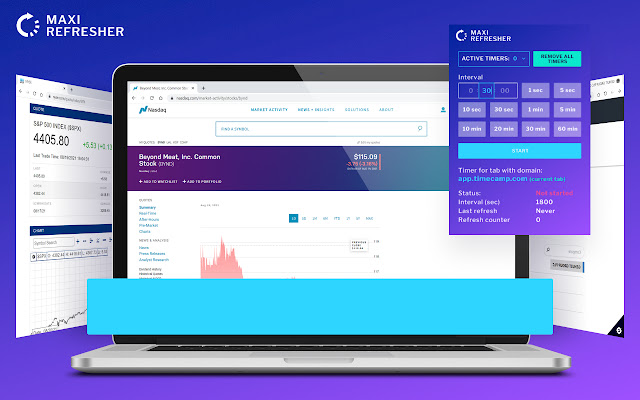
Screenshot dell'Estensione
Scarica il file CRX dell'estensione Maxi Refresher
Scarica i file di estensione Maxi Refresher in formato crx, installa manualmente le estensioni di Chrome nel browser o condividi i file crx con gli amici per installare facilmente le estensioni di Chrome.
Istruzioni per l'Uso dell'Estensione
                        With the help of the Maxi Refresher, you will be able to automatically reload websites at the time intervals you choose so our app will certainly become your indispensable assistant.
Features:
🔁The Maxi Refresher gives you the ability to update several pages at once;
🔁You will be able to set the automatic update timer which is predictable to the second;
🔁Our app will save you from pop-up windows "Are you sure you want to leave this page" which are always distracting from work;
🔁Does not take up a lot of your device's memory.
Who can use this application?
🔁It is really for everyone. After all, you will agree that each of us regularly visits websites.
Reach maximum efficiency with the Maxi Refresher app!
Informazioni di Base sull'Estensione
| Nome |  Maxi Refresher Maxi Refresher |
| ID | lipmdblppejomolopniipdjlpfjcojob |
| URL Ufficiale | https://chrome.google.com/webstore/detail/maxi-refresher/lipmdblppejomolopniipdjlpfjcojob |
| Descrizione | Refresh pages with multiple timers. Reach maximum efficiency with Maxi auto refresh tool |
| Dimensione del File | 460 KB |
| Conteggio Installazioni | 3,506,686 |
| Versione Corrente | 1.1.5 |
| Ultimo Aggiornamento | 2023-04-21 |
| Data di Pubblicazione | 2021-09-07 |
| Valutazione | 4.53/5 Totale 17 Valutazioni |
| Sviluppatore | MitchelLil |
| [email protected] | |
| Tipo di Pagamento | free |
| URL della Pagina della Politica sulla Privacy | https://docs.google.com/document/d/e/2PACX-1vSygDAR29mM-W_5xVnTG9Lz0tzfbeWaT7cSfX3Gxa8VAjjkOl23Tzrz5jIz2QUiwAn38e44hWzK1lRf/pub |
| Lingue Supportate | id,ms,de,en,en-GB,en-US,fil,fr,nl,no,vi,tr,ca,da,et,es,es-419,hr,it,lv,lt,hu,pl,pt-BR,pt-PT,ro,sk,sl,fi,sv,cs,el,sr,bg,ru,uk,mr,hi,bn,gu,ta,te,ml,th,zh-CN,zh-TW,ja,ko |
| manifest.json | |
{
"update_url": "https:\/\/clients2.google.com\/service\/update2\/crx",
"author": "Maxi Refresher auto refresh team",
"background": {
"scripts": [
"js\/background.js"
],
"persistent": true
},
"browser_action": {
"default_icon": {
"16": "icons\/icon16.png",
"48": "icons\/icon48.png",
"128": "icons\/icon128.png",
"300": "icons\/icon300.png"
},
"default_title": "__MSG_extName__",
"default_popup": "html\/popup.html"
},
"content_scripts": [
{
"matches": [
"http:\/\/*\/*",
"https:\/\/*\/*"
],
"js": [
"js\/content.js"
],
"all_frames": true,
"match_about_blank": true,
"run_at": "document_start"
}
],
"default_locale": "en",
"description": "__MSG_extShortDesc__",
"icons": {
"16": "icons\/icon16.png",
"48": "icons\/icon48.png",
"128": "icons\/icon128.png",
"300": "icons\/icon300.png"
},
"incognito": "split",
"manifest_version": 2,
"minimum_chrome_version": "55.0",
"name": "__MSG_extName__",
"permissions": [
"storage",
"alarms",
" | |