ChroPath
ChroPath helps to generate and validate selectors like relative xpath with iframe,svg support. It also generate english testcases.
Cos'è ChroPath?
ChroPath è un'estensione di Chrome sviluppata da Sauce Labs, e la sua funzione principale è "ChroPath helps to generate and validate selectors like relative xpath with iframe,svg support. It also generate english testcases.".
Screenshot dell'Estensione


Scarica il file CRX dell'estensione ChroPath
Scarica i file di estensione ChroPath in formato crx, installa manualmente le estensioni di Chrome nel browser o condividi i file crx con gli amici per installare facilmente le estensioni di Chrome.
Istruzioni per l'Uso dell'Estensione
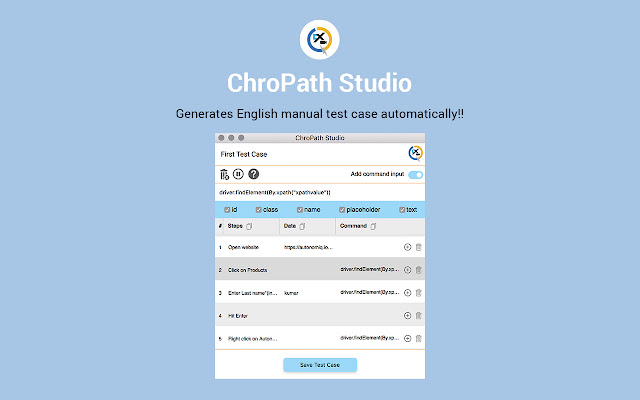
                        ChroPath generates all possible selectors just by one click. ChroPath can also be used as Editor for selectors. It makes easy to write, edit, extract, and evaluate XPath queries on any webpage. ChroPath Studio helps to record all manual steps along with automation steps. With smart maintenance feature, all xpaths can be verified from script. ChroPath also supports iframe, multi selectors generation, dynamic attributes, generate relative xpath with custom attribute, automation script steps generation.

Let us make it very clear that we don't track any user data. Everything runs in your local for this extension. Whatever stats or number of users we get is from the chrome store.

Please contact us at [email protected] for support.

Instructions:

1. Right-click on the web page, and then click Inspect.
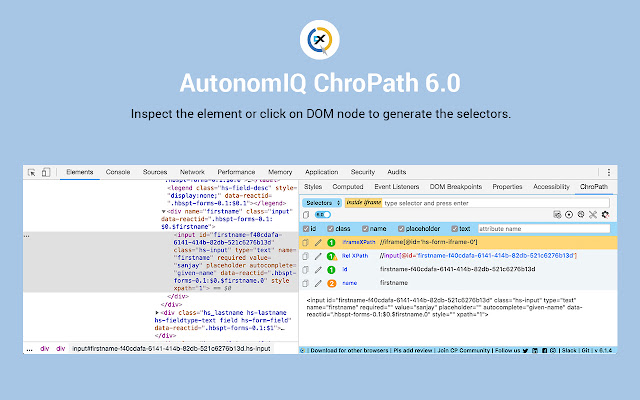
2. In the right side of Elements tab, click on ChroPath tab. Please refer attached screenshot.
3. To generate selectors, inspect element or click on any DOM node, it will generate the unique relative XPath/absolute XPath/CSS selector/linkText/partialLinkText.
4. To evaluate XPath/CSS, type the XPath/CSS query and press enter key.
	As you enter, it will query in DOM for the relevant element/node. You can view the matching node(s) and nodes value as per their sequential occurrence. A green colour outline appears around to highlight the first matching elements and rest in blue colour in the web page.
5. If you mouse hover on any matching node in the ChroPath tab, green/blue dashed outline will convert into dotted orange red to highlight the corresponding element in the webpage.
6. If the found element is not in visible area on webpage then mouse hover on found node in ChroPath panel will scroll that element in the visible area with dotted orange red outline.
7. If found element is not highlighted but visible then on mouse hover on matching node on ChroPath tab it will highlight element with dotted orange red outline.
8. copy the locators by clicking on copy icon.
9. click on edit icon if want to edit any locator.

Change log 6.0-
New Features:
1. All possible locators like id, className, name, xpath etc along with the number of occurrences.
2. Unique relative and absolute XPath for SVG elements & SVG child elements.
3. iframe xpath along with element xpath.
4. ChroPath will suggest the relative xpath for user's selector i.e. when user will verify the selector in CP then CP will suggest the unique relative xpath for the first matching node.
5. Automation command with label as well. No more time waste in editing command.
6. Alert for dynamic id/class, meaningful error message and much more.
7. Reset button to set all the default config.
8. ChroPath will save the user attribute and predefined command in local config so next time when user open CP, user doesn't need to waste time and can get last set configuration automatically.
9. Copy all recorded selectors/steps from ChroPath tab itself without downloading xls.
10. Option to generate XPath with and without text.
11. ChroPath Studio.
12. Smart Maintenance.
Informazioni di Base sull'Estensione
| Nome |  ChroPath ChroPath |
| ID | ljngjbnaijcbncmcnjfhigebomdlkcjo |
| URL Ufficiale | https://chrome.google.com/webstore/detail/chropath/ljngjbnaijcbncmcnjfhigebomdlkcjo |
| Descrizione | ChroPath helps to generate and validate selectors like relative xpath with iframe,svg support. It also generate english testcases. |
| Dimensione del File | 540 KB |
| Conteggio Installazioni | 200,000 |
| Versione Corrente | 6.1.12 |
| Ultimo Aggiornamento | 2021-08-02 |
| Data di Pubblicazione | 2020-06-18 |
| Valutazione | 4.54/5 Totale 1149 Valutazioni |
| Sviluppatore | Sauce Labs |
| [email protected] | |
| Tipo di Pagamento | in_app |
| Sito Web dell'Estensione | https://autonomiq.io |
| URL della Pagina di Aiuto | https://autonomiq.io |
| URL della Pagina della Politica sulla Privacy | https://autonomiq.io/images/pdf/Privacy-Policy.pdf |
| Lingue Supportate | en-US |
| manifest.json | |
{
"update_url": "https:\/\/clients2.google.com\/service\/update2\/crx",
"manifest_version": 2,
"name": "ChroPath",
"author": "Sanjay Kumar",
"description": "ChroPath helps to generate and validate selectors like relative xpath with iframe,svg support. It also generate english testcases.",
"homepage_url": "https:\/\/autonomiq.io\/",
"version": "6.1.12",
"browser_action": {
"default_title": "ChroPath",
"default_popup": "extension\/popup.html"
},
"devtools_page": "devtools-panel\/devtools.html",
"icons": {
"48": "icons-48.png",
"96": "icons-96.png",
"128": "icons-128.png"
},
"background": {
"scripts": [
"content-script\/browser-polyfill.min.js",
"extension\/background.js"
],
"persistent": false
},
"permissions": [
"notifications",
"storage"
],
"content_scripts": [
{
"run_at": "document_start",
"matches": [
" | |