Laziest Load
Load only the active tab when booting up an old session of Chrome.
Cos'è Laziest Load?
Laziest Load è un'estensione di Chrome sviluppata da hwangas, e la sua funzione principale è "Load only the active tab when booting up an old session of Chrome.".
Screenshot dell'Estensione

Scarica il file CRX dell'estensione Laziest Load
Scarica i file di estensione Laziest Load in formato crx, installa manualmente le estensioni di Chrome nel browser o condividi i file crx con gli amici per installare facilmente le estensioni di Chrome.
Istruzioni per l'Uso dell'Estensione
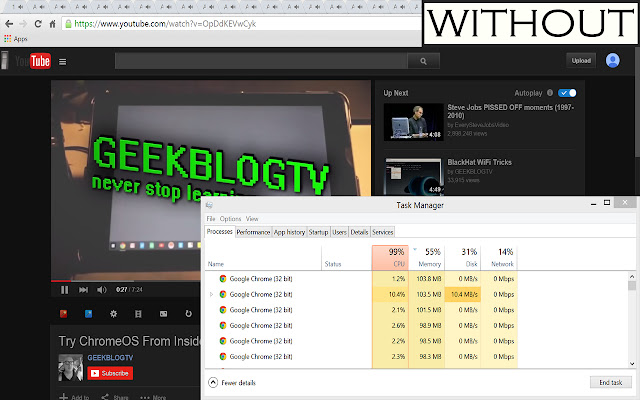
                        Chrome by default upon restart loads every tab that is currently open, which takes much more memory and time required than necessary. This extension allows only the tab currently selected to be loaded at restart, making Chrome load up much faster.

This extension does not require any actions in part by the user to work.

VERSION 1.1 CHANGES
 - Tabs load faster when switched to.

INITIAL USE: please restart your Chrome browser in order to have the extension work properly.

To view the source, go to https://github.com/hwangas/lazyload
Informazioni di Base sull'Estensione
| Nome |  Laziest Load Laziest Load |
| ID | mgmkfbapiafkaebchhbghgffkfcmolhb |
| URL Ufficiale | https://chrome.google.com/webstore/detail/laziest-load/mgmkfbapiafkaebchhbghgffkfcmolhb |
| Descrizione | Load only the active tab when booting up an old session of Chrome. |
| Dimensione del File | 33.34 KB |
| Conteggio Installazioni | 346 |
| Versione Corrente | 1.1 |
| Ultimo Aggiornamento | 2015-06-24 |
| Data di Pubblicazione | 2015-06-23 |
| Valutazione | 4.55/5 Totale 11 Valutazioni |
| Sviluppatore | hwangas |
| Tipo di Pagamento | free |
| Sito Web dell'Estensione | https://github.com/hwangas/lazyload |
| Lingue Supportate | en-US |
| manifest.json | |
{
    "update_url": "https:\/\/clients2.google.com\/service\/update2\/crx",
    "manifest_version": 2,
    "name": "Laziest Load",
    "description": "Load only the active tab when booting up an old session of Chrome.",
    "version": "1.1",
    "author": "Anna Hwang",
    "icons": {
        "16": "16_laziest_load.png",
        "48": "48_laziest_load.png",
        "128": "128_laziest_load.png"
    },
    "background": {
        "persistent": true,
        "scripts": [
            "lazy.js"
        ]
    },
    "permissions": [
        "tabs",
        "webRequest",
        "webRequestBlocking",
        "http:\/\/*\/*",
        "https:\/\/*\/*",
        "https:\/\/ajax.googleapis.com\/"
    ]
} | |