Custom Button
Customize a button.
Cos'è Custom Button?
Custom Button è un'estensione di Chrome sviluppata da Rubén Martínez, e la sua funzione principale è "Customize a button.".
Screenshot dell'Estensione



Scarica il file CRX dell'estensione Custom Button
Scarica i file di estensione Custom Button in formato crx, installa manualmente le estensioni di Chrome nel browser o condividi i file crx con gli amici per installare facilmente le estensioni di Chrome.
Istruzioni per l'Uso dell'Estensione
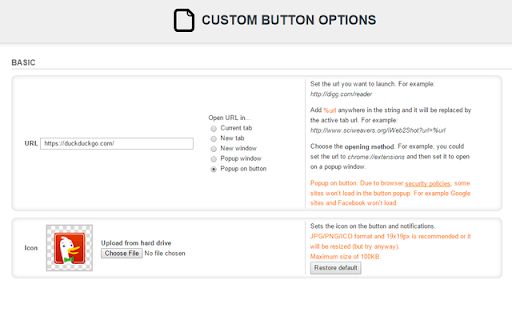
                        Custom button it's just that, a button that you can customize with an URL and icon.

Features:
- Set a custom URL to open on click.
- Open in current tab, new tab, new window, new popup window or popup on button (this doesn't work with every site).
- Change the icon.
- Set the domains where it should work using a regular expression.
- Show notification when domain doesn't match.
Informazioni di Base sull'Estensione
| Nome |  Custom Button Custom Button |
| ID | mphgmadkligoedhahoinkjghofkpmedf |
| URL Ufficiale | https://chromewebstore.google.com/detail/custom-button/mphgmadkligoedhahoinkjghofkpmedf |
| Descrizione | Customize a button. |
| Dimensione del File | 30.12 KB |
| Conteggio Installazioni | 2,896 |
| Versione Corrente | 1.1.0 |
| Ultimo Aggiornamento | 2021-05-09 |
| Data di Pubblicazione | 2019-02-03 |
| Valutazione | 4.50/5 Totale 26 Valutazioni |
| Sviluppatore | Rubén Martínez |
| [email protected] | |
| Tipo di Pagamento | free |
| Sito Web dell'Estensione | https://github.com/rubenmv/chrome-extension-custom-button |
| URL della Pagina di Aiuto | https://github.com/rubenmv/chrome-extension-custom-button/issues |
| Lingue Supportate | en |
| manifest.json | |
{
    "update_url": "https:\/\/clients2.google.com\/service\/update2\/crx",
    "manifest_version": 2,
    "name": "Custom Button",
    "short_name": "Custom Button",
    "description": "Customize a button.",
    "version": "1.1.0",
    "permissions": [
        "notifications",
        "storage",
        "tabs"
    ],
    "content_security_policy": "script-src 'self' 'unsafe-eval'; object-src 'self'",
    "browser_action": {
        "default_icon": {
            "38": "images\/default-32.png",
            "19": "images\/default-24.png"
        }
    },
    "icons": {
        "128": "images\/default-128.png",
        "48": "images\/default-64.png",
        "24": "images\/default-24.png"
    },
    "background": {
        "scripts": [
            "globals.js",
            "background.js"
        ]
    },
    "options_page": "options.html"
} | |