Smart Bookmark Manager
A better look at your browsers Bookmarks with advance searching and the most useful filters
Cos'è Smart Bookmark Manager?
Smart Bookmark Manager è un'estensione di Chrome sviluppata da https://chromio.net, e la sua funzione principale è "A better look at your browsers Bookmarks with advance searching and the most useful filters".
Screenshot dell'Estensione

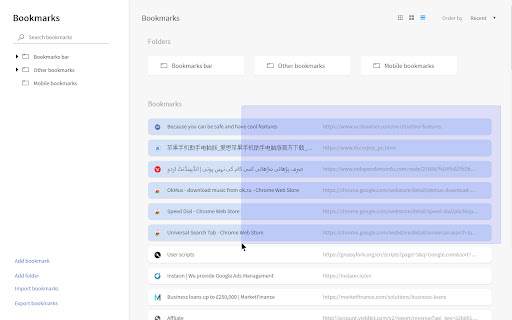


Scarica il file CRX dell'estensione Smart Bookmark Manager
Scarica i file di estensione Smart Bookmark Manager in formato crx, installa manualmente le estensioni di Chrome nel browser o condividi i file crx con gli amici per installare facilmente le estensioni di Chrome.
Istruzioni per l'Uso dell'Estensione
                        With Smart Bookmark Manager you can

- Short bookmarks by date and name
- Custom Bookmark search
- Arrange Bookmarks in Grid and list style
- Select multiple bookmarks with mouse cursor
- Open single or multi bookmarks in new tab, new windows or private window
- Import and export bookmarks
- edit, move, delete and copy bookmark’s URL

Upcoming features
- Display web shots in Grid style
- Display search suggestions

Please give suggestion in support so we improve this extension - Thanks
Informazioni di Base sull'Estensione
| Nome |  Smart Bookmark Manager Smart Bookmark Manager |
| ID | nfobeapoafofgmfaggcajmnfdjemfpno |
| URL Ufficiale | https://chromewebstore.google.com/detail/smart-bookmark-manager/nfobeapoafofgmfaggcajmnfdjemfpno |
| Descrizione | A better look at your browsers Bookmarks with advance searching and the most useful filters |
| Dimensione del File | 91.59 KB |
| Conteggio Installazioni | 1,629 |
| Versione Corrente | 1.0.0 |
| Ultimo Aggiornamento | 2019-11-24 |
| Data di Pubblicazione | 2019-11-19 |
| Valutazione | 4.32/5 Totale 25 Valutazioni |
| Sviluppatore | https://chromio.net |
| Tipo di Pagamento | free |
| Lingue Supportate | en |
| manifest.json | |
{
    "update_url": "https:\/\/clients2.google.com\/service\/update2\/crx",
    "manifest_version": 2,
    "name": "__MSG_extName__",
    "version": "1.0.0",
    "description": "__MSG_extDescription__",
    "icons": {
        "16": "icons\/icon-16.png",
        "32": "icons\/icon-32.png",
        "64": "icons\/icon-64.png",
        "128": "icons\/icon-128.png"
    },
    "default_locale": "en",
    "browser_action": {
        "default_icon": "icons\/icon-popup.png"
    },
    "background": {
        "scripts": [
            "js\/background.js"
        ]
    },
    "chrome_url_overrides": {
        "bookmarks": "bookmarks.html"
    },
    "permissions": [
        "bookmarks",
        "chrome:\/\/favicon\/"
    ]
} | |