Search Downloads
Manage your downloads through the Omnibox (search box). To start searching: type in search bar 'ds' then press 'tab'. Usage:…
Cos'è Search Downloads?
Search Downloads è un'estensione di Chrome sviluppata da Brian Chung, e la sua funzione principale è "Manage your downloads through the Omnibox (search box). To start searching: type in search bar 'ds' then press 'tab'. Usage:…".
Screenshot dell'Estensione
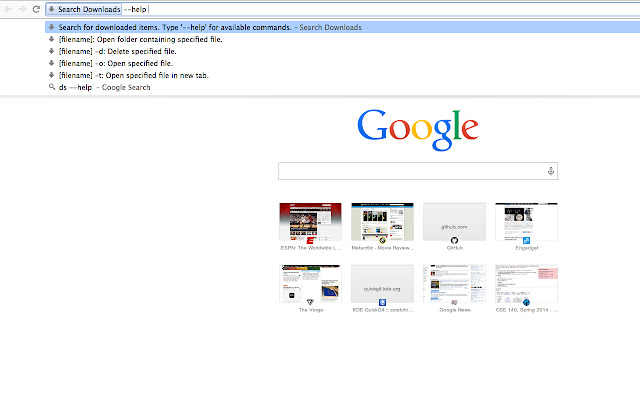
Scarica il file CRX dell'estensione Search Downloads
Scarica i file di estensione Search Downloads in formato crx, installa manualmente le estensioni di Chrome nel browser o condividi i file crx con gli amici per installare facilmente le estensioni di Chrome.
Istruzioni per l'Uso dell'Estensione
                        Manage your downloads through the Omnibox (search box).

To start searching: type in search bar 'ds' then press 'tab'.

Usage:

--help: Show all available arguments:
[filename]: Open folder containing specified file.
[filename] -d: Delete specified file.
[filename] -o: Open specified file.
[filename] -t: Open specified file in a new tab.

Find on Github: https://github.com/brianchung808/Chrome-Omnibox-Download-Management

Changelog:
v1.0.1: Remove notifications for opening files, folders, tabs. Fix parsing issues.
v1.0: init. release
Informazioni di Base sull'Estensione
| Nome |  Search Downloads Search Downloads |
| ID | obefkpoacckligmdblalmddagdkcncbf |
| URL Ufficiale | https://chrome.google.com/webstore/detail/search-downloads/obefkpoacckligmdblalmddagdkcncbf |
| Descrizione | Manage your downloads through the Omnibox (search box). To start searching: type in search bar 'ds' then press 'tab'. Usage:… |
| Dimensione del File | 7.01 KB |
| Conteggio Installazioni | 34 |
| Versione Corrente | 1.0.2 |
| Ultimo Aggiornamento | 2014-05-01 |
| Data di Pubblicazione | 2014-05-01 |
| Sviluppatore | Brian Chung |
| Tipo di Pagamento | free |
| Lingue Supportate | en |
| manifest.json | |
{
    "update_url": "https:\/\/clients2.google.com\/service\/update2\/crx",
    "manifest_version": 2,
    "name": "Search Downloads",
    "version": "1.0.2",
    "omnibox": {
        "keyword": "ds"
    },
    "icons": {
        "128": "icon128.png"
    },
    "background": {
        "persistent": false,
        "scripts": [
            "background.js"
        ]
    },
    "permissions": [
        "downloads",
        "downloads.open",
        "notifications",
        "tabs"
    ]
} | |