TradingView Watchlist Rotator
Rotate through each item in your TradingView watchlist of your choice in one tab per watchlist
Cos'è TradingView Watchlist Rotator?
TradingView Watchlist Rotator è un'estensione di Chrome sviluppata da Lightning Fast Coder, e la sua funzione principale è "Rotate through each item in your TradingView watchlist of your choice in one tab per watchlist".
Screenshot dell'Estensione
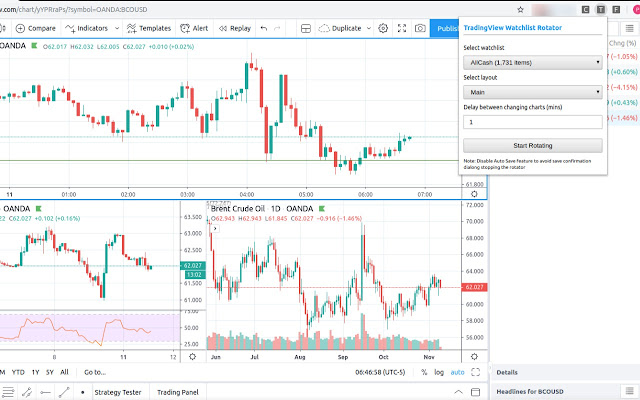
Scarica il file CRX dell'estensione TradingView Watchlist Rotator
Scarica i file di estensione TradingView Watchlist Rotator in formato crx, installa manualmente le estensioni di Chrome nel browser o condividi i file crx con gli amici per installare facilmente le estensioni di Chrome.
Istruzioni per l'Uso dell'Estensione
                        Create slideshow of stocks in your tradingview watchlist in a tab with custom duration to display each chart.
You can also select in which layout these charts should be shown.
Easy to use as it requires only 3 clicks
Watch the video for demo
Informazioni di Base sull'Estensione
| Nome |  TradingView Watchlist Rotator TradingView Watchlist Rotator |
| ID | oodmglmdhijlggmhghkcagfoceendlkc |
| URL Ufficiale | https://chrome.google.com/webstore/detail/oodmglmdhijlggmhghkcagfoceendlkc |
| Descrizione | Rotate through each item in your TradingView watchlist of your choice in one tab per watchlist |
| Dimensione del File | 46.28 KB |
| Conteggio Installazioni | 531 |
| Versione Corrente | 1.2.0 |
| Ultimo Aggiornamento | 2021-02-19 |
| Data di Pubblicazione | 2020-02-26 |
| Valutazione | 4.14/5 Totale 7 Valutazioni |
| Sviluppatore | Lightning Fast Coder |
| [email protected] | |
| Tipo di Pagamento | free |
| URL della Pagina della Politica sulla Privacy | https://gpzweb.com/privacy-policy |
| Lingue Supportate | en |
| manifest.json | |
{
    "update_url": "https:\/\/clients2.google.com\/service\/update2\/crx",
    "name": "TradingView Watchlist Rotator",
    "description": "Rotate through each item in your TradingView watchlist of your choice in one tab per watchlist",
    "version": "1.2.0",
    "manifest_version": 2,
    "permissions": [
        "tabs",
        "https:\/\/*.tradingview.com\/*"
    ],
    "browser_action": {
        "default_icon": "icon2.png",
        "default_popup": "\/html\/popup.html"
    },
    "icons": {
        "128": "icon.png"
    },
    "content_scripts": [
        {
            "js": [
                "\/js\/jquery-2.1.4.min.js",
                "\/js\/script.js"
            ],
            "run_at": "document_start",
            "matches": [
                "https:\/\/*.tradingview.com\/*"
            ]
        }
    ],
    "background": {
        "scripts": [
            "\/js\/jquery-2.1.4.min.js",
            "\/js\/bg.js"
        ]
    }
} | |