Flowster Capture: screenshots, training, SOPs
Automate screen capture & screenshots for training & standard operating procedure (SOP) workflows.
Cos'è Flowster Capture: screenshots, training, SOPs?
Flowster Capture: screenshots, training, SOPs è un'estensione di Chrome sviluppata da https://flowster.app, e la sua funzione principale è "Automate screen capture & screenshots for training & standard operating procedure (SOP) workflows.".
Screenshot dell'Estensione
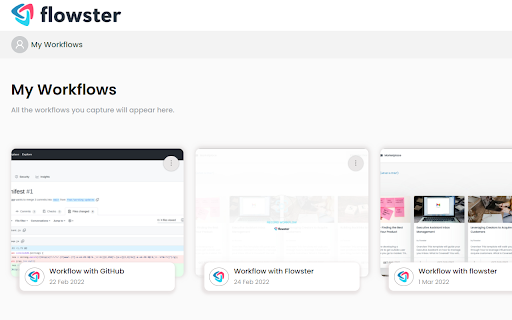


Scarica il file CRX dell'estensione Flowster Capture: screenshots, training, SOPs
Scarica i file di estensione Flowster Capture: screenshots, training, SOPs in formato crx, installa manualmente le estensioni di Chrome nel browser o condividi i file crx con gli amici per installare facilmente le estensioni di Chrome.
Istruzioni per l'Uso dell'Estensione
                        Note: this extension is currently in BETA. That means there could be some bugs, but there's an easy-to-use button to submit any questions or concerns to support :)

Are you looking for a super fast way to document your processes?

We have good news! With the Flowster Capture extension, creating your own fully-customized workflows has never been easier or faster.

Flowster Capture generates screenshots each time you click your mouse or use your keyboard. These screen grabs are more easily-editable than screen recordings, plus if you pair Flowster Capture with Flowster.app (optional), you can build out fully-functional templates and SOPs.

The Flowster Capture Chrome Extension is way less time-consuming than recording yourself talking over video, or taking screenshots and manually annotating them. Plus, by avoiding video-based screen recordings and workflows, you will also avoid the painful process of having to re-shoot or edit all your videos to keep them up-to-date.

Ready to speed up your business process creation? Start using Flowster Capture today!

Note: Flowster Capture does not require you to have a separate account at Flowster.app; however, if you do decide to get a free account at Flowster.app, you will unlock even more functionality and get access to hundreds of pre-made (fully customizable) workflow templates.
Informazioni di Base sull'Estensione
| Nome |  Flowster Capture: screenshots, training, SOPs Flowster Capture: screenshots, training, SOPs |
| ID | pdcecemoemegcljjfiojljdmbaleicmc |
| URL Ufficiale | https://chromewebstore.google.com/detail/flowster-capture-screensh/pdcecemoemegcljjfiojljdmbaleicmc |
| Descrizione | Automate screen capture & screenshots for training & standard operating procedure (SOP) workflows. |
| Dimensione del File | 192 KB |
| Conteggio Installazioni | 1,035 |
| Versione Corrente | 3.1.5 |
| Ultimo Aggiornamento | 2023-12-02 |
| Data di Pubblicazione | 2022-03-25 |
| Valutazione | 5.00/5 Totale 7 Valutazioni |
| Sviluppatore | https://flowster.app |
| [email protected] | |
| Tipo di Pagamento | free |
| Sito Web dell'Estensione | https://flowster.app/flowster-capture-chrome-extension/ |
| URL della Pagina di Aiuto | https://flowster.app/contact/ |
| URL della Pagina della Politica sulla Privacy | https://flowster.app/privacy-capture |
| Lingue Supportate | en-US |
| manifest.json | |
{
"update_url": "https:\/\/clients2.google.com\/service\/update2\/crx",
"name": "Flowster Capture: screenshots, training, SOPs",
"description": "Automate screen capture & screenshots for training & standard operating procedure (SOP) workflows.",
"version": "3.1.5",
"manifest_version": 3,
"icons": {
"16": "images\/icon.png",
"48": "images\/icon.png",
"128": "images\/icon.png"
},
"action": {
"default_popup": "popup.html",
"default_title": "Flowster Capture",
"default_icon": "images\/icon.png"
},
"web_accessible_resources": [
{
"resources": [
"*.html",
"*.css",
"*.svg",
"*.png",
"*.js"
],
"matches": [
" | |