Activate on Steam
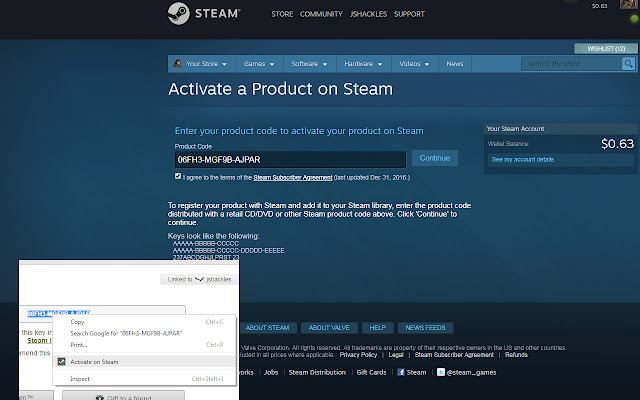
Adds a context menu to activate the selected text on Steam
Cos'è Activate on Steam?
Activate on Steam è un'estensione di Chrome sviluppata da jshackles, e la sua funzione principale è "Adds a context menu to activate the selected text on Steam".
Screenshot dell'Estensione
Scarica il file CRX dell'estensione Activate on Steam
Scarica i file di estensione Activate on Steam in formato crx, installa manualmente le estensioni di Chrome nel browser o condividi i file crx con gli amici per installare facilmente le estensioni di Chrome.
Istruzioni per l'Uso dell'Estensione
                        This simple Chrome extension will add a context menu when right clicking on selected text to activate as a Steam product.

This is useful for external sites that sell Steam keys and allows you to quickly and easily register your games on Steam without having to copy and paste or open the Steam client.

This extension is open source.  The source code can be found at https://github.com/jshackles/ActivateOnSteam
Informazioni di Base sull'Estensione
| Nome |  Activate on Steam Activate on Steam |
| ID | pofgpbehpaaadihajegaefaggfenhmpc |
| URL Ufficiale | https://chrome.google.com/webstore/detail/activate-on-steam/pofgpbehpaaadihajegaefaggfenhmpc |
| Descrizione | Adds a context menu to activate the selected text on Steam |
| Dimensione del File | 31.62 KB |
| Conteggio Installazioni | 2,000 |
| Versione Corrente | 0.1 |
| Ultimo Aggiornamento | 2017-09-01 |
| Data di Pubblicazione | 2017-09-01 |
| Valutazione | 4.33/5 Totale 39 Valutazioni |
| Sviluppatore | jshackles |
| Tipo di Pagamento | free |
| Lingue Supportate | en |
| manifest.json | |
{
"update_url": "https:\/\/clients2.google.com\/service\/update2\/crx",
"manifest_version": 2,
"name": "Activate on Steam",
"short_name": "ActivateOnSteam",
"description": "Adds a context menu to activate the selected text on Steam",
"version": "0.1",
"minimum_chrome_version": "38",
"permissions": [
"contextMenus",
"tabs"
],
"icons": {
"16": "img\/logo.png",
"32": "img\/logo_32.png",
"128": "img\/logo_128.png"
},
"background": {
"page": "background.html"
},
"content_scripts": [
{
"matches": [
" | |










![[DEPRECATED] Fanatical Assistant](https://lh3.googleusercontent.com/S4ydvehuCPsqcv9qq8j3WngnSIOvtYQdNHzR1keSA4ncEKk6Xr-BR21RtNCJ87s76kAR5gXdbyi5owXDjJGwEVahcQ)


