Tab Renamer for GmailTM
This extension re-names gmail tabs.
Cos'è Tab Renamer for GmailTM?
Tab Renamer for GmailTM è un'estensione di Chrome sviluppata da ks111777, e la sua funzione principale è "This extension re-names gmail tabs.".
Screenshot dell'Estensione
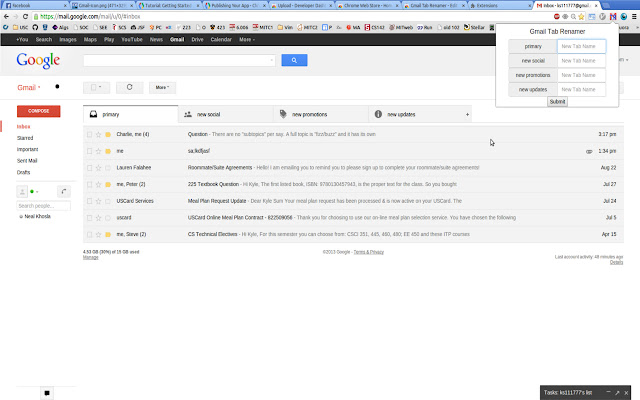
Scarica il file CRX dell'estensione Tab Renamer for GmailTM
Scarica i file di estensione Tab Renamer for GmailTM in formato crx, installa manualmente le estensioni di Chrome nel browser o condividi i file crx con gli amici per installare facilmente le estensioni di Chrome.
Istruzioni per l'Uso dell'Estensione
                        This extension allows you to re-name the tabs in your Gmail inbox.  As long as this extension is up and running in Chrome, your inputted tab names will be as well.

To use Tab Renamer, follow these simple steps:
1. Load the extension into chrome, making sure its icon is visible at the top right
2. If already open, refresh Gmail. Otherwise, open Gmail in a tab.
3. With the Gmail tab open on your screen, click on the Tab Renamer icon at the top right of Chrome, and enter your input.
4. Click submit and you're done!

Now as long as the Tab Renamer extension is active in Chrome, your chosen tabs will exist! (If you click on the popup and nothing appears, give it a few seconds and try clicking on it again)
Informazioni di Base sull'Estensione
| Nome |  Tab Renamer for GmailTM Tab Renamer for GmailTM |
| ID | pomanledljafeolobikkjkcccbddgjap |
| URL Ufficiale | https://chrome.google.com/webstore/detail/pomanledljafeolobikkjkcccbddgjap |
| Descrizione | This extension re-names gmail tabs. |
| Dimensione del File | 140 KB |
| Conteggio Installazioni | 58 |
| Versione Corrente | 4.0 |
| Ultimo Aggiornamento | 2013-08-30 |
| Data di Pubblicazione | 2013-08-30 |
| Valutazione | 2.38/5 Totale 8 Valutazioni |
| Sviluppatore | ks111777 |
| Tipo di Pagamento | free |
| Lingue Supportate | en-US |
| manifest.json | |
{
    "update_url": "https:\/\/clients2.google.com\/service\/update2\/crx",
    "manifest_version": 2,
    "name": "Tab Renamer for GmailTM",
    "description": "This extension re-names gmail tabs.",
    "version": "4.0",
    "permissions": [
        "https:\/\/mail.google.com\/mail\/u\/0\/#inbox",
        "pageCapture",
        "tabs",
        "activeTab",
        "storage",
        "https:\/\/*\/*"
    ],
    "browser_action": {
        "default_icon": "icon7.png",
        "default_popup": "popup.html"
    },
    "icons": {
        "128": "icon7.png",
        "16": "icon7.png",
        "48": "icon7.png"
    },
    "background": {
        "page": "background.html"
    },
    "content_scripts": [
        {
            "js": [
                "jquery.min.js",
                "jquery-ui.min.js",
                "bootstrap.min.css",
                "bootstrap.min.js"
            ],
            "matches": [
                "*:\/\/mail.google.com\/*"
            ]
        }
    ],
    "web_accessible_resources": [
        "parser.js"
    ]
} | |