Sign PDF (by PDFLite.co)
Sign PDF and add signatures, text, images, checkmarks. No uploads and no Internet required.
Sign PDF (by PDFLite.co)とは何ですか?
Sign PDF (by PDFLite.co)はhttp://pdflite.coによって開発されたChromeの拡張機能で、その主な機能は「Sign PDF and add signatures, text, images, checkmarks. No uploads and no Internet required.」です。
拡張機能のスクリーンショット


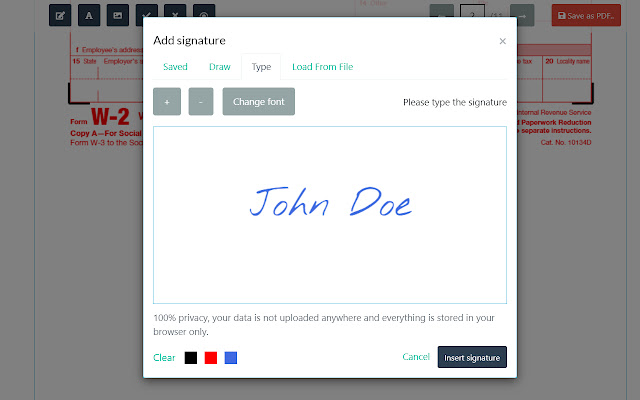
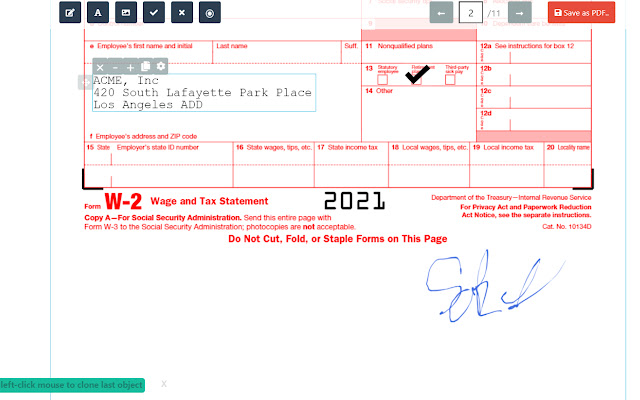

Sign PDF (by PDFLite.co)拡張機能のCRXファイルをダウンロード
Sign PDF (by PDFLite.co)拡張子のファイルをcrx形式でダウンロードし、ブラウザにChrome拡張機能を手動でインストールするか、crxファイルを友達と共有して簡単にChrome拡張機能をインストールします。
拡張機能の使用方法
                        Sign PDF and fill PDF forms. Works offline, no fee or signup. Provides 100% privacy for your files and documents.

Features:

- sign PDF, JPG, PNG documents
- draw and add signature to pdf
- fill in pdf forms with text, checkmarks, radioboxes
- add images on top of pdf from images
- add signature from scanned image
- multi-page pdfs are supported
- No subscription, no fee or no sign up is required
拡張機能の基本情報
| 名前 |  Sign PDF (by PDFLite.co) Sign PDF (by PDFLite.co) |
| ID | aaflpkccchobonghlbfdgjcegmeklcgg |
| 公式URL | https://chrome.google.com/webstore/detail/sign-pdf-by-pdfliteco/aaflpkccchobonghlbfdgjcegmeklcgg |
| 説明 | Sign PDF and add signatures, text, images, checkmarks. No uploads and no Internet required. |
| ファイルサイズ | 1.82 MB |
| インストール数 | 557 |
| 現在のバージョン | 1.0.3 |
| 最終更新日 | 2021-04-08 |
| 公開日 | 2021-04-08 |
| 評価 | 4.80/5 合計 5 レビュー |
| 開発者 | http://pdflite.co |
| Eメール | [email protected] |
| 支払い方法 | free |
| プライバシーポリシーページのURL | https://pdf.co/pages/legal/privacy |
| 対応言語 | en-US |
| manifest.json | |
{
    "update_url": "https:\/\/clients2.google.com\/service\/update2\/crx",
    "manifest_version": 2,
    "version": "1.0.3",
    "name": "Sign PDF (by PDFLite.co)",
    "description": "Sign PDF and add signatures, text, images, checkmarks. No uploads and no Internet required.",
    "author": "PDFLite.co",
    "short_name": "PDFLite.co",
    "icons": {
        "16": "assets\/favicon\/favicon-16x16.png",
        "32": "assets\/favicon\/favicon-32x32.png",
        "192": "assets\/favicon\/android-chrome-192x192.png",
        "256": "assets\/favicon\/android-chrome-256x256.png",
        "384": "assets\/favicon\/android-chrome-384x384.png"
    },
    "browser_action": {
        "default_icon": {
            "32": "assets\/favicon\/favicon-32x32.png"
        },
        "default_title": "Sign PDF (by PDFLite.co)",
        "default_popup": "popup.html"
    }
} | |