Ali-Scout
Find your ideal product!
Ali-Scoutとは何ですか?
Ali-Scoutはhttps://ali-scout.comによって開発されたChromeの拡張機能で、その主な機能は「Find your ideal product!」です。
拡張機能のスクリーンショット

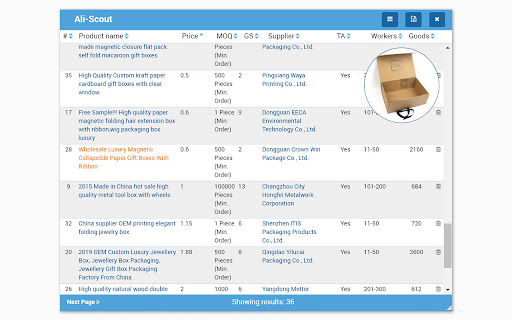
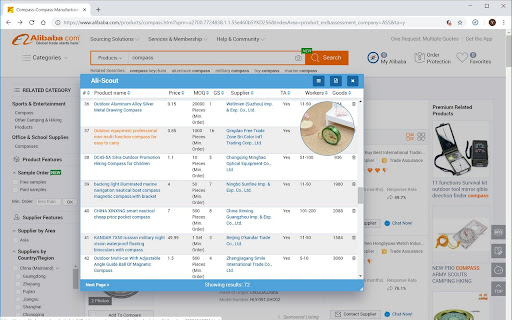
Ali-Scout拡張機能のCRXファイルをダウンロード
Ali-Scout拡張子のファイルをcrx形式でダウンロードし、ブラウザにChrome拡張機能を手動でインストールするか、crxファイルを友達と共有して簡単にChrome拡張機能をインストールします。
拡張機能の使用方法
                        Ali-Scout was created by online sellers for themselves, to automate the business model of buying and selling from Alibaba

Chrome Extension analysis of Alibaba suppliers and products

Ali-Scout enhances the quality of information and improves your chance of success and profitability
拡張機能の基本情報
| 名前 |  Ali-Scout Ali-Scout |
| ID | aeemhjkolnngmpmdlbdgimnohhhhdkbh |
| 公式URL | https://chromewebstore.google.com/detail/ali-scout/aeemhjkolnngmpmdlbdgimnohhhhdkbh |
| 説明 | Find your ideal product! |
| ファイルサイズ | 203 KB |
| インストール数 | 69 |
| 現在のバージョン | 0.16 |
| 最終更新日 | 2019-07-12 |
| 公開日 | 2019-07-12 |
| 開発者 | https://ali-scout.com |
| 支払い方法 | free |
| 拡張機能のウェブサイト | https://ali-scout.com/ |
| 対応言語 | en,ru |
| manifest.json | |
{
    "update_url": "https:\/\/clients2.google.com\/service\/update2\/crx",
    "name": "__MSG_appName__",
    "description": "__MSG_appDescription__",
    "homepage_url": "https:\/\/ali-scout.com",
    "default_locale": "en",
    "version": "0.16",
    "manifest_version": 2,
    "permissions": [
        "cookies",
        "activeTab",
        "declarativeContent",
        "https:\/\/*.alibaba.com\/",
        "http:\/\/*.alibaba.com\/"
    ],
    "background": {
        "scripts": [
            "background.js"
        ]
    },
    "page_action": {
        "default_icon": "icon128.png",
        "default_title": "AliScout"
    },
    "icons": {
        "16": "icon16.png",
        "48": "icon48.png",
        "128": "icon128.png"
    },
    "content_scripts": [
        {
            "matches": [
                "https:\/\/*.alibaba.com\/*"
            ],
            "js": [
                "jquery-3.3.1.min.js",
                "font-awesome.js",
                "content-script.js",
                "chunk-vendors.js",
                "app.js"
            ],
            "css": [
                "bundle.css",
                "style.css",
                "on-page-style.css"
            ],
            "run_at": "document_end"
        }
    ],
    "web_accessible_resources": [
        "icon128.png",
        "icon128-white.png"
    ]
} | |