BinoTools – OlympTrade Robot
The browser version of the BinoTools robot for the Olymp Trade platform
BinoTools – OlympTrade Robotとは何ですか?
BinoTools – OlympTrade Robotはhttp://binotools.comによって開発されたChromeの拡張機能で、その主な機能は「The browser version of the BinoTools robot for the Olymp Trade platform」です。
拡張機能のスクリーンショット


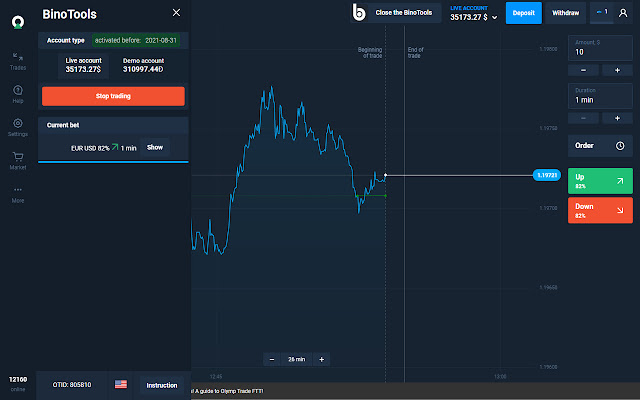

BinoTools – OlympTrade Robot拡張機能のCRXファイルをダウンロード
BinoTools – OlympTrade Robot拡張子のファイルをcrx形式でダウンロードし、ブラウザにChrome拡張機能を手動でインストールするか、crxファイルを友達と共有して簡単にChrome拡張機能をインストールします。
拡張機能の使用方法
                        BinoTools Robot is a professional tool that will allow you to automate trading processes on the OlymTrade binary options platform. Just set the required parameters and start the robot.

CHOOSE ONE OF UNIQUE STRATEGIES:
1. Aggressive - allows you to make money from each open deal, overriding the previous ones if they were unprofitable. This strategy allows you to earn a significant percentage of profits, but it has increased risks.
2. Conservative - this strategy is designed for calm trading and there are practically no risks of losing the deposit. Choose this strategy if you expect to earn 5% of your deposit per day and do not want to worry about the risks.

CONFIGURE ADDITIONAL OPTIONS:
1. Before trading on a live account, test BinoTools Robot on a demo account
2. Set the value of the initial option
3. Select a time interval (expiry time of each option)
4. Select the desired asset or let the robot automatically select it for you
5. Select the required strategy for each trading session
6. If necessary, enable the filter for limiting profit. The robot will stop automatically as soon as it reaches the specified amount.

If you still have questions about the functionality of BinoTools Robot, then you can refer to the built-in help section, where the possibilities are described in detail and recommendations for trading are provided.

We are constantly working to improve the robot and introduce new functionality. Your feedback and suggestions are important to us. If you want to use some additional functionality, write to, and perhaps we will implement it.

IMPORTANT! OlympTrade is closed for residents of some countries, in order to remove restrictions and trade in full, use any free VPN Proxy extension for Google Chrome.

* The BinoTools Robot extension is not controlled by OlympTrade and is an independent development of BonoTools Software.
拡張機能の基本情報
| 名前 |  BinoTools – OlympTrade Robot BinoTools – OlympTrade Robot |
| ID | afdndnglcgfbpkljoffaigdafhmfhack |
| 公式URL | https://chrome.google.com/webstore/detail/binotools-%E2%80%93-olymptrade-ro/afdndnglcgfbpkljoffaigdafhmfhack |
| 説明 | The browser version of the BinoTools robot for the Olymp Trade platform |
| ファイルサイズ | 509 KB |
| インストール数 | 352 |
| 現在のバージョン | 1.0.1 |
| 最終更新日 | 2020-09-02 |
| 公開日 | 2020-09-02 |
| 評価 | 5.00/5 合計 1 レビュー |
| 開発者 | http://binotools.com |
| Eメール | [email protected] |
| 支払い方法 | free |
| 拡張機能のウェブサイト | https://binotools.com |
| ヘルプページのURL | https://binotools.com#contact |
| プライバシーポリシーページのURL | https://binotools.com/policy |
| 対応言語 | id,ms,en-US,vi,tr,es,pt-BR,pt-PT,ru,uk,hi,th,zh-CN,zh-TW |
| manifest.json | |
{
    "update_url": "https:\/\/clients2.google.com\/service\/update2\/crx",
    "author": "BinoTools Software",
    "browser_action": {
        "default_popup": "popup.html",
        "default_title": "__MSG_title__"
    },
    "content_scripts": [
        {
            "css": [
                "css\/style.css",
                "css\/fontaw.css",
                "css\/sweetalert2.min.css",
                "css\/animate.css"
            ],
            "js": [
                "jquery.js",
                "lang.js",
                "main.js",
                "jquery.inputmask.bundle.js",
                "sweetalert2.min.js",
                "background.js"
            ],
            "matches": [
                "https:\/\/binotools.com\/*",
                "https:\/\/*.olymptrade.com\/*",
                "https:\/\/*.indonesia-olymptrade.com\/*",
                "https:\/\/*.tr-olymptrade.com\/*",
                "https:\/\/*.ina-olymptrade.com\/*"
            ],
            "run_at": "document_end"
        }
    ],
    "default_locale": "en_US",
    "description": "__MSG_desc__",
    "icons": {
        "128": "img\/icon-128.png",
        "16": "img\/icon-16.png",
        "48": "img\/icon-48.png",
        "64": "img\/icon-64.png"
    },
    "manifest_version": 2,
    "name": "__MSG_name__",
    "permissions": [
        "tabs",
        "activeTab",
        "storage",
        "cookies",
        "webNavigation",
        "webRequest",
        "https:\/\/binotools.com\/*",
        "https:\/\/*.olymptrade.com\/*",
        "https:\/\/*.indonesia-olymptrade.com\/*",
        "https:\/\/*.tr-olymptrade.com\/*",
        "https:\/\/*.ina-olymptrade.com\/*"
    ],
    "short_name": "__MSG_shortname__",
    "version": "1.0.1",
    "web_accessible_resources": [
        "img\/*"
    ]
} | |