YouTube URL Shortener
Shorten YouTube video URLs and share them on social media.
YouTube URL Shortenerとは何ですか?
YouTube URL Shortenerはhttps://ytmp3.nuによって開発されたChromeの拡張機能で、その主な機能は「Shorten YouTube video URLs and share them on social media.」です。
拡張機能のスクリーンショット

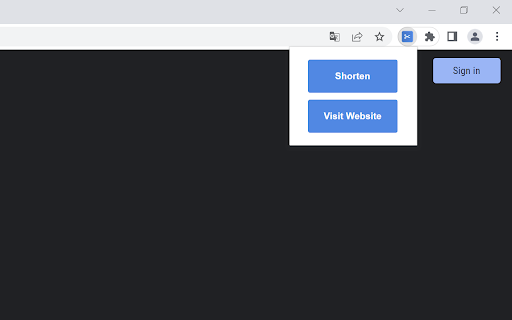
YouTube URL Shortener拡張機能のCRXファイルをダウンロード
YouTube URL Shortener拡張子のファイルをcrx形式でダウンロードし、ブラウザにChrome拡張機能を手動でインストールするか、crxファイルを友達と共有して簡単にChrome拡張機能をインストールします。
拡張機能の使用方法
The Add-On will add a new Icon to your browser toolbar. After installing the Add-On, just visit a YouTube video URL (example: youtube.com/watch?v=id or youtube.com/shorts/id) and click on the Add-On icon. A small PopUp will open and show you a "Shorten" button. With a click on that button you will be redirected to our website that will automatically shorten the YouTube video URL. You will get 2 URLs. The official short YouTube video URL (youtu.be/id) and an even shorter URL using our website yts.nu which will be valid for 48 hours, allowing you to share it on Facebook and Twitter with just a click. 拡張機能の基本情報
| 名前 |  YouTube URL Shortener YouTube URL Shortener |
| ID | afhogbpjeeoholecmgggidldmdjlgjbn |
| 公式URL | https://chromewebstore.google.com/detail/youtube-url-shortener/afhogbpjeeoholecmgggidldmdjlgjbn |
| 説明 | Shorten YouTube video URLs and share them on social media. |
| ファイルサイズ | 11.76 KB |
| インストール数 | 857 |
| 現在のバージョン | 1.1 |
| 最終更新日 | 2022-11-25 |
| 公開日 | 2022-11-21 |
| 開発者 | https://ytmp3.nu |
| Eメール | [email protected] |
| 支払い方法 | free |
| 拡張機能のウェブサイト | https://ytmp3.nu |
| ヘルプページのURL | https://ytmp3.nu/shortener/ |
| プライバシーポリシーページのURL | https://ytmp3.nu/privacy-policy |
| 対応言語 | en-US |
| manifest.json | |
{
    "update_url": "https:\/\/clients2.google.com\/service\/update2\/crx",
    "manifest_version": 3,
    "name": "YouTube URL Shortener",
    "description": "Shorten YouTube video URLs and share them on social media.",
    "version": "1.1",
    "icons": {
        "16": "\/icons\/16.png",
        "32": "\/icons\/32.png",
        "48": "\/icons\/48.png",
        "128": "\/icons\/128.png"
    },
    "action": {
        "default_title": "YouTube URL Shortener",
        "default_popup": "\/html\/popup.html",
        "default_icon": {
            "16": "\/icons\/16.png",
            "32": "\/icons\/32.png",
            "48": "\/icons\/48.png",
            "128": "\/icons\/128.png"
        }
    },
    "permissions": [
        "activeTab"
    ]
} | |