Vertical Tabs in Side Panel
Display and manage tabs vertically in the browser sidebar.
Vertical Tabs in Side Panelとは何ですか?
Vertical Tabs in Side Panelはhttps://guokai.devによって開発されたChromeの拡張機能で、その主な機能は「Display and manage tabs vertically in the browser sidebar.」です。
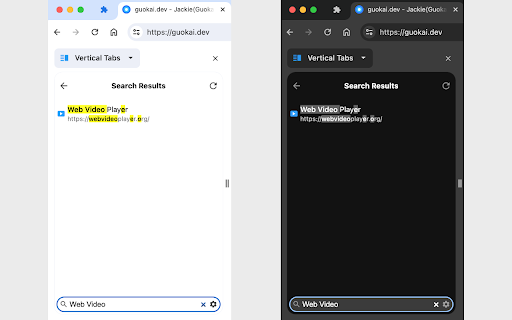
拡張機能のスクリーンショット


Vertical Tabs in Side Panel拡張機能のCRXファイルをダウンロード
Vertical Tabs in Side Panel拡張子のファイルをcrx形式でダウンロードし、ブラウザにChrome拡張機能を手動でインストールするか、crxファイルを友達と共有して簡単にChrome拡張機能をインストールします。
拡張機能の使用方法
                        This extension lets you display and manage tabs vertically in the browser sidebar, supports light and dark themes and search functionality.

2023/12/21 Update: Support Tab Groups, including collapse/expand a group, drag and drop a group and context menu (i.e. right-click) on a group.

Three Ways to Open the Extension Sidebar:
1. Click the Extension icon. You need to "Pin" the extension to the browser toolbar.
2. Use shortcut keys. Please set it at "chrome://extensions/shortcuts" by yourself, the default is Alt+V .
3. Click the browser sidebar icon and switch to this extension.

How to use the extension:
1. Single Click: switch to the tab.
2. Double Click: close the tab.
3. Middle Click: close the tab.
4. Right Click: functions such as closing, pinning, and duplicating the tab.
5. Drag and Drop: move the position of the tab.
6. Bottom Toolbar: search tabs.

Set the position of the sidebar: left or right:
Browser Settings → Appearance → Side panel

Note: This extension only supports Chrome 114 and above, and may not support other browsers.
拡張機能の基本情報
| 名前 |  Vertical Tabs in Side Panel Vertical Tabs in Side Panel |
| ID | akahnknmcbmgodngfjcflnaljdbhnlfo |
| 公式URL | https://chromewebstore.google.com/detail/vertical-tabs-in-side-pan/akahnknmcbmgodngfjcflnaljdbhnlfo |
| 説明 | Display and manage tabs vertically in the browser sidebar. |
| ファイルサイズ | 37.71 KB |
| インストール数 | 12,621 |
| 現在のバージョン | 1.0.2 |
| 最終更新日 | 2024-01-22 |
| 公開日 | 2023-06-08 |
| 評価 | 4.66/5 合計 82 レビュー |
| 開発者 | https://guokai.dev |
| Eメール | [email protected] |
| 支払い方法 | free |
| プライバシーポリシーページのURL | https://guokai.dev/privacy |
| 対応言語 | de,en,fr,es,pt-BR,pt-PT,zh-CN,zh-TW,ja |
| manifest.json | |
{
    "update_url": "https:\/\/clients2.google.com\/service\/update2\/crx",
    "name": "__MSG_extName__",
    "short_name": "__MSG_extShortName__",
    "description": "__MSG_extDescription__",
    "version": "1.0.2",
    "author": "Guokai Han",
    "manifest_version": 3,
    "default_locale": "en",
    "minimum_chrome_version": "114",
    "offline_enabled": true,
    "permissions": [
        "tabs",
        "tabGroups",
        "favicon",
        "storage",
        "sidePanel"
    ],
    "icons": {
        "128": "icon\/icon-128.png"
    },
    "action": {
        "default_title": "__MSG_actionTitle__"
    },
    "side_panel": {
        "default_path": "sidepanel.html"
    },
    "commands": {
        "_execute_action": {
            "suggested_key": {
                "default": "Alt+V"
            }
        }
    },
    "background": {
        "service_worker": "sw.js"
    }
} | |