DevTab
New tab extension that provides tools for front-end developers
DevTabとは何ですか?
DevTabはdtnによって開発されたChromeの拡張機能で、その主な機能は「New tab extension that provides tools for front-end developers」です。
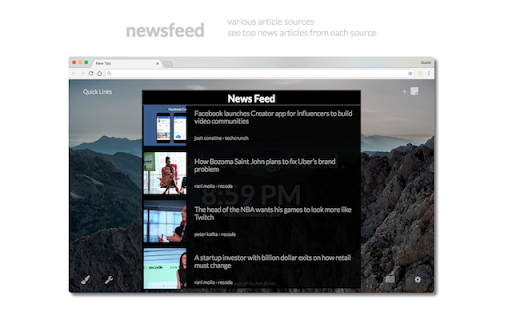
拡張機能のスクリーンショット


DevTab拡張機能のCRXファイルをダウンロード
DevTab拡張子のファイルをcrx形式でダウンロードし、ブラウザにChrome拡張機能を手動でインストールするか、crxファイルを友達と共有して簡単にChrome拡張機能をインストールします。
拡張機能の使用方法
                        DevTab replaces your new tab with a personalized, front-end developer focused home page to cater all your needs.

--- FEATURES ---
- Greeting based on local time of day with (username personalization)
- Pomodoro timer to optimize productivity
- Various backgrounds to view a beautiful image on each new tab
- Quicklinks to access frequently visited sites
- Sticky notes to store reminders, lists, etc.
- Color picker to access HEX, RGB, HSL color codes
- HTML/CSS code validators
- Page speed insights to test your website's performance
- Newsfeed with various article sources
- Settings for user customization/personalization

--- UPDATES ---
- Settings includes updates
- Sticky notes are re-sizable
- Timer has input option

--- BUG FIXES ---
- Quicklinks flicker
- Scroll on Mozilla pages
- Sticky note re-size icon above other elements
- Timer persists when out of focus

--- HELP/SUGGESTIONS & CONTACT ---
GitHub: https://github.com/chingu-coders/Voyage2-Turtles-02
Email: [email protected]
拡張機能の基本情報
| 名前 |  DevTab DevTab |
| ID | alolnmpdpmfhpcaljhaheeoedkfkganm |
| 公式URL | https://chromewebstore.google.com/detail/devtab/alolnmpdpmfhpcaljhaheeoedkfkganm |
| 説明 | New tab extension that provides tools for front-end developers |
| ファイルサイズ | 39.69 MB |
| インストール数 | 149 |
| 現在のバージョン | 1.1.4 |
| 最終更新日 | 2018-02-07 |
| 公開日 | 2018-02-07 |
| 評価 | 4.92/5 合計 13 レビュー |
| 開発者 | dtn |
| Eメール | [email protected] |
| 支払い方法 | free |
| 拡張機能のウェブサイト | https://github.com/chingu-coders/Voyage2-Turtles-02 |
| 対応言語 | en-US |
| manifest.json | |
{
    "update_url": "https:\/\/clients2.google.com\/service\/update2\/crx",
    "name": "DevTab",
    "description": "New tab extension that provides tools for front-end developers",
    "manifest_version": 2,
    "version": "1.1.4",
    "icons": {
        "128": "assets\/img\/devtab5.png"
    },
    "chrome_url_overrides": {
        "newtab": "index.html"
    },
    "browser_action": {
        "default_icon": "assets\/img\/devtab5.png"
    },
    "content_scripts": [
        {
            "matches": [
                "*:\/\/*.mozilla.org\/*"
            ],
            "js": [
                "js\/app.min.js"
            ],
            "css": [
                "css\/styles.css"
            ],
            "run_at": "document_idle"
        }
    ]
} | |