Zaposta Chrome Extension
Shop and Ship from over a thousand shops and have it delivered to you in Nigeria
Zaposta Chrome Extensionとは何ですか?
Zaposta Chrome Extensionはhttp://www.zaposta.comによって開発されたChromeの拡張機能で、その主な機能は「Shop and Ship from over a thousand shops and have it delivered to you in Nigeria」です。
拡張機能のスクリーンショット


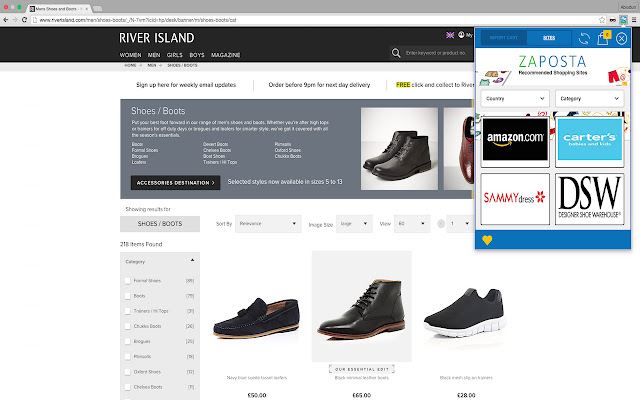

Zaposta Chrome Extension拡張機能のCRXファイルをダウンロード
Zaposta Chrome Extension拡張子のファイルをcrx形式でダウンロードし、ブラウザにChrome拡張機能を手動でインストールするか、crxファイルを友達と共有して簡単にChrome拡張機能をインストールします。
拡張機能の使用方法
An extension that automates making a shopping or shipping list on Zaposta.com. When users place orders or make shipment bookings on Zaposta.com, they can click on the extension to import their shopping cart from the international vendor website and recreate the list, including product images, on the Zaposta shopping cart. This removes the need to manually type and populate shopping cart list on the web application. 拡張機能の基本情報
| 名前 |  Zaposta Chrome Extension Zaposta Chrome Extension |
| ID | apfmmeplcfanojoeaphhkiigkjemoodm |
| 公式URL | https://chrome.google.com/webstore/detail/apfmmeplcfanojoeaphhkiigkjemoodm |
| 説明 | Shop and Ship from over a thousand shops and have it delivered to you in Nigeria |
| ファイルサイズ | 436 KB |
| インストール数 | 29 |
| 現在のバージョン | 1.0.2.3 |
| 最終更新日 | 2016-05-05 |
| 公開日 | 2016-05-05 |
| 評価 | 5.00/5 合計 2 レビュー |
| 開発者 | http://www.zaposta.com |
| 支払い方法 | free |
| 拡張機能のウェブサイト | http://www.zaposta.com |
| ヘルプページのURL | http://www.zaposta.com/faq |
| 対応言語 | en-GB |
| manifest.json | |
{
"update_url": "https:\/\/clients2.google.com\/service\/update2\/crx",
"name": "Zaposta Chrome Extension",
"short_name": "Zaposta",
"version": "1.0.2.3",
"manifest_version": 2,
"description": "Shop and Ship from over a thousand shops and have it delivered to you in Nigeria",
"icons": {
"16": "icons\/icon16.png",
"48": "icons\/icon48.png",
"128": "icons\/icon128.png"
},
"browser_action": {
"default_icon": "icons\/icon128.png",
"default_popup": "popup.html"
},
"web_accessible_resources": [
"img\/*"
],
"permissions": [
"tabs",
"storage",
" | |