Link Shortcuts
Access common urls by typing a shortcut name
Link Shortcutsとは何ですか?
Link Shortcutsはpminkovによって開発されたChromeの拡張機能で、その主な機能は「Access common urls by typing a shortcut name」です。
拡張機能のスクリーンショット
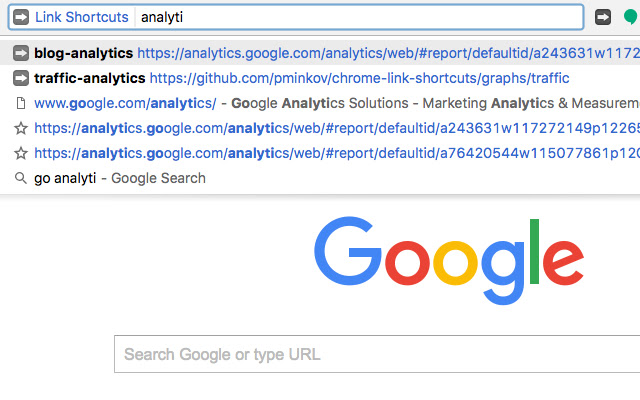
Link Shortcuts拡張機能のCRXファイルをダウンロード
Link Shortcuts拡張子のファイルをcrx形式でダウンロードし、ブラウザにChrome拡張機能を手動でインストールするか、crxファイルを友達と共有して簡単にChrome拡張機能をインストールします。
拡張機能の使用方法
                        No need to remember long web addresses or look through your bookmarks. Just associate a web page with a short name and go to the page by typing the short name.

Type the keyword "go", tab/space and start typing.

To add a new shortcut, click on the extension icon and add it in the menu.
拡張機能の基本情報
| 名前 |  Link Shortcuts Link Shortcuts |
| ID | bceohjonbodagliebplenbfjlapegaei |
| 公式URL | https://chrome.google.com/webstore/detail/link-shortcuts/bceohjonbodagliebplenbfjlapegaei |
| 説明 | Access common urls by typing a shortcut name |
| ファイルサイズ | 66.75 KB |
| インストール数 | 73 |
| 現在のバージョン | 1.0.9 |
| 最終更新日 | 2017-02-17 |
| 公開日 | 2017-02-17 |
| 評価 | 4.00/5 合計 4 レビュー |
| 開発者 | pminkov |
| 支払い方法 | free |
| 拡張機能のウェブサイト | https://github.com/pminkov/chrome-link-shortcuts |
| 対応言語 | en |
| manifest.json | |
{
"update_url": "https:\/\/clients2.google.com\/service\/update2\/crx",
"manifest_version": 2,
"name": "Link Shortcuts",
"description": "Access common urls by typing a shortcut name",
"version": "1.0.9",
"omnibox": {
"keyword": "go"
},
"browser_action": [],
"icons": {
"16": "icons\/Icons-03-16x16.png",
"48": "icons\/Icons-03-48x48.png",
"128": "icons\/Icons-03-128x128.png"
},
"background": {
"scripts": [
"message_names.js",
"bookmark_utils.js",
"dataset.js",
"background.js"
],
"persistent": false
},
"content_scripts": [
{
"matches": [
" | |