Send to Google Maps
Sends the current text selection with 1-Click to Google Maps.
Send to Google Mapsとは何ですか?
Send to Google MapsはSend To Mapsによって開発されたChromeの拡張機能で、その主な機能は「Sends the current text selection with 1-Click to Google Maps.」です。
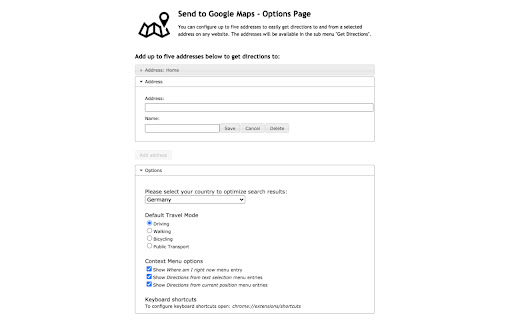
拡張機能のスクリーンショット


Send to Google Maps拡張機能のCRXファイルをダウンロード
Send to Google Maps拡張子のファイルをcrx形式でダウンロードし、ブラウザにChrome拡張機能を手動でインストールするか、crxファイルを友達と共有して簡単にChrome拡張機能をインストールします。
拡張機能の使用方法
                        This extension allows you to send a selected address on any website directly to Google Maps.

Therefore the extension adds an item to the Context Menu if text is selected. By right clicking on the selected text the context menu opens and you can choose between different options:

- Search for the selected text in Maps
- Show your current position in Maps
- If you need directions:
Just go to the options page and enter up to five favorite addresses. They will be available in the context menu to easily get directions.

Also, you can select company names, names of sights and a lot more on any webpage to get directions to. Just try it out! It's not limited to addresses only...
拡張機能の基本情報
| 名前 |  Send to Google Maps Send to Google Maps |
| ID | bhggankplfegmjjngfmhfajedmiikolo |
| 公式URL | https://chromewebstore.google.com/detail/send-to-google-maps/bhggankplfegmjjngfmhfajedmiikolo |
| 説明 | Sends the current text selection with 1-Click to Google Maps. |
| ファイルサイズ | 317 KB |
| インストール数 | 51,352 |
| 現在のバージョン | 4.3 |
| 最終更新日 | 2023-12-12 |
| 公開日 | 2018-01-29 |
| 評価 | 4.04/5 合計 146 レビュー |
| 開発者 | Send To Maps |
| Eメール | [email protected] |
| 支払い方法 | free |
| 対応言語 | en |
| manifest.json | |
{
"update_url": "https:\/\/clients2.google.com\/service\/update2\/crx",
"name": "Send to Google Maps",
"version": "4.3",
"manifest_version": 3,
"description": "Sends the current text selection with 1-Click to Google Maps.",
"icons": {
"16": "img\/icon16.png",
"48": "img\/icon48.png",
"128": "img\/icon128.png"
},
"options_page": "options_new.html",
"background": {
"service_worker": "background-worker.js"
},
"content_scripts": [
{
"run_at": "document_start",
"matches": [
" | |