Security Tweaks
Improve your online security with few tweaks via toolbar popup!
Security Tweaksとは何ですか?
Security Tweaksはlooraによって開発されたChromeの拡張機能で、その主な機能は「Improve your online security with few tweaks via toolbar popup!」です。
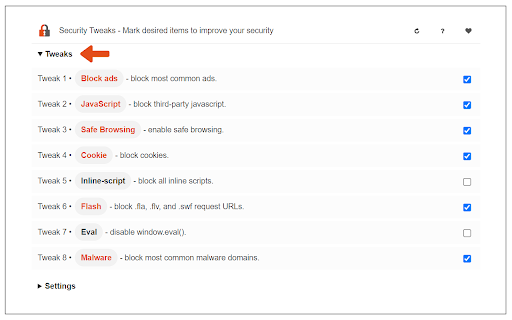
拡張機能のスクリーンショット

Security Tweaks拡張機能のCRXファイルをダウンロード
Security Tweaks拡張子のファイルをcrx形式でダウンロードし、ブラウザにChrome拡張機能を手動でインストールするか、crxファイルを友達と共有して簡単にChrome拡張機能をインストールします。
拡張機能の使用方法
                        Security Tweaks is an extension that helps you improve your security while browsing by using eight different techniques.

Simply open toolbar popup UI and mark a desired tweak. Please note that, only few tweaks are selected by default. There are few settings (related to JavaScript, inline-script and cookie) available in toolbar popup to adjust.

Currently there are 8 tweaks available for this add-on:
1. Block most common ads.
2. Block third-party JavaScript.
3. Enable safe-browsing.
4. Block cookies.
5. Block inline-script.
6. Block Flash contents.
7. Disable window.eval().
8. Block most common malware URLs.

Note 1: I have made this extension with Yubi's collaboration. This add-on is inspired by Speed Tweaks made by Yubi: https://chrome.google.com/webstore/detail/speed-tweaks/afebilemcaepdkmhmibgmnpfppnjimjf

Note 2: to report bugs, please fill the bug report form in the addon's homepage (https://mybrowseraddon.com/security-tweaks.html).
拡張機能の基本情報
| 名前 |  Security Tweaks Security Tweaks |
| ID | cbfhjbllealmkfknkpfmpkpljmlcjpjl |
| 公式URL | https://chromewebstore.google.com/detail/security-tweaks/cbfhjbllealmkfknkpfmpkpljmlcjpjl |
| 説明 | Improve your online security with few tweaks via toolbar popup! |
| ファイルサイズ | 3.07 MB |
| インストール数 | 903 |
| 現在のバージョン | 0.1.6 |
| 最終更新日 | 2024-02-20 |
| 公開日 | 2018-10-17 |
| 評価 | 4.67/5 合計 3 レビュー |
| 開発者 | loora |
| Eメール | [email protected] |
| 支払い方法 | free |
| 拡張機能のウェブサイト | https://mybrowseraddon.com/security-tweaks.html |
| ヘルプページのURL | https://mybrowseraddon.com/security-tweaks.html |
| プライバシーポリシーページのURL | https://mybrowseraddon.com/privacy-policy/security-tweaks.html |
| 対応言語 | en |
| manifest.json | |
{
    "update_url": "https:\/\/clients2.google.com\/service\/update2\/crx",
    "version": "0.1.6",
    "manifest_version": 3,
    "name": "Security Tweaks",
    "host_permissions": [
        "*:\/\/*\/*"
    ],
    "homepage_url": "https:\/\/mybrowseraddon.com\/security-tweaks.html",
    "description": "Improve your online security with few tweaks via toolbar popup!",
    "commands": {
        "_execute_action": []
    },
    "background": {
        "service_worker": "background.js"
    },
    "permissions": [
        "storage",
        "privacy",
        "notifications",
        "contentSettings",
        "declarativeNetRequest"
    ],
    "web_accessible_resources": [
        {
            "matches": [
                "*:\/\/*\/*"
            ],
            "resources": [
                "data\/content_script\/tweaks\/eval.js"
            ]
        }
    ],
    "action": {
        "default_title": "Security Tweaks",
        "default_popup": "data\/popup\/popup.html",
        "default_icon": {
            "16": "data\/icons\/16.png",
            "32": "data\/icons\/32.png",
            "48": "data\/icons\/48.png",
            "64": "data\/icons\/64.png"
        }
    },
    "content_scripts": [
        {
            "all_frames": true,
            "matches": [
                "*:\/\/*\/*"
            ],
            "run_at": "document_start",
            "js": [
                "data\/content_script\/inject.js",
                "data\/content_script\/tweaks\/eval.js"
            ]
        }
    ],
    "icons": {
        "16": "data\/icons\/16.png",
        "32": "data\/icons\/32.png",
        "48": "data\/icons\/48.png",
        "64": "data\/icons\/64.png",
        "128": "data\/icons\/128.png"
    }
} | |