Kurety Encryption Decryption
This extension can encrypt and decrypt using Kurety technology
Kurety Encryption Decryptionとは何ですか?
Kurety Encryption Decryptionはhttp://kuretysoft.comによって開発されたChromeの拡張機能で、その主な機能は「This extension can encrypt and decrypt using Kurety technology」です。
拡張機能のスクリーンショット


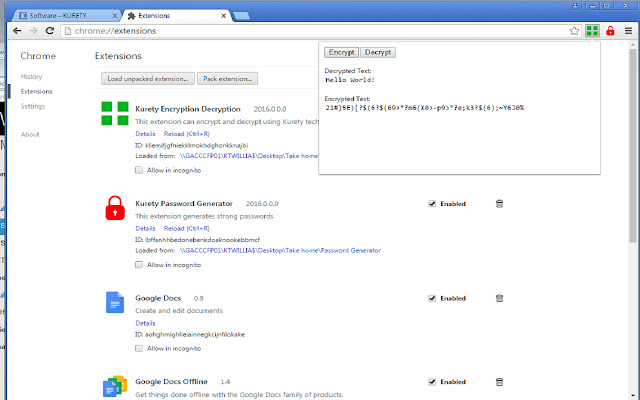

Kurety Encryption Decryption拡張機能のCRXファイルをダウンロード
Kurety Encryption Decryption拡張子のファイルをcrx形式でダウンロードし、ブラウザにChrome拡張機能を手動でインストールするか、crxファイルを友達と共有して簡単にChrome拡張機能をインストールします。
拡張機能の使用方法
                        Our vision is to supply market leading technology that offers a simple solution to cyber-security.

We do not just develop software, we offer an innovative solution to protecting your business and personal data, eliminating stress whilst keeping your information secure.

Kurety Encryption Decryption (KED) is a must have extension.  KED is an encryption/decryption software available as a Chrome extension.  KED encrypts and decrypts typed and received messages for SECURE and CONFIDENTIAL communication online and off-line.

KED can be used for top secret B2B electronic communication protecting emails and files.

KED is for everyone!  Personal or business will benefit in feeling confident that they can choose to keep safe information when it matters most.  Feel confident to send:

Business Proposals
Contracts
Credit card information
Social Security Numbers
Passwords
Bank account numbers

Anything text or numerical can be encrypted and decrypted safely and securely right before your eyes and with the Hot Key Script running keystrokes are undetectable.

Customize your Kurety Encryption Decryption software for your unique business need.  You will have your very own encryption language to insure the security of electronic communication, password protected files, and network security access.

No longer waste money using password managers online when you can use the power of Kurety Encryption Decryption to create your own.  No more subscription fees and you can even use the same password that you remember with it being encrypted.  Look out for a video to explain how.

Don't hesitate! Buy Kurety Encryption Decryption Now!

Don't forget to download the KAHKS from www.kuretysoft.com.  This is the glue to Kurety Software Suite and protects you when you need it from those hackers wanting to record your keystrokes using keylogger software.  Nothing better than added layers of protection.
拡張機能の基本情報
| 名前 |  Kurety Encryption Decryption Kurety Encryption Decryption |
| ID | cfblhhdpabccjphhgdppdnokceilghgc |
| 公式URL | https://chrome.google.com/webstore/detail/kurety-encryption-decrypt/cfblhhdpabccjphhgdppdnokceilghgc |
| 説明 | This extension can encrypt and decrypt using Kurety technology |
| ファイルサイズ | 87.5 KB |
| インストール数 | 37 |
| 現在のバージョン | 2016.0.0.2 |
| 最終更新日 | 2019-07-16 |
| 公開日 | 2019-07-16 |
| 評価 | 4.00/5 合計 4 レビュー |
| 開発者 | http://kuretysoft.com |
| Eメール | [email protected] |
| 支払い方法 | in_store |
| 拡張機能のウェブサイト | http://sekurety7.wixsite.com/kuretysoft |
| 対応言語 | en-US |
| manifest.json | |
{
    "update_url": "https:\/\/clients2.google.com\/service\/update2\/crx",
    "manifest_version": 2,
    "minimum_chrome_version": "29",
    "name": "Kurety Encryption Decryption",
    "description": "This extension can encrypt and decrypt using Kurety technology",
    "version": "2016.0.0.2",
    "oauth2": {
        "client_id": "854867491481-ll7rkejusijq7cus9qmbrdkq2kbccnm6.apps.googleusercontent.com",
        "scopes": [
            "https:\/\/www.googleapis.com\/auth\/chromewebstore.readonly"
        ]
    },
    "icons": {
        "48": "images\/icon-48.png",
        "128": "images\/icon-128.png"
    },
    "key": "MIIBIjANBgkqhkiG9w0BAQEFAAOCAQ8AMIIBCgKCAQEAl8YamI8UPnUsqz4mKnyYmXgiEHJhQzJjpyRr1VIKBWVqjLXxWZHI3KU1hZzzV6NmbxyvX4XlMquEsP\/RAW1kuzoAbDkUD5igQnTTYacPJnlAhJEB\/SV8303yaYMMcXtJWaoq\/DNrzOG6CIvRsRkwHWEJHc4jJOLjvLH\/\/SVnEz4tGJQaOOcdWOIbarqpd0U7AslJ10EdLn1LXpNsw6QlcDlqwulTq\/9oX4h6EZZx8GroLt1LwhZL\/hN8hkvoQrMVKxk2kkuspdGjHzBD8HhiZZuxDsPpjOh4WUUWVfp+\/eSbQKG7jzfaLYPljeU02+bgSYv0SQGs\/3\/e8YsurI\/cmwIDAQAB",
    "browser_action": {
        "default_title": "Kurety Encryption Decryption",
        "default_icon": "images\/icon-19.png",
        "default_popup": "popup.html"
    },
    "permissions": [
        "tabs",
        "identity",
        "https:\/\/www.googleapis.com\/"
    ]
} | |