any-color
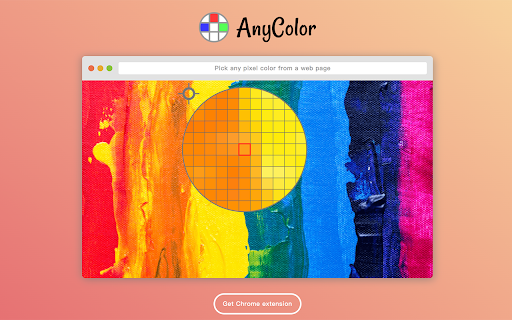
Pick any pixel color from a web page
any-colorとは何ですか?
any-colorはhttps://hankchiu.twによって開発されたChromeの拡張機能で、その主な機能は「Pick any pixel color from a web page」です。
拡張機能のスクリーンショット
any-color拡張機能のCRXファイルをダウンロード
any-color拡張子のファイルをcrx形式でダウンロードし、ブラウザにChrome拡張機能を手動でインストールするか、crxファイルを友達と共有して簡単にChrome拡張機能をインストールします。
拡張機能の使用方法
                        A chrome extension let you pick up any pixel color from a web page.

- Inspired from chrome devtool's color picker.
- Toggle the color inspector by Alt+Shift+A.
- Turn off the color inspector by ESC.
- Click and copy the color hex.

## Why?
Most of the color picker extensions have these drawbacks:
- Most of them are aimed at picking DOM colors. Can not pick image colors.
- Not efficient when I only want to pick colors.

## How to use
Install the extension and toggle the color inspector by Alt+Shift+A. That's it.

## How it works
Mainly it uses [captureVisibleTab](https://developer.chrome.com/extensions/tabs#method-captureVisibleTab) API to the take the page screenshot. The image data is rasterized and pixel colors are ready to use.

## License
[ Apache2 License ](LICENSE) © [hankchiu.tw](https://hankchiu.tw)
拡張機能の基本情報
| 名前 |  any-color any-color |
| ID | cmehpadapglhhambdiafddpfjdngonba |
| 公式URL | https://chromewebstore.google.com/detail/any-color/cmehpadapglhhambdiafddpfjdngonba |
| 説明 | Pick any pixel color from a web page |
| ファイルサイズ | 227 KB |
| インストール数 | 168 |
| 現在のバージョン | 0.3.0 |
| 最終更新日 | 2020-11-25 |
| 公開日 | 2020-06-23 |
| 評価 | 5.00/5 合計 1 レビュー |
| 開発者 | https://hankchiu.tw |
| Eメール | [email protected] |
| 支払い方法 | free |
| 拡張機能のウェブサイト | https://any-color.vercel.app |
| 対応言語 | en-US |
| manifest.json | |
{
    "update_url": "https:\/\/clients2.google.com\/service\/update2\/crx",
    "name": "any-color",
    "short_name": "AnyColor",
    "version": "0.3.0",
    "manifest_version": 2,
    "description": "Pick any pixel color from a web page",
    "homepage_url": "https:\/\/github.com\/hankchiutw\/any-color",
    "icons": {
        "16": "assets\/icon16.png",
        "48": "assets\/icon48.png",
        "128": "assets\/icon128.png"
    },
    "background": {
        "scripts": [
            "main.js"
        ],
        "persistent": false
    },
    "browser_action": {
        "default_title": "Click or press Alt+Shift+A to launch AnyColor",
        "name": "Click to launch AnyColor"
    },
    "permissions": [
        "activeTab"
    ],
    "commands": {
        "_execute_browser_action": {
            "suggested_key": {
                "default": "Alt+Shift+A",
                "mac": "Alt+Shift+A"
            },
            "description": "Toggle AnyColor"
        }
    },
    "web_accessible_resources": [
        "assets\/*"
    ]
} | |





![redd.AT - an [A]wesome [T]heme for reddit](https://lh3.googleusercontent.com/sPtma8dqc4jUEpdaHgAoUCH-TGNebKS1_MIGinMfi5566q3hdj-C9vYk6yleQHDROYYdvuyuRBozvHA-AxYNh2h-Ww)