Xtreme Download Manager
XDM is an open source download manager
Xtreme Download Managerとは何ですか?
Xtreme Download Managerはhttps://subhra74.github.io/xdmによって開発されたChromeの拡張機能で、その主な機能は「XDM is an open source download manager」です。
拡張機能のスクリーンショット
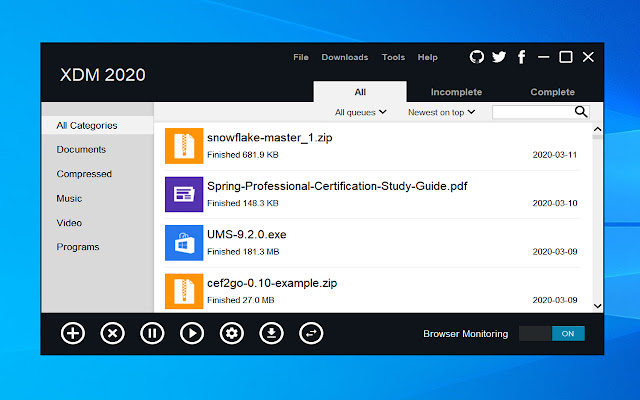


Xtreme Download Manager拡張機能のCRXファイルをダウンロード
Xtreme Download Manager拡張子のファイルをcrx形式でダウンロードし、ブラウザにChrome拡張機能を手動でインストールするか、crxファイルを友達と共有して簡単にChrome拡張機能をインストールします。
拡張機能の使用方法
                        Xtreme Download Manager Integration extension replaces default download manager of Google Chrome by Xtreme Download Manager.

This extension is just a companion for Xtreme download manager desktop application, which must already be installed first. It can be downloaded from: https://github.com/subhra74/xdm

The sole purpose of this extension is integration with Xtreme Download Manager desktop application.

Xtreme Download Manager is a fast and reliable download manager and accelerator that improves your experience with downloads and helps you organize them in an easy manner.

Please report any Issues here:
https://github.com/subhra74/xdm/issues

For more info & usage visit:
https://github.com/subhra74/xdm
https://sourceforge.net/projects/xdman/
https://subhra74.github.io/xdm/
拡張機能の基本情報
| 名前 |  Xtreme Download Manager Xtreme Download Manager |
| ID | dkckaoghoiffdbomfbbodbbgmhjblecj |
| 公式URL | https://chrome.google.com/webstore/detail/xtreme-download-manager/dkckaoghoiffdbomfbbodbbgmhjblecj |
| 説明 | XDM is an open source download manager |
| ファイルサイズ | 50.71 KB |
| インストール数 | 300,000 |
| 現在のバージョン | 2.1 |
| 最終更新日 | 2020-05-30 |
| 公開日 | 2020-05-28 |
| 評価 | 4.29/5 合計 194 レビュー |
| 開発者 | https://subhra74.github.io/xdm |
| Eメール | [email protected] |
| 支払い方法 | free |
| 拡張機能のウェブサイト | https://github.com/subhra74/xdm |
| ヘルプページのURL | https://subhra74.github.io/xdm/privacy.html |
| プライバシーポリシーページのURL | https://subhra74.github.io/xdm/privacy.html |
| 対応言語 | en |
| manifest.json | |
{
    "update_url": "https:\/\/clients2.google.com\/service\/update2\/crx",
    "manifest_version": 2,
    "minimum_chrome_version": "18.0",
    "name": "Xtreme Download Manager",
    "description": "XDM is an open source download manager",
    "version": "2.1",
    "icons": {
        "48": "icon.png",
        "128": "icon-128.png"
    },
    "background": {
        "page": "background.html"
    },
    "browser_action": {
        "default_icon": "icon.png"
    },
    "permissions": [
        "activeTab",
        "cookies",
        "contextMenus",
        "webRequest",
        "webRequestBlocking",
        "*:\/\/*\/*"
    ],
    "commands": {
        "toggle-monitoring": {
            "suggested_key": {
                "default": "Ctrl+Shift+E",
                "mac": "Command+Shift+E"
            },
            "description": "Toggle monitoring"
        }
    }
} | |