Define
Get the definition/synonym of any word in a webpage.
Defineとは何ですか?
Defineはlerxstによって開発されたChromeの拡張機能で、その主な機能は「Get the definition/synonym of any word in a webpage.」です。
拡張機能のスクリーンショット

Define拡張機能のCRXファイルをダウンロード
Define拡張子のファイルをcrx形式でダウンロードし、ブラウザにChrome拡張機能を手動でインストールするか、crxファイルを友達と共有して簡単にChrome拡張機能をインストールします。
拡張機能の使用方法
                        v2.0.1
**Google dictionary error fixed**

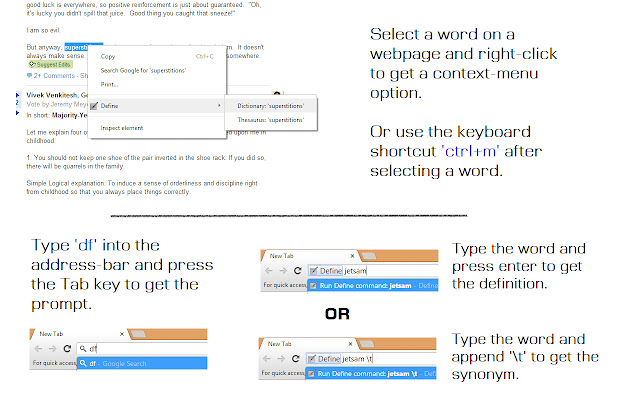
• Select any word on a webpage and see its definition or its synonym by using the context-menu option.
The definition can also be viewed using the key combination 'Ctrl+m' after selecting a word.

•You can also type in the word you want to look-up by using Chrome's omnibox.

**Using the OMNIBOX**
To use Chrome's address bar for a quick search, type 'df' (without quotes) and press 'Tab' to get the prompt. Type in the search word and press enter.
To look the word up in a thesaurus, append the search word with '\t' (without quotes).

Choose from 5 online dictionaries -
• Google
• Merriam-Webster
• Collins
• The Free Dictionary

and 3 online thesauruses -
• Thesaurus.com
• Merriam-Webster
• Collins

The dictionary/thesaurus to be used can be selected from the Options page of the extension (Tools -> Extensions).
拡張機能の基本情報
| 名前 |  Define Define |
| ID | dkfohljnogkakijpbgoebdcbgllabgbm |
| 公式URL | https://chrome.google.com/webstore/detail/define/dkfohljnogkakijpbgoebdcbgllabgbm |
| 説明 | Get the definition/synonym of any word in a webpage. |
| ファイルサイズ | 248 KB |
| インストール数 | 1,000 |
| 現在のバージョン | 2.0.1 |
| 最終更新日 | 2013-12-28 |
| 公開日 | 2013-12-28 |
| 評価 | 3.88/5 合計 32 レビュー |
| 開発者 | lerxst |
| Eメール | [email protected] |
| 支払い方法 | free |
| 対応言語 | en |
| manifest.json | |
{
"update_url": "http:\/\/clients2.google.com\/service\/update2\/crx",
"manifest_version": 2,
"name": "Define",
"version": "2.0.1",
"options_page": "options.html",
"description": "Get the definition\/synonym of any word in a webpage.",
"background": {
"scripts": [
"background.js"
],
"persistent": true
},
"omnibox": {
"keyword": "df"
},
"permissions": [
"contextMenus",
"tabs"
],
"icons": {
"16": "icon16.png",
"48": "icon48.png",
"64": "icon64.png",
"128": "icon128.png"
},
"content_scripts": [
{
"matches": [
" | |