TaxAdda PMS Login
TaxAdda PMS Login Extension allows CA and Tax Professionals to login into Client's Accounts in GST and Income Tax Portals.
TaxAdda PMS Loginとは何ですか?
TaxAdda PMS Loginはhttps://taxadda.comによって開発されたChromeの拡張機能で、その主な機能は「TaxAdda PMS Login Extension allows CA and Tax Professionals to login into Client's Accounts in GST and Income Tax Portals.」です。
拡張機能のスクリーンショット


TaxAdda PMS Login拡張機能のCRXファイルをダウンロード
TaxAdda PMS Login拡張子のファイルをcrx形式でダウンロードし、ブラウザにChrome拡張機能を手動でインストールするか、crxファイルを友達と共有して簡単にChrome拡張機能をインストールします。
拡張機能の使用方法
                        This extension enables CA & Tax practitioners to login in their client's GST or Income tax portals with one click. When you login in GST or IT portal with new username then it gives option to save such client. When you use already existing username but new password then it automatically updates password. Auto-sync between multiple computers.

You has to subscribe to either TaxAdda Login Tool or TaxAdda PMS.

TaxAdda Login Tool is specifically made to facilitate the login in GST and Income Tax portals. Know more at https://taxadda.com/gst-income-tax-login-tool/

This extension is also available for TaxAdda PMS users. TaxAdda PMS is a full fledged practice management software for Chartered Accountants and Tax Professionals. Subscribers of TaxAdda PMS can also use this extensions for login in client's account. Know more at https://taxadda.com/practice-management-software-for-ca-tax-professionals/

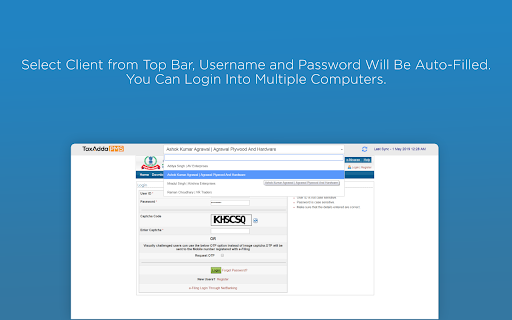
After installing this extension, you will get a small bar at top on GST and Income Tax login pages. You just need to select the client and client's username and password will be auto-filled. So you need not type it every time.

TaxAdda PMS has the following features:-

1) Just enter GSTIN and all details such as Client Name, Trade Name, Registration Date etc will be fetched from GSTN.

2) Get return status of a client in one click directly from GSTN.

3) Create return task of all clients in one click.

4) See task status of all clients in one page. Just like excel but with a much better interface and tracking.
拡張機能の基本情報
| 名前 |  TaxAdda PMS Login TaxAdda PMS Login |
| ID | efebjdlhfmhgfinbomaklemolefmemap |
| 公式URL | https://chromewebstore.google.com/detail/taxadda-pms-login/efebjdlhfmhgfinbomaklemolefmemap |
| 説明 | TaxAdda PMS Login Extension allows CA and Tax Professionals to login into Client's Accounts in GST and Income Tax Portals. |
| ファイルサイズ | 947 KB |
| インストール数 | 2,683 |
| 現在のバージョン | 7.0.7 |
| 最終更新日 | 2023-04-28 |
| 公開日 | 2020-07-02 |
| 評価 | 5.00/5 合計 5 レビュー |
| 開発者 | https://taxadda.com |
| Eメール | [email protected] |
| 支払い方法 | free |
| 拡張機能のウェブサイト | https://pms.taxadda.com/ |
| ヘルプページのURL | https://pms.taxadda.com/support |
| プライバシーポリシーページのURL | https://taxadda.com/privacy-policy |
| 対応言語 | en |
| manifest.json | |
{
    "update_url": "https:\/\/clients2.google.com\/service\/update2\/crx",
    "name": "__MSG_appName__",
    "short_name": "__MSG_appShortName__",
    "description": "__MSG_appDescription__",
    "version": "7.0.7",
    "manifest_version": 2,
    "default_locale": "en",
    "icons": {
        "16": "images\/icon-16.png",
        "128": "images\/icon-128.png"
    },
    "background": {
        "scripts": [
            "libs\/jquery.js",
            "libs\/crypto-js.min.js",
            "scripts\/config.js",
            "scripts\/background.js"
        ]
    },
    "browser_action": {
        "default_icon": {
            "19": "images\/icon-19.png",
            "38": "images\/icon-38.png"
        },
        "default_title": "__MSG_browserActionTitle__",
        "default_popup": "pages\/popup.html"
    },
    "content_scripts": [
        {
            "matches": [
                "https:\/\/services.gst.gov.in\/services\/login",
                "https:\/\/services.gst.gov.in\/services\/forgotpassword",
                "https:\/\/services.gst.gov.in\/services\/auth\/changepassword",
                "https:\/\/services.gst.gov.in\/services\/auth\/fowelcome"
            ],
            "css": [
                "styles\/style-gst.css"
            ],
            "run_at": "document_end",
            "all_frames": false
        },
        {
            "matches": [
                "https:\/\/portal.incometaxindiaefiling.gov.in\/e-Filing\/UserLogin\/Login**",
                "https:\/\/lite.incometaxindiaefiling.gov.in\/e-Filing\/UserLogin\/Login**",
                "https:\/\/www1.incometaxindiaefiling.gov.in\/e-FilingGS\/ResetPassword**",
                "https:\/\/portal.incometaxindiaefiling.gov.in\/e-Filing\/MyAccount\/ChangePasswordLink**",
                "https:\/\/portal.incometaxindiaefiling.gov.in\/e-Filing\/MyAccount\/MyAccountHome**",
                "https:\/\/portal.incometaxindiaefiling.gov.in\/e-Filing\/Services\/SkipAddressUpdate**",
                "https:\/\/portal.incometaxindiaefiling.gov.in\/e-Filing\/Services\/LoginAfterAddressUpdate**",
                "https:\/\/portal.incometaxindiaefiling.gov.in\/e-Filing\/UserLogin\/BankPanAction**",
                "https:\/\/eportal.incometax.gov.in\/iec\/foservices\/*"
            ],
            "css": [
                "styles\/style-tax.css"
            ],
            "run_at": "document_end",
            "all_frames": false
        },
        {
            "matches": [
                "https:\/\/services.gst.gov.in\/services\/login",
                "https:\/\/services.gst.gov.in\/services\/forgotpassword",
                "https:\/\/services.gst.gov.in\/services\/auth\/changepassword",
                "https:\/\/portal.incometaxindiaefiling.gov.in\/e-Filing\/UserLogin\/Login**",
                "https:\/\/lite.incometaxindiaefiling.gov.in\/e-Filing\/UserLogin\/Login**",
                "https:\/\/services.gst.gov.in\/services\/auth\/fowelcome",
                "https:\/\/www1.incometaxindiaefiling.gov.in\/e-FilingGS\/ResetPassword**",
                "https:\/\/portal.incometaxindiaefiling.gov.in\/e-Filing\/MyAccount\/Change**",
                "https:\/\/portal.incometaxindiaefiling.gov.in\/e-Filing\/MyAccount\/MyAccountHome**",
                "https:\/\/portal.incometaxindiaefiling.gov.in\/e-Filing\/Services\/SkipAddressUpdate**",
                "https:\/\/portal.incometaxindiaefiling.gov.in\/e-Filing\/Services\/LoginAfterAddressUpdate**",
                "https:\/\/portal.incometaxindiaefiling.gov.in\/e-Filing\/UserLogin\/BankPanAction**",
                "https:\/\/eportal.incometax.gov.in\/iec\/foservices\/*"
            ],
            "css": [
                "styles\/select2.min.css",
                "styles\/vanillatoasts.css"
            ],
            "js": [
                "libs\/jquery.js",
                "libs\/crypto-js.min.js",
                "libs\/vanillatoasts.js",
                "libs\/select2.min.js",
                "scripts\/content.js"
            ],
            "run_at": "document_end",
            "all_frames": false
        },
        {
            "matches": [
                "https:\/\/web.whatsapp.com\/**"
            ],
            "css": [
                "styles\/vanillatoasts.css",
                "styles\/wpapp.css"
            ],
            "js": [
                "libs\/jquery.js",
                "libs\/vanillatoasts.js",
                "scripts\/wpapp.js"
            ],
            "run_at": "document_end",
            "all_frames": false
        }
    ],
    "permissions": [
        "tabs",
        "notifications",
        "https:\/\/pms.taxadda.com\/**",
        "https:\/\/loginapi.taxadda.com\/**",
        "http:\/\/dev.taxadda.com\/**",
        "storage"
    ],
    "web_accessible_resources": [
        "images\/*",
        "pages\/add-new-client.html"
    ]
} | |