Organize your tabs
OYTs smartly organizes tabs, based on category.
Organize your tabsとは何ですか?
Organize your tabsはAnurag Gautamによって開発されたChromeの拡張機能で、その主な機能は「OYTs smartly organizes tabs, based on category.」です。
拡張機能のスクリーンショット
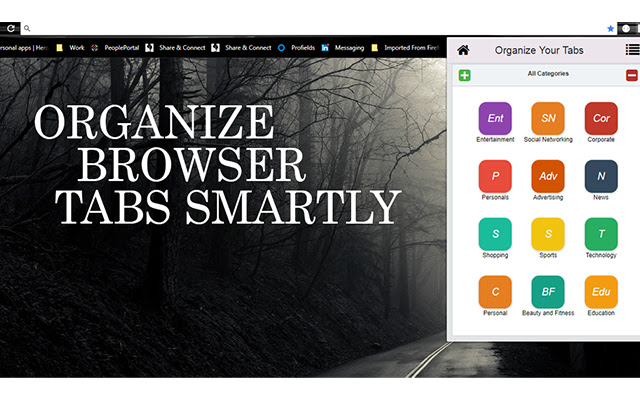
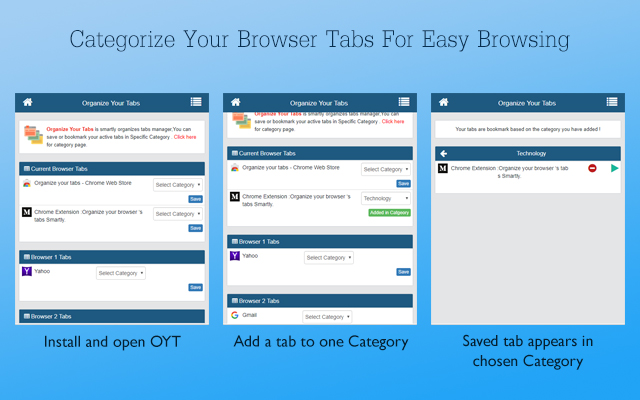

Organize your tabs拡張機能のCRXファイルをダウンロード
Organize your tabs拡張子のファイルをcrx形式でダウンロードし、ブラウザにChrome拡張機能を手動でインストールするか、crxファイルを友達と共有して簡単にChrome拡張機能をインストールします。
拡張機能の使用方法
                        - Organize Your Tabs (OYTs) is a smart tab organizer. It’s non intrusive and fully private. When you enable this extension your tabs are bookmark based on the category you have added.
- It will allow you to discover greater insights about your browsing habits.
- Manager for quickly finding and organizing all your tabs. Saves your windows and tabs when you close Chrome.

HOW IT WORKS:
- Click on the OYTs icon in the upper-right to open a popup. This popup lists all your window tabs so you can easily see them at a glance.
- Categories can be added and removed based on need, tabs can be added to categories to make it more friendly while browsing.
拡張機能の基本情報
| 名前 |  Organize your tabs Organize your tabs |
| ID | ehoilfhlbigihkabnbgjdjokffckaifl |
| 公式URL | https://chrome.google.com/webstore/detail/organize-your-tabs/ehoilfhlbigihkabnbgjdjokffckaifl |
| 説明 | OYTs smartly organizes tabs, based on category. |
| ファイルサイズ | 304 KB |
| インストール数 | 206 |
| 現在のバージョン | 1.1.3 |
| 最終更新日 | 2022-05-24 |
| 公開日 | 2019-06-09 |
| 評価 | 4.44/5 合計 9 レビュー |
| 開発者 | Anurag Gautam |
| Eメール | [email protected] |
| 支払い方法 | in_app |
| 拡張機能のウェブサイト | https://medium.com/@anuraggautam/chrome-extension-organize-your-browser-tabs-smartly-64d1207a1ab |
| ヘルプページのURL | https://medium.com/@anuraggautam/chrome-extension-organize-your-browser-tabs-smartly-64d1207a1ab |
| 対応言語 | en |
| manifest.json | |
{
    "update_url": "https:\/\/clients2.google.com\/service\/update2\/crx",
    "manifest_version": 3,
    "version": "1.1.3",
    "name": "Organize your tabs",
    "short_name": "OYTs",
    "description": "OYTs smartly organizes tabs, based on category.",
    "icons": {
        "16": "assets\/img\/16.png",
        "32": "assets\/img\/32.png",
        "48": "assets\/img\/48.png",
        "64": "assets\/img\/64.png",
        "128": "assets\/img\/128.png"
    },
    "action": {
        "default_popup": "index.html",
        "default_icon": {
            "16": "assets\/img\/16.png",
            "32": "assets\/img\/32.png",
            "48": "assets\/img\/48.png",
            "64": "assets\/img\/64.png",
            "128": "assets\/img\/128.png"
        }
    },
    "background": {
        "service_worker": "js\/background.js"
    },
    "permissions": [
        "storage",
        "tabs"
    ],
    "content_security_policy": {
        "extension_pages": "script-src 'self'; object-src 'self'"
    }
} | |