WebTools
An add-on allowing you to use a bunch of useful tools without leaving the page you're currently visiting
WebToolsとは何ですか?
WebToolsはLeersieによって開発されたChromeの拡張機能で、その主な機能は「An add-on allowing you to use a bunch of useful tools without leaving the page you're currently visiting」です。
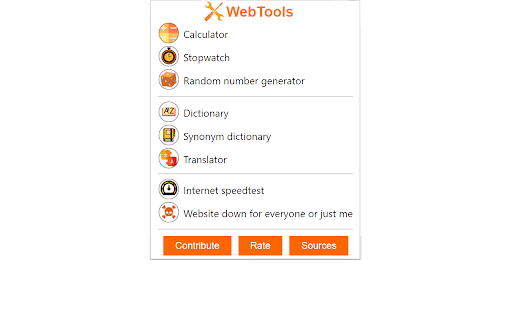
拡張機能のスクリーンショット
WebTools拡張機能のCRXファイルをダウンロード
WebTools拡張子のファイルをcrx形式でダウンロードし、ブラウザにChrome拡張機能を手動でインストールするか、crxファイルを友達と共有して簡単にChrome拡張機能をインストールします。
拡張機能の使用方法
                        “WebTools” is an extension that gathers in one pop-up the most useful tools on the internet to make your daily life easier, as much for your work as for your leisure !
With this Internet extension, you will be able to use devices you use daily like a calculator or a dictionary without having to leave the web page you’re visiting !

Thanks to Webtools, the following tools will be accessible easily, quickly and effortless :
- Calculator
- Timer / Stopwatch
- Random number generator
- Dictionary
- Synonym dictionary
- Translator
- Internet Speedtest (ping)
- Device to tell if the website you're visiting is down for everyone or just for you

Toolbox / Swiss Knife / Web-Tools / Floating / Translate / Translation / Dice / toolkit
拡張機能の基本情報
| 名前 |  WebTools WebTools |
| ID | ejnboneedfadhjddmbckhflmpnlcomge |
| 公式URL | https://chromewebstore.google.com/detail/webtools/ejnboneedfadhjddmbckhflmpnlcomge |
| 説明 | An add-on allowing you to use a bunch of useful tools without leaving the page you're currently visiting |
| ファイルサイズ | 731 KB |
| インストール数 | 512 |
| 現在のバージョン | 1.2.60 |
| 最終更新日 | 2022-01-18 |
| 公開日 | 2021-03-07 |
| 評価 | 4.95/5 合計 22 レビュー |
| 開発者 | Leersie |
| Eメール | [email protected] |
| 支払い方法 | free |
| 対応言語 | en,fr |
| manifest.json | |
{
    "update_url": "https:\/\/clients2.google.com\/service\/update2\/crx",
    "manifest_version": 2,
    "name": "__MSG_appName__",
    "description": "__MSG_appDesc__",
    "version": "1.2.60",
    "default_locale": "en",
    "permissions": [],
    "omnibox": {
        "keyword": "WebTools"
    },
    "options_ui": {
        "chrome_style": true,
        "page": "intro.html"
    },
    "background": {
        "scripts": [
            "background.js"
        ],
        "persistent": true
    },
    "browser_action": {
        "default_icon": "lilogonobg.png",
        "default_popup": "popup.html"
    },
    "icons": {
        "128": "lilogonobg.png"
    }
} | |