Dictionary Extension
Get your dictionary in your newtab
Dictionary Extensionとは何ですか?
Dictionary ExtensionはISHTWOによって開発されたChromeの拡張機能で、その主な機能は「Get your dictionary in your newtab」です。
拡張機能のスクリーンショット
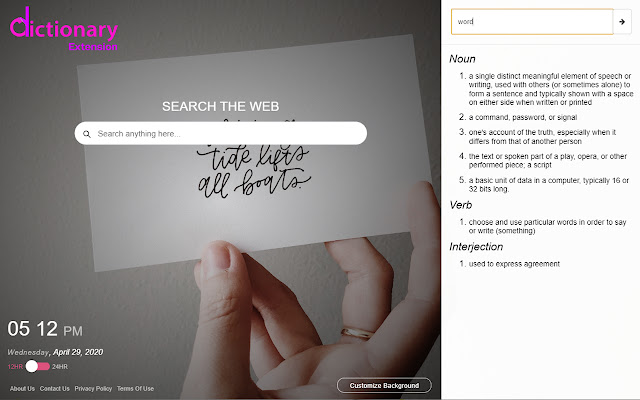
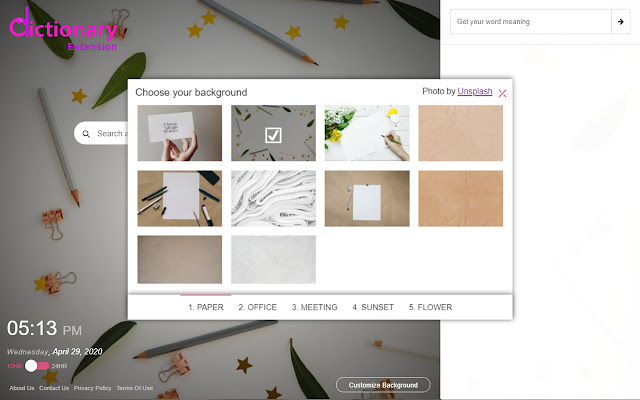
Dictionary Extension拡張機能のCRXファイルをダウンロード
Dictionary Extension拡張子のファイルをcrx形式でダウンロードし、ブラウザにChrome拡張機能を手動でインストールするか、crxファイルを友達と共有して簡単にChrome拡張機能をインストールします。
拡張機能の使用方法
                        The Dictionary Extension gives you an easy way for finding the meaning of a word and gives you an easy way to change your Chrome Browser new tab default to look attractive and pleasing to the eye...

This is a free add-on for Chrome Browser where the primary target is finding the meaning of a word easily and quickly. Also set a background from our selective Dictionary images gallery powered by Unsplash in your Chrome Browser default new tab. We are actually changing your Chrome browser default new tab page.

Also as an added feature, we are giving you an easy way to search your desired information, image, video and more through Yahoo search.

There is also a Digital Clock in new tabs where you can check your current location time in 12 hour/ 24-hour format according to your preference.


By clicking "Add to chrome", I accept and agree to install the "Dictionary Extension" and setting Chrome™ New Tab to that provided by the service and the Privacy (www.ishtwo.com/privacy-policy) and Terms of Use (www.ishtwo.com/terms-and-conditions).
拡張機能の基本情報
| 名前 |  Dictionary Extension Dictionary Extension |
| ID | ejohellfebipplefmdddjipgfmalmcpb |
| 公式URL | https://chrome.google.com/webstore/detail/dictionary-extension/ejohellfebipplefmdddjipgfmalmcpb |
| 説明 | Get your dictionary in your newtab |
| ファイルサイズ | 1.84 MB |
| インストール数 | 184 |
| 現在のバージョン | 1.8 |
| 最終更新日 | 2020-10-02 |
| 公開日 | 2020-05-18 |
| 開発者 | ISHTWO |
| Eメール | [email protected] |
| 支払い方法 | free |
| プライバシーポリシーページのURL | https://www.ishtwo.com/privacy-policy |
| 対応言語 | en-US |
| manifest.json | |
{
    "update_url": "https:\/\/clients2.google.com\/service\/update2\/crx",
    "manifest_version": 2,
    "name": "Dictionary Extension",
    "description": "Get your dictionary in your newtab",
    "homepage_url": "https:\/\/www.dictionaryextension.com",
    "permissions": [
        "storage",
        "https:\/\/www.ishtwo.com\/dictionary2\/*"
    ],
    "version": "1.8",
    "browser_action": {
        "default_icon": {
            "16": "images\/bd-16.png",
            "32": "images\/bd-32.png",
            "48": "images\/bd-48.png",
            "128": "images\/bd-128.png"
        }
    },
    "icons": {
        "16": "images\/bd-16.png",
        "32": "images\/bd-32.png",
        "48": "images\/bd-48.png",
        "128": "images\/bd-128.png"
    },
    "chrome_url_overrides": {
        "newtab": "landing.html"
    },
    "background": {
        "scripts": [
            "js\/background.js"
        ],
        "persistent": false
    },
    "externally_connectable": {
        "matches": [
            "https:\/\/www.dictionaryextension.com\/*"
        ]
    },
    "web_accessible_resources": [
        "images\/*.*"
    ],
    "content_security_policy": "script-src 'self' https:\/\/www.ishtwo.com\/dictionary2\/custom.js https:\/\/www.ishtwo.com\/dictionary2\/background.js https:\/\/ssl.google-analytics.com; object-src 'self';style-src 'self' 'unsafe-inline' *;media-src *;"
} | |