Image Sticker
You can paste any image on a web page. Supports moving, scaling, rotating, duplication, and deletion. No upload will occur.
Image Stickerとは何ですか?
Image Stickerはdev.imagestickerによって開発されたChromeの拡張機能で、その主な機能は「You can paste any image on a web page. Supports moving, scaling, rotating, duplication, and deletion. No upload will occur.」です。
拡張機能のスクリーンショット
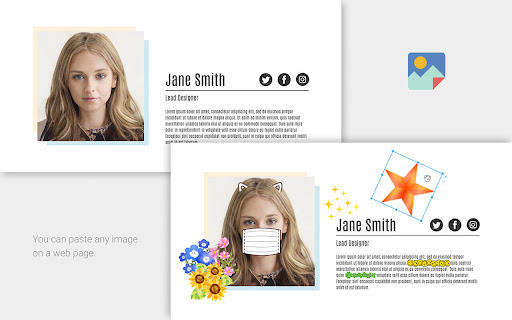
Image Sticker拡張機能のCRXファイルをダウンロード
Image Sticker拡張子のファイルをcrx形式でダウンロードし、ブラウザにChrome拡張機能を手動でインストールするか、crxファイルを友達と共有して簡単にChrome拡張機能をインストールします。
拡張機能の使用方法
                        - Use your favorite images to make your screenshots more fun and colorful.
- Hide your personal information with images and secure your screenshots.
- Overlay a mask or glasses on a photo of a person to check for impression changes.
拡張機能の基本情報
| 名前 |  Image Sticker Image Sticker |
| ID | ekhjcdobeemnkaoboadpkfmlddcilbmp |
| 公式URL | https://chromewebstore.google.com/detail/image-sticker/ekhjcdobeemnkaoboadpkfmlddcilbmp |
| 説明 | You can paste any image on a web page. Supports moving, scaling, rotating, duplication, and deletion. No upload will occur. |
| ファイルサイズ | 144 KB |
| インストール数 | 45 |
| 現在のバージョン | 4.0.0 |
| 最終更新日 | 2022-04-03 |
| 公開日 | 2021-05-06 |
| 開発者 | dev.imagesticker |
| Eメール | [email protected] |
| 支払い方法 | free |
| 拡張機能のウェブサイト | https://github.com/dsktschy/image-sticker |
| ヘルプページのURL | https://github.com/dsktschy/image-sticker/issues |
| 対応言語 | en,ja |
| manifest.json | |
{
    "update_url": "https:\/\/clients2.google.com\/service\/update2\/crx",
    "name": "__MSG_extensionName__",
    "description": "__MSG_extensionDescription__",
    "version": "4.0.0",
    "manifest_version": 3,
    "permissions": [
        "activeTab",
        "scripting"
    ],
    "action": {
        "default_popup": "default_popup.html",
        "default_icon": {
            "16": "images\/icon16.png",
            "24": "images\/icon24.png",
            "32": "images\/icon32.png",
            "48": "images\/icon48.png",
            "96": "images\/icon96.png",
            "128": "images\/icon128.png"
        }
    },
    "background": {
        "service_worker": "background.js"
    },
    "icons": {
        "16": "images\/icon16.png",
        "24": "images\/icon24.png",
        "32": "images\/icon32.png",
        "48": "images\/icon48.png",
        "96": "images\/icon96.png",
        "128": "images\/icon128.png"
    },
    "default_locale": "en"
} | |