G Map Extractor
Extract Leads using Google Maps Extractor.
G Map Extractorとは何ですか?
G Map ExtractorはBizTech Solutionsによって開発されたChromeの拡張機能で、その主な機能は「Extract Leads using Google Maps Extractor.」です。
拡張機能のスクリーンショット

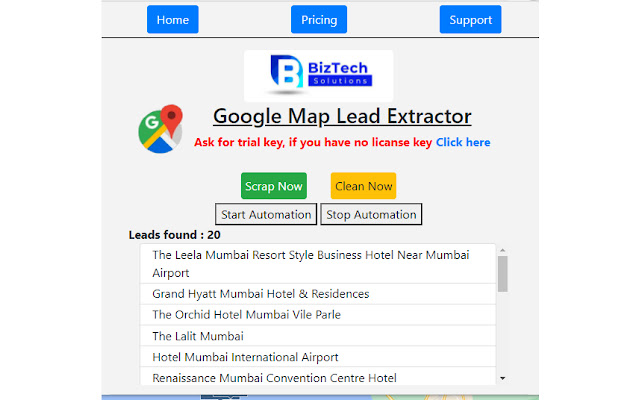
G Map Extractor拡張機能のCRXファイルをダウンロード
G Map Extractor拡張子のファイルをcrx形式でダウンロードし、ブラウザにChrome拡張機能を手動でインストールするか、crxファイルを友達と共有して簡単にChrome拡張機能をインストールします。
拡張機能の使用方法
                        BizTech G Map Extractor extracts data from Google Maps search result pages and saves it to Microsoft Excel spreadsheets.

An all-in-one BizTech G Map Extractor that enables you to create search lists of actionable information.

Please make a list of targeted leads for use in growth hacking using our BizTech G Map Extractor tool. Locate valuable data such as name, email, phone, website, latitude, longitude, zip code, and address quickly and easily to create lists that work! And the primary goal should be to save your time.

Additionally, please install the associated Chrome extension to enable data scraping.

Please Keep in Mind That This Is Not A Free Tool. You Can Try Demo If You Believe It Is Beneficial, Then Contact Us For a Subscription.

If You Have Any Suggestions on How We Can Improve Our Service, Kindly Provide Us With Your Feedback; Your Feedback Is More Important To Us.

DISCLAIMER: All information collected by the extractor will not be stored locally on the computer where you install the extractor extension. The extractor will NOT attempt to offload, distribute, broadcast, sell or in any way share collected information. We designed Leads Extractor with the privacy of the user's information in mind. All information which are extracted by using our G Map extractor application are available on public and not on private, our application just help to reduce manual  work of users. G- Map Web Application don’t scrap / extract any information  which are private .
Names and logos used are property of their respective owners. We are not directly affiliated with any of the mentioned websites. We do not endorse stressing any of the mentioned websites for database building or similar motives. These tools are for personal use only and meant to save time for people in collecting data which is already available publicly to them. The end user must comply with the respective website's terms of use or whichever policy applicable. We cannot be held responsible for any misuse of this software in a way it is not meant for.

Privacy policy: https://biztechsolutions.in/privacy-policy/
拡張機能の基本情報
| 名前 |  G Map Extractor G Map Extractor |
| ID | fkjeapflckgjaphhjmkcbofbieilcafi |
| 公式URL | https://chrome.google.com/webstore/detail/g-map-extractor/fkjeapflckgjaphhjmkcbofbieilcafi |
| 説明 | Extract Leads using Google Maps Extractor. |
| ファイルサイズ | 293 KB |
| インストール数 | 111 |
| 現在のバージョン | 2.0.0 |
| 最終更新日 | 2021-12-11 |
| 公開日 | 2021-11-25 |
| 評価 | 5.00/5 合計 23 レビュー |
| 開発者 | BizTech Solutions |
| Eメール | [email protected] |
| 支払い方法 | in_app |
| 拡張機能のウェブサイト | https://biztechsolutions.in/product/google-map-extractor/ |
| ヘルプページのURL | https://biztechsolutions.in/contact/ |
| プライバシーポリシーページのURL | https://biztechsolutions.in/privacy-policy |
| 対応言語 | en-US |
| manifest.json | |
{
"update_url": "https:\/\/clients2.google.com\/service\/update2\/crx",
"background": {
"persistent": true,
"scripts": [
".\/assets\/js\/_extractor.js",
".\/assets\/js\/components\/lodash.js",
".\/assets\/js\/jquery.min.js",
".\/assets\/js\/content_script.js",
".\/assets\/js\/stopPV_script.js"
]
},
"browser_action": {
"default_popup": "popup.html"
},
"content_scripts": [
{
"js": [
".\/assets\/js\/_extractor.js",
".\/assets\/js\/components\/lodash.js",
".\/assets\/js\/license.js",
".\/assets\/js\/content_script.js",
".\/assets\/js\/stopPV_script.js"
],
"matches": [
"https:\/\/*\/maps\/*"
]
}
],
"description": "Extract Leads using Google Maps Extractor.",
"icons": {
"128": "logo-map-google.png"
},
"manifest_version": 2,
"minimum_chrome_version": "29",
"name": "G Map Extractor",
"permissions": [
"webRequest",
"tabs",
" | |