Sound Tool
Advanced tool for composing synthetic music
Sound Toolとは何ですか?
Sound ToolはNewBauhaus41によって開発されたChromeの拡張機能で、その主な機能は「Advanced tool for composing synthetic music」です。
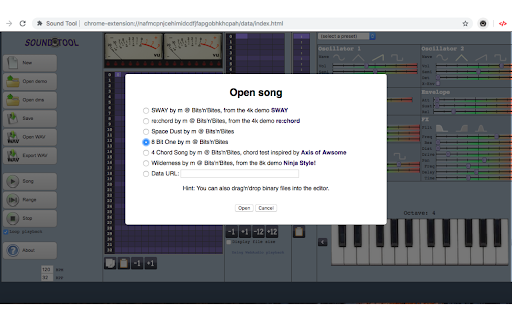
拡張機能のスクリーンショット


Sound Tool拡張機能のCRXファイルをダウンロード
Sound Tool拡張子のファイルをcrx形式でダウンロードし、ブラウザにChrome拡張機能を手動でインストールするか、crxファイルを友達と共有して簡単にChrome拡張機能をインストールします。
拡張機能の使用方法
                        HTML5 synth music tracker.
This extension is a tool for composing synthetic music, in your Chrome. Its design is basically that of a music tracker, which essentially means that the music is organized in tracks and patterns.
- Free!!
- Music editor: a song is made up of 8 channels. Each channel has 36 note patterns (0-9,A-Z), and each note pattern has 4 note tracks and 1 FX track
- Songs can be saved as data URLs or as binary files
- Import and export songs and playback. It is also possible importing binary file with drag and drop method
- Sequencer and pattern editor with note and FX editor
- Instrument editor
- Export song as WAV format. It is also possible open WAV audio, to listen song, directy in SoundTool
- Piano with keyboard keys pressing. It is also possible to use a MIDI input device

Release 1.0.1 - Removed unnecessary permissions
拡張機能の基本情報
| 名前 |  Sound Tool Sound Tool |
| ID | fmmmagikfabhildfoeigncbiaifcjogd |
| 公式URL | https://chromewebstore.google.com/detail/sound-tool/fmmmagikfabhildfoeigncbiaifcjogd |
| 説明 | Advanced tool for composing synthetic music |
| ファイルサイズ | 3.58 MB |
| インストール数 | 30 |
| 現在のバージョン | 1.0.1 |
| 最終更新日 | 2023-10-07 |
| 公開日 | 2020-05-04 |
| 開発者 | NewBauhaus41 |
| Eメール | [email protected] |
| 支払い方法 | free |
| プライバシーポリシーページのURL | https://ulmdevice.altervista.org/privacy-policy.html |
| 対応言語 | en |
| manifest.json | |
{
    "update_url": "https:\/\/clients2.google.com\/service\/update2\/crx",
    "manifest_version": 2,
    "name": "Sound Tool",
    "short_name": "Extension for Sound Artists",
    "description": "Advanced tool for composing synthetic music",
    "version": "1.0.1",
    "minimum_chrome_version": "43",
    "permissions": [],
    "browser_action": {
        "default_icon": {
            "19": "assets\/16x16.png",
            "38": "assets\/128x128.png"
        }
    },
    "icons": {
        "16": "assets\/16x16.png",
        "128": "assets\/128x128.png"
    },
    "offline_enabled": true,
    "content_security_policy": "script-src 'self'; frame-src 'self'; default-src 'self'; media-src * data:; img-src 'self' data:; style-src * 'unsafe-inline'; font-src *; connect-src 'self'; base-uri 'self'",
    "background": {
        "scripts": [
            "background.js"
        ]
    }
} | |