Exam room
Activate an exam environment and block/allow specific websites
Exam roomとは何ですか?
Exam roomはNicolas Grilletによって開発されたChromeの拡張機能で、その主な機能は「Activate an exam environment and block/allow specific websites」です。
拡張機能のスクリーンショット
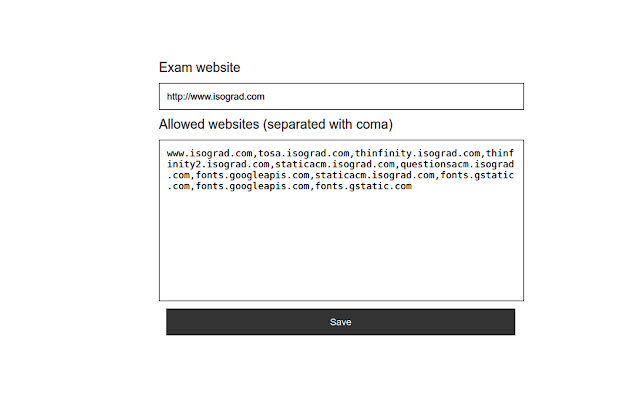
Exam room拡張機能のCRXファイルをダウンロード
Exam room拡張子のファイルをcrx形式でダウンロードし、ブラウザにChrome拡張機能を手動でインストールするか、crxファイルを友達と共有して簡単にChrome拡張機能をインストールします。
拡張機能の使用方法
                        {english}
Activate an exam environment and block/allow specific websites.
Once you have activated the "Exam" mode, the main website will automatically open and all others websites, expect those who have allowed, are block.
This is an useful tool to pass online exam like Tosa from Isograd for example.

{français}
Activez un environnement d'examen et bloquez/autorisez des sites web spécifiques.
Une fois le mode "Exam" activé, le site principal va s'ouvrir automatiquement et tous les sites, sauf ceux que vous avez autorisé, sont bloqués.
CEt outil est utile pour passer des tests en ligne tel que le Tosa d'Isograd par exemple.
"Configurez votre navigateur avec une liste blanche d'URLs"
拡張機能の基本情報
| 名前 |  Exam room Exam room |
| ID | gfceeghcoekcmlpgonlplkpmakdmpgmg |
| 公式URL | https://chrome.google.com/webstore/detail/exam-room/gfceeghcoekcmlpgonlplkpmakdmpgmg |
| 説明 | Activate an exam environment and block/allow specific websites |
| ファイルサイズ | 139 KB |
| インストール数 | 1,000 |
| 現在のバージョン | 0.0.1 |
| 最終更新日 | 2016-11-18 |
| 公開日 | 2016-11-18 |
| 評価 | 5.00/5 合計 1 レビュー |
| 開発者 | Nicolas Grillet |
| 支払い方法 | free |
| 対応言語 | en |
| manifest.json | |
{
    "update_url": "https:\/\/clients2.google.com\/service\/update2\/crx",
    "name": "Exam room",
    "version": "0.0.1",
    "manifest_version": 2,
    "description": "Activate an exam environment and block\/allow specific websites",
    "homepage_url": "http:\/\/www.codnex.net",
    "icons": {
        "16": "icons\/icon16.png",
        "48": "icons\/icon48.png",
        "128": "icons\/icon128.png",
        "256": "icons\/icon256.png"
    },
    "default_locale": "en",
    "background": {
        "page": "src\/bg\/background.html"
    },
    "options_page": "src\/options\/index.html",
    "browser_action": {
        "default_icon": "icons\/icon19.png",
        "default_title": "browser action demo",
        "default_popup": "src\/browser_action\/browser_action.html"
    },
    "permissions": [
        "storage",
        "tabs",
        "webRequest",
        "webRequestBlocking",
        "http:\/\/*\/*",
        "https:\/\/*\/*"
    ]
} | |