Bitcoin Live
Get live notifications for bitcoin value
Bitcoin Liveとは何ですか?
Bitcoin Liveはyoni jahによって開発されたChromeの拡張機能で、その主な機能は「Get live notifications for bitcoin value」です。
拡張機能のスクリーンショット
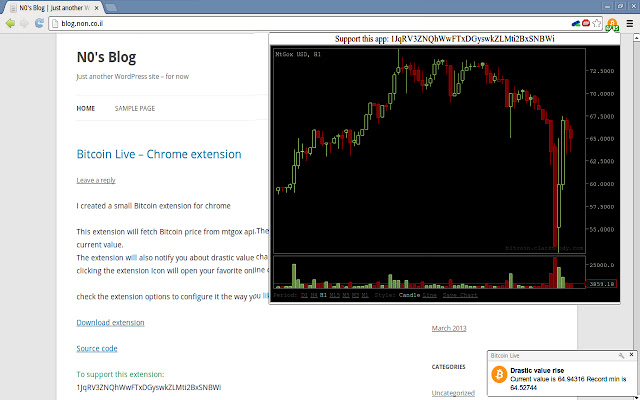
Bitcoin Live拡張機能のCRXファイルをダウンロード
Bitcoin Live拡張子のファイルをcrx形式でダウンロードし、ブラウザにChrome拡張機能を手動でインストールするか、crxファイルを友達と共有して簡単にChrome拡張機能をインストールします。
拡張機能の使用方法
                        This extension will automatically monitor Bitcoin values from mtgox and bitcoin average.
- live value displayed in your browser
- live notification on drastic value changes
- easy access to your favorite on-line charts
- (new) supports mBTC μBTC and Matoshi units

Please check the extension options after installing it to set your own preferences.
I'm really happy about all the positive reviews but if you have any questions you'll get a faster response if you ask them on my blog -
http://blog.non.co.il/index.php/bitcoin-live-chrome-extension/
拡張機能の基本情報
| 名前 |  Bitcoin Live Bitcoin Live |
| ID | gihnmkplbiedplobapnkhgblipfgjoci |
| 公式URL | https://chrome.google.com/webstore/detail/bitcoin-live/gihnmkplbiedplobapnkhgblipfgjoci |
| 説明 | Get live notifications for bitcoin value |
| ファイルサイズ | 56.25 KB |
| インストール数 | 245 |
| 現在のバージョン | 0.2.1 |
| 最終更新日 | 2013-11-28 |
| 公開日 | 2013-11-28 |
| 評価 | 4.19/5 合計 27 レビュー |
| 開発者 | yoni jah |
| 支払い方法 | free |
| 拡張機能のウェブサイト | http://blog.non.co.il/index.php/bitcoin-live-chrome-extension/ |
| 対応言語 | en |
| manifest.json | |
{
    "update_url": "https:\/\/clients2.google.com\/service\/update2\/crx",
    "manifest_version": 2,
    "name": "Bitcoin Live",
    "description": "Get live notifications for bitcoin value",
    "version": "0.2.1",
    "icons": {
        "16": "bitcoin-16.png",
        "48": "bitcoin-48.png",
        "128": "bitcoin-128.png"
    },
    "permissions": [
        "*:\/\/data.mtgox.com\/*",
        "https:\/\/websocket.mtgox.com\/*",
        "storage",
        "notifications"
    ],
    "web_accessible_resources": [
        "bitcoin-128.png"
    ],
    "background": {
        "scripts": [
            "background.js"
        ]
    },
    "options_page": "options.html",
    "browser_action": {
        "default_icon": "bitcoin-128.png",
        "default_popup": "popup.html"
    }
} | |