ToolBox
This extension has several different functionalities to make your chrome experience smoother.
ToolBoxとは何ですか?
ToolBoxはjonathanpedによって開発されたChromeの拡張機能で、その主な機能は「This extension has several different functionalities to make your chrome experience smoother.」です。
拡張機能のスクリーンショット
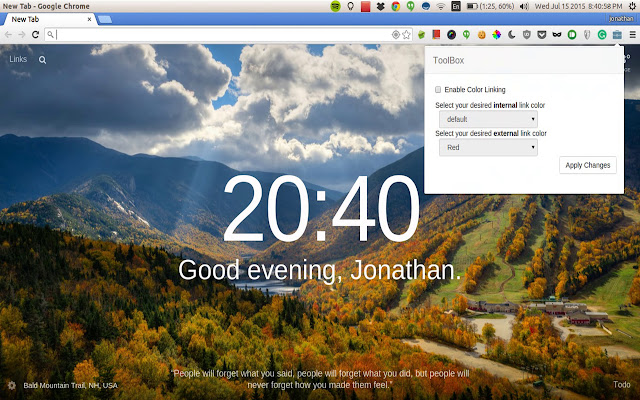
ToolBox拡張機能のCRXファイルをダウンロード
ToolBox拡張子のファイルをcrx形式でダウンロードし、ブラウザにChrome拡張機能を手動でインストールするか、crxファイルを友達と共有して簡単にChrome拡張機能をインストールします。
拡張機能の使用方法
                        A small extension that gives added functionality to your chromium browser.
Currently ToolBox includes:
 * color coding links - You can have links have different color based on whether they are internal or external

I am planning on having a bunch more features, but if you have any ideas tweet at me @jonpon101


Tags: Color coding links. Color links. Chrome extension change color of links.
拡張機能の基本情報
| 名前 |  ToolBox ToolBox |
| ID | gjaalifmgnmmmfamlndnlcfcjaiapida |
| 公式URL | https://chrome.google.com/webstore/detail/toolbox/gjaalifmgnmmmfamlndnlcfcjaiapida |
| 説明 | This extension has several different functionalities to make your chrome experience smoother. |
| ファイルサイズ | 188 KB |
| インストール数 | 107 |
| 現在のバージョン | 1.0 |
| 最終更新日 | 2015-07-15 |
| 公開日 | 2015-07-15 |
| 開発者 | jonathanped |
| 支払い方法 | free |
| 対応言語 | en-US |
| manifest.json | |
{
    "update_url": "https:\/\/clients2.google.com\/service\/update2\/crx",
    "manifest_version": 2,
    "name": "ToolBox",
    "description": "This extension has several different functionalities to make your chrome experience smoother.",
    "version": "1.0",
    "permissions": [
        "tabs",
        "http:\/\/*\/*",
        "https:\/\/*\/*",
        "storage"
    ],
    "browser_action": {
        "default_popup": "popup.html",
        "default_icon": "briefcase.png",
        "default_title": "Settings"
    },
    "content_scripts": [
        {
            "matches": [
                "http:\/\/*\/*",
                "https:\/\/*\/*"
            ],
            "exclude_matches": [
                "https:\/\/www.google.com\/*"
            ],
            "js": [
                "colorLink.js"
            ],
            "run_at": "document_end",
            "all_frames": true
        }
    ]
} | |