eversign: eSign in Gmail, Drive & Google Docs
Sign documents right from Gmail, Google Docs, Google Drive, and from your Chrome Browser PDF Preview.
eversign: eSign in Gmail, Drive & Google Docsとは何ですか?
eversign: eSign in Gmail, Drive & Google Docsはhttps://eversign.comによって開発されたChromeの拡張機能で、その主な機能は「Sign documents right from Gmail, Google Docs, Google Drive, and from your Chrome Browser PDF Preview.」です。
拡張機能のスクリーンショット

eversign: eSign in Gmail, Drive & Google Docs拡張機能のCRXファイルをダウンロード
eversign: eSign in Gmail, Drive & Google Docs拡張子のファイルをcrx形式でダウンロードし、ブラウザにChrome拡張機能を手動でインストールするか、crxファイルを友達と共有して簡単にChrome拡張機能をインストールします。
拡張機能の使用方法
                        eversign for Chrome allows you to place legally binding signatures on any document in Gmail, Google Drive, Google Docs, and sign documents right from your Chrome Browsers. You’ll never need to print, sign or scan a document again — just open a document file, place your signature and other dynamic fields, and let eversign do the rest. eversign ensures legally binding signatures and complies with worldwide e-Signature legality standards.

1. Sign from Gmail

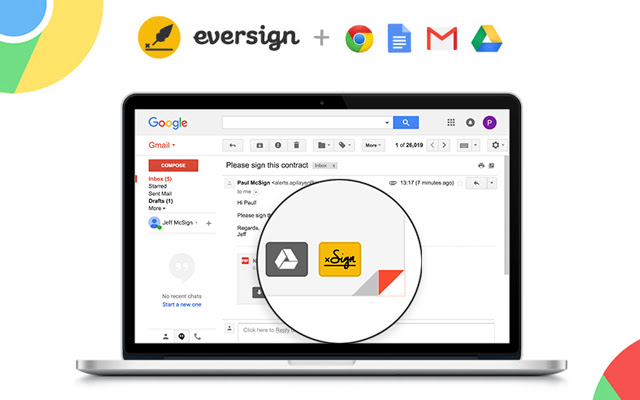
Just hover over an email attachment and click the new „Sign“ button in Gmail to immediately sign any document you receive without leaving your Gmail inbox. Once the document is signed, we’ll automatically attach it to your email’s draft response.

2. Sign from Google Docs

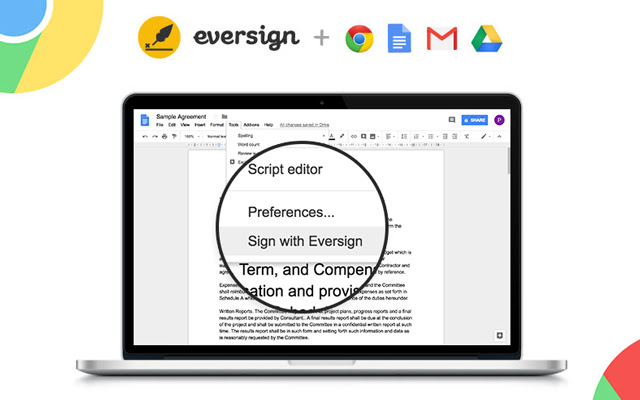
To sign a document right from Google Docs, just open the document, click „Tools“ in the top-options bar and select “Sign with eversign”. After signing you can download the document and we immediately archive it in your eversign account.

3. Sign from Google Drive

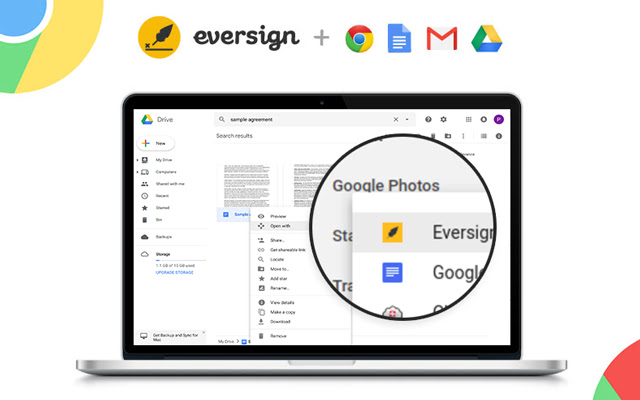
To sign a document right from Google Drive, simply right click on any File and choose „Open with eversign“. After signing you can download the final document and we immediately archive it in your eversign account.

4. Sign from Chrome Preview

Now you can sign PDF documents right from your Chrome Browser Preview Page. Simply click on the „Sign“ icon that appears in the lower right corner of your PDF Preview to sign any PDF document without leaving the page. After signing, you can download the document and we immediately archive it in your eversign account.

Want more information about eversign? Visit us at https://eversign.com
拡張機能の基本情報
| 名前 |  eversign: eSign in Gmail, Drive & Google Docs eversign: eSign in Gmail, Drive & Google Docs |
| ID | hdlhmemcpdlkhkiglelebglchamjmhce |
| 公式URL | https://chrome.google.com/webstore/detail/eversign-esign-in-gmail-d/hdlhmemcpdlkhkiglelebglchamjmhce |
| 説明 | Sign documents right from Gmail, Google Docs, Google Drive, and from your Chrome Browser PDF Preview. |
| ファイルサイズ | 253 KB |
| インストール数 | 13,474 |
| 現在のバージョン | 1.1.11 |
| 最終更新日 | 2021-05-27 |
| 公開日 | 2020-06-24 |
| 評価 | 3.44/5 合計 18 レビュー |
| 開発者 | https://eversign.com |
| Eメール | [email protected] |
| 支払い方法 | free |
| 拡張機能のウェブサイト | https://eversign.com |
| ヘルプページのURL | https://eversign.com/help |
| プライバシーポリシーページのURL | https://eversign.com/legal/privacy |
| 対応言語 | de,en,fr,nl,tr,da,es,it,pl,pt-PT,sv,ru,zh-CN |
| manifest.json | |
{
    "update_url": "https:\/\/clients2.google.com\/service\/update2\/crx",
    "name": "__MSG_name__",
    "description": "__MSG_description__",
    "default_locale": "en",
    "version": "1.1.11",
    "manifest_version": 2,
    "author": "",
    "key": "MIIBIjANBgkqhkiG9w0BAQEFAAOCAQ8AMIIBCgKCAQEAmUy0PlVAsDxDMfG4ioIokYOht64Ilg9nVLSN7JvcKLvZ1Ooy5IOlurXyeE8GC1LnyMf4Jqacykvua3ZPSqvw9NHmmUNbOQfuvx1tuZGbyENx1CLbLzQfIh108L1KB\/SRGms3XGZLA1Qg+lW9Nkd8n8cS0hYCVkzb6ucAjdwW4BExhuaQXf1gqycHdq43BfH8rs6tkVCgArmSjVqweopnm4tlMWWee5f+qFlXUu4cNOrtPV8sy0z+cqBTe72EbA2fZOx4VuWSfG55OQ\/oTlKBykQlPvRPjqDM7tlhNsZ9To\/YLTBrVGnwitNRdlMGZqPIwvVzOyXvxAFowBk78n8kJQIDAQAB",
    "icons": {
        "128": "\/img\/logo_rounded.png"
    },
    "browser_action": {
        "default_icon": "\/img\/logo_rounded.png",
        "default_popup": "\/pages\/popup\/index.html"
    },
    "background": {
        "scripts": [
            "\/lib\/jquery.min.js",
            "\/lib\/x.js",
            "\/js\/background\/background.js"
        ],
        "persistent": false
    },
    "content_scripts": [
        {
            "matches": [
                "https:\/\/mail.google.com\/*",
                "https:\/\/drive.google.com\/*",
                "https:\/\/docs.google.com\/*",
                "https:\/\/eversign.com\/*",
                "https:\/\/*.eversign.com\/*"
            ],
            "all_frames": true,
            "js": [
                "\/lib\/jquery.min.js",
                "\/lib\/moment.min.js",
                "\/lib\/URI.min.js",
                "\/lib\/x.js",
                "\/js\/converters\/main_converter.js",
                "\/js\/converters\/gmail_converter.js",
                "\/js\/converters\/google_docs_converter.js",
                "\/js\/converters\/google_drive_converter.js",
                "\/js\/components\/FileDataManager.js",
                "\/js\/components\/InjectedCodeManager.js",
                "\/js\/components\/WidgetManager.js",
                "\/js\/components\/ApiManager.js",
                "\/js\/components\/GoogleDocsMenuItemManager.js",
                "\/js\/components\/GoogleDriveContextmenuManager.js",
                "\/js\/components\/GmailButtonManager.js",
                "\/js\/components\/PdfButtonManager.js",
                "\/js\/components\/Controller.js",
                "\/js\/content_scripts\/main.js"
            ]
        }
    ],
    "permissions": [
        "storage",
        "https:\/\/mail.google.com\/*",
        "https:\/\/drive.google.com\/*",
        "https:\/\/docs.google.com\/*",
        "https:\/\/*.googleusercontent.com\/*",
        "https:\/\/eversign.com\/*",
        "https:\/\/*.eversign.com\/*"
    ],
    "web_accessible_resources": [
        "\/*"
    ]
} | |