BORUTO - Naruto New Tab HDPop Stars Theme
Every time you open a new tab, you will get a different HD wallpaper. This new theme includes clock and more.
BORUTO - Naruto New Tab HDPop Stars Themeとは何ですか?
BORUTO - Naruto New Tab HDPop Stars ThemeはOnline Wallpaperによって開発されたChromeの拡張機能で、その主な機能は「Every time you open a new tab, you will get a different HD wallpaper. This new theme includes clock and more.」です。
拡張機能のスクリーンショット
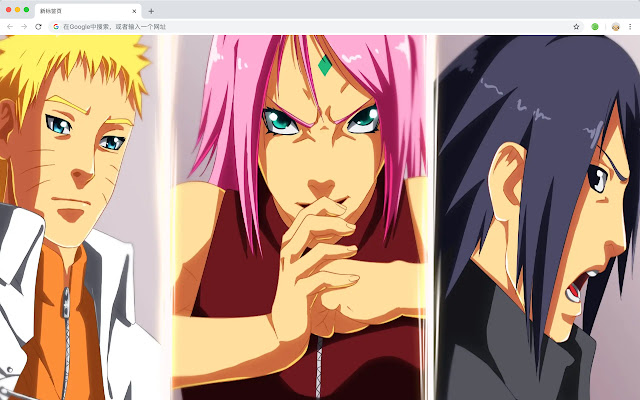


BORUTO - Naruto New Tab HDPop Stars Theme拡張機能のCRXファイルをダウンロード
BORUTO - Naruto New Tab HDPop Stars Theme拡張子のファイルをcrx形式でダウンロードし、ブラウザにChrome拡張機能を手動でインストールするか、crxファイルを友達と共有して簡単にChrome拡張機能をインストールします。
拡張機能の使用方法
                        Japanese TV anime "BORUTO - Naruto New Generation -" (Chinese translation of "Bao Ren Chuan: Naruto New Era") adapted from the original work of the shore of Qi Qi history and supervision, Ikebukuro Katsuo, the script of the same name

Here's a list of other features you'll get:
 - To-do list
 - Set your favorite wallpapers
 - Discover new hot spots
 - Bookmarks
 - Social network notifications
 - High quality wallpaper for each new label
 - Clock showing date and time
 - Weather widget
 - Open to search
拡張機能の基本情報
| 名前 |  BORUTO - Naruto New Tab HDPop Stars Theme BORUTO - Naruto New Tab HDPop Stars Theme |
| ID | hgigpdebbbmaoelgnhcbkpofkibhgbno |
| 公式URL | https://chrome.google.com/webstore/detail/boruto-naruto-new-tab-hdp/hgigpdebbbmaoelgnhcbkpofkibhgbno |
| 説明 | Every time you open a new tab, you will get a different HD wallpaper. This new theme includes clock and more. |
| ファイルサイズ | 25.74 KB |
| インストール数 | 80 |
| 現在のバージョン | 1.1.1.0 |
| 最終更新日 | 2020-02-24 |
| 公開日 | 2020-02-24 |
| 開発者 | Online Wallpaper |
| 支払い方法 | free |
| 対応言語 | en,zh-CN,zh-TW |
| manifest.json | |
{
    "name": "__MSG_ext_name__",
    "manifest_version": 2,
    "description": "__MSG_ext_desc__",
    "browser_action": {
        "default_icon": {
            "48": "icons\/48.png"
        },
        "default_title": "__MSG_ext_name__"
    },
    "chrome_url_overrides": {
        "newtab": "pages\/newtab\/index.html"
    },
    "background": {
        "scripts": [
            "app.js",
            "pages\/background\/index.js"
        ],
        "persistent": false
    },
    "default_locale": "en",
    "icons": {
        "48": "icons\/48.png",
        "128": "icons\/128.png"
    },
    "minimum_chrome_version": "57",
    "offline_enabled": true,
    "update_url": "https:\/\/clients2.google.com\/service\/update2\/crx",
    "version": "1.1.1.0"
} | |